

MAI: Second Brain Voice Notes
MAI: Second Brain Voice Notes is made and published by Health 4 Wealth LTD. AppBrain is an independent app data site and isn't affiliated with Health 4 Wealth LTD. The app name, icon, screenshots and description belong to Health 4 Wealth LTD and are shown as published on the App Store.
AppBrain's verdict
- Last updated
- October 3, 2026
Rankings
App Store top chartsApp Store Rankings for MAI: Second Brain Voice Notes
Competitors
Similar apps and more from Health 4 Wealth LTDMore from Health 4 Wealth LTD


Releases
Updates seen on the App Store- Version
- 2.8.9
- Launched
- December 2025
No changelog data
User feedback
Ratings and reviews on the App StoreComments on MAI: Second Brain Voice Notes for iOS
We don't have enough comments to show example comments. Please check back later.
Technology
Found in the app by AppBrain- Price
- Free
- App size
- 63.2 MB
- Content rating
- Everyone
Technologies used by MAI: Second Brain Voice Notes
About the app and developer
About MAI: Second Brain Voice Notes
MAI: Second Brain Voice Notes is a productivity app developed by Health 4 Wealth LTD.
User Ratings
The app has no ratings yet.
App Information
MAI: Second Brain Voice Notes is freely available from the App Store. The app size is 63.20 MB. The latest version available is 2.8.9. The last update was on October 3, 2026.
Technical Requirements
The app has a content rating of Everyone. The app has been available on the App Store since December 2025.
Developer information for Health 4 Wealth LTD
Address:
Store listing
By Health 4 Wealth LTD, from the App Store





Description by Health 4 Wealth LTD Written by the developer, not by AppBrain. Click to read.
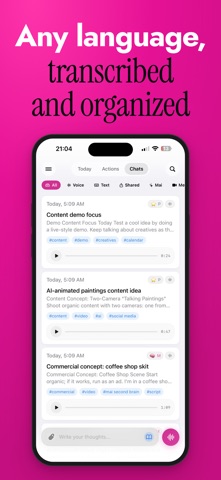
MAI turns a spoken thought into organized notes, tasks, and summaries—so nothing you think slips away. Open the app, talk, and MAI transcribes, titles, summarizes, and files it for you. No typing, no formatting, no friction.
HOW IT WORKS
1. Speak. Tap once and say whatever's on your mind—an idea, a to-do, a reflection, a full meeting.
2. MAI organizes. AI transcribes your voice, writes a clean summary, pulls out action items, and sorts it into the right project.
3. Recall anything. Search everything you've ever captured in plain language and pick up where you left off.
BUILT FOR THE WAY YOU THINK
• Voice-first — capture at the speed of speech, hands-free.
• ADHD & dyslexia friendly — get the thought out before it's gone; let AI handle the structure and spelling.
• Busy, multi-project minds — keep every idea, note, and meeting separated by project.
• Builders & web coders — save context from your AI coding sessions and pull it back when you need it.
WHAT YOU CAN DO
• Record voice notes and get instant transcripts + summaries
• Send a notetaker to your Google Meet, Zoom, or Teams calls for the full transcript, summary, and action items
• Turn any note into tasks and track them across projects
• Draft LinkedIn posts, emails, and translations from a note in one tap
• Search your entire second brain in natural language
• Collaborate—share projects and entries with your team
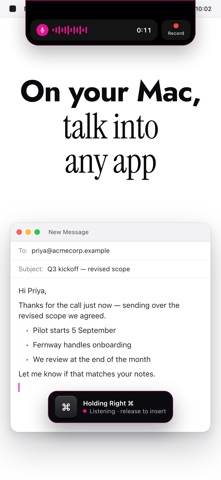
• Capture anywhere—iPhone, iPad, Apple Watch, and Mac
WORKS WITH CLAUDE & ANY MCP AI
MAI connects to Claude and other MCP-compatible AI clients. Save references straight from your AI chats, then let your AI read and write your notes, meetings, and tasks—your second brain becomes the memory layer for everything you build.
WHY MAI
Most notes apps make you do the work—type it, title it, tag it, file it. MAI does that for you, so the only job left is to think out loud.
Start free. MAI Premium unlocks unlimited AI capture, meeting notetakers, and advanced recall.
Questions or feedback? We'd love to hear from you at somaflow.app.
Subscription & Pricing:
Free to try, with option for Pro for full AI and second-brain features:
Unlimited AI summaries and task extraction
Full history search across entries, tasks, and saved links
Advanced sharing and recall
Pricing:
Monthly: $9.99
Annual: $49.99
Prices may vary by region. Subscriptions auto-renew unless canceled at least 24 hours before the end of the current period in your App Store account settings.
Terms of use: https://www.apple.com/legal/internet-services/itunes/dev/stdeula/
Privacy Policy: https://kai.somaflow.app/privacy