

Mailbox Email Client for Gmail
Mailbox Email Client for Gmail is made and published by Indigogo. AppBrain is an independent app data site and isn't affiliated with Indigogo. The app name, icon, screenshots and description belong to Indigogo and are shown as published on the App Store.
AppBrain's verdict
- Rating on App Store
- 4.60
- 30 ratings
- Last updated
- November 12, 2025
It doesn't have enough ratings yet to judge what users think.
Rankings
App Store top chartsApp Store Rankings for Mailbox Email Client for Gmail
Competitors
Similar apps and more from IndigogoAlternatives to Mailbox Email Client for Gmail


More from Indigogo







Releases
Updates seen on the App Store- Version
- 26.0.2
- Launched
- October 2023
No changelog data
User feedback
Ratings and reviews on the App StoreComments on Mailbox Email Client for Gmail for iOS
We don't have enough comments to show example comments. Please check back later.
Technology
Found in the app by AppBrain- Price
- Free
- App size
- 9.40 MB
- Content rating
- Everyone
Technologies used by Mailbox Email Client for Gmail
About the app and developer
About Mailbox Email Client for Gmail
Mailbox Email Client for Gmail is a productivity app developed by Indigogo.
User Ratings
Mailbox Email Client for Gmail is rated 4.60 out of 5 stars. The rating is based on 30 ratings.
App Information
Mailbox Email Client for Gmail is freely available from the App Store. The app size is 9.40 MB. The latest version available is 26.0.2. The last update was on November 12, 2025.
Technical Requirements
The app has a content rating of Everyone. The app has been available on the App Store since October 2023.
Developer information for Indigogo
Address:
Frequently asked questions about Mailbox Email Client for Gmail
Is Mailbox Email Client for Gmail free?
Yes. Mailbox Email Client for Gmail is free on the App Store.
Is Mailbox Email Client for Gmail still available?
Yes. Mailbox Email Client for Gmail is on the App Store, and the last update we saw was on November 12, 2025.
How large is Mailbox Email Client for Gmail?
Mailbox Email Client for Gmail is 9.40 MB.
Is Mailbox Email Client for Gmail suitable for children?
App Store rates the content of Mailbox Email Client for Gmail as suitable for everyone.
How do people rate Mailbox Email Client for Gmail?
Mailbox Email Client for Gmail scores 4.60 out of 5 stars, from 30 ratings on the App Store.
Who made Mailbox Email Client for Gmail?
Mailbox Email Client for Gmail was developed by Indigogo. It is listed in the productivity category on the App Store.
What are the best alternatives to Mailbox Email Client for Gmail?
People looking at Mailbox Email Client for Gmail also look at these productivity apps: Inbox Pro - Email for Gmail, Mailsociety: Gmail Inbox, Sortd for Gmail, ChatInbox: Email by Sender, Whats Web: Multiple Accounts.
Store listing
By Indigogo, from the App Store


Description by Indigogo Written by the developer, not by AppBrain. Click to read.
Experience Gmail like never before with AI-powered simplification and beautiful
design.
Mailbox for Gmail transforms your email experience with intelligent features that
help you focus on what matters. Manage multiple Gmail accounts, simplify complex
emails with AI, and stay organized with powerful productivity tools.
KEY FEATURES
AI Email Simplification
• Get instant summaries of long emails
• Extract key points automatically
• Powered by OpenAI for accurate understanding
• Save time reading newsletters and reports
Multi-Account Management
• Seamlessly switch between multiple Gmail accounts
• Each account keeps separate preferences
• Instant switching - no re-authentication needed
• Secure OAuth2 authentication with Google
Smart Email Scheduling
• Snooze emails to reappear at the perfect time
• Schedule messages for later review
• Keep your inbox focused on what's urgent
Productivity Features
• Lightning-fast swipe actions
• Star important messages
• Archive, delete, or snooze with a swipe
• Thread conversations for context
Beautiful Design
• Modern, clean interface built with SwiftUI
• Smooth animations and intuitive navigation
• Customizable text sizes for comfortable reading
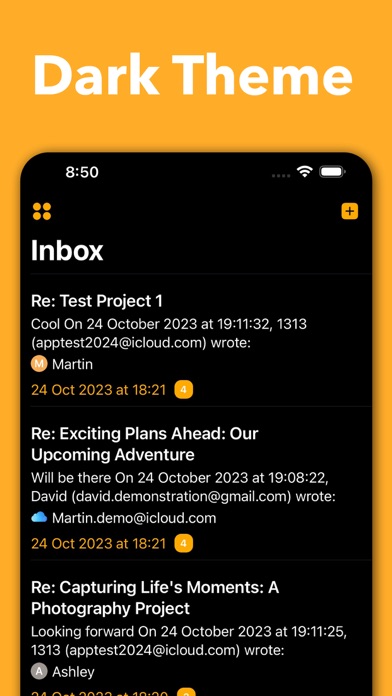
• Dark mode support (coming soon)
Privacy & Security
• Secure OAuth2 authentication
• Your credentials never stored on servers
• Data encrypted with iOS Keychain
• No email content shared with third parties
Built for iOS
• Native iOS 15+ performance
• Optimized for all iPhone sizes
• Offline access to cached emails
• Fast sync with Gmail servers
PERFECT FOR
• Professionals managing multiple email accounts
• Anyone overwhelmed by long email threads
• Users who want AI-powered productivity
• People seeking a modern Gmail experience
TRY DEMO MODE
Not ready to connect your account? Try our built-in demo mode with realistic fake
emails to explore all features risk-free!
REQUIREMENTS
• iOS 15.0 or later
• Gmail account(s)
• OpenAI API key (for AI features - optional)
GET STARTED IN SECONDS
1. Sign in with your Gmail account
2. Customize your preferences
3. Start managing emails smarter
Download Mailbox for Gmail today and experience email productivity reimagined!
.