

Makeup Mirror - LazyPlanet
Makeup Mirror - LazyPlanet is made and published by Planeta Pigra Co., Ltd. AppBrain is an independent app data site and isn't affiliated with Planeta Pigra Co., Ltd. The app name, icon, screenshots and description belong to Planeta Pigra Co., Ltd. and are shown as published on the App Store.
AppBrain's verdict
- Last updated
- June 13, 2026
Rankings
App Store top chartsApp Store Rankings for Makeup Mirror - LazyPlanet
Competitors
Similar apps and more from Planeta Pigra Co., Ltd.Alternatives to Makeup Mirror - LazyPlanet


More from Planeta Pigra Co., Ltd.


Releases
Updates seen on the App Store- Version
- 1.0
- Launched
- June 2026
No changelog data
User feedback
Ratings and reviews on the App StoreComments on Makeup Mirror - LazyPlanet for iOS
We don't have enough comments to show example comments. Please check back later.
Technology
Found in the app by AppBrain- Price
- $0.99
- App size
- 2.18 MB
- Content rating
- Everyone
Technologies used by Makeup Mirror - LazyPlanet
About the app and developer
About Makeup Mirror - LazyPlanet
Makeup Mirror - LazyPlanet is a lifestyle app developed by Planeta Pigra Co., Ltd.
User Ratings
The app has no ratings yet.
App Information
Makeup Mirror - LazyPlanet costs $0.99. The app size is 2.18 MB. The latest version available is 1.0. The last update was on June 13, 2026.
Technical Requirements
The app has a content rating of Everyone. The app has been available on the App Store since June 2026.
Developer information for Planeta Pigra Co., Ltd.
Address:
Store listing
By Planeta Pigra Co., Ltd., from the App Store


Description by Planeta Pigra Co., Ltd. Written by the developer, not by AppBrain. Click to read.
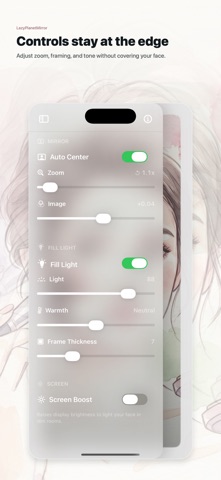
It opens straight to the mirror. The controls stay out of the way, so you can check your face quickly without moving through menus.
Features:
- Clean edge lighting with no heavy glow
- Smooth zoom for eye makeup, lips, skin texture, shaving, and contact lenses
- Face-centered framing for a steadier mirror view
- Simple brightness tuning
- iPad pinned detail views, so one area can stay visible while you keep using the mirror
- No account, no social feed, and no cloud upload
Camera frames are processed on your device. The goal is simple: open the app, use the mirror, and get back to what you were doing.