

Manga Maker: Photo Comics
Manga Maker: Photo Comics is made and published by ONETT. AppBrain is an independent app data site and isn't affiliated with ONETT. The app name, icon, screenshots and description belong to ONETT and are shown as published on the App Store.
AppBrain's verdict
- Rating on App Store
- 5.00
- 3 ratings
- Last updated
- October 31, 2026
- Size
- 19.0 MB
It doesn't have enough ratings yet to judge what users think.
User feedback
Ratings and reviews on the App StoreComments on Manga Maker: Photo Comics for iOS
We don't have enough comments to show example comments. Please check back later.
Store listing
By ONETT, from the App Store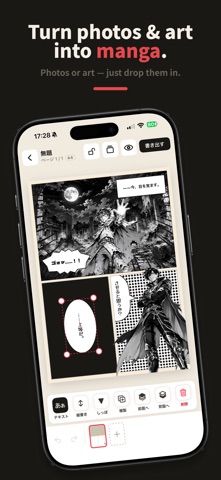


Description by ONETT Written by the developer, not by AppBrain. Click to read.
Manga Maker lets you build comics by dropping images — photos or illustrations — into panels. Arrange the panels with your finger and tell your story. With photos you don't even need to draw, and your own illustrations and screenshots work too.
■ Flexible panel layouts
• Split, merge, and resize panels by dragging (no limit on panel count)
• Plenty of ready-made templates (4-panel, big panel + 3, and more)
• Save your own layouts to My layouts and reuse them across pages and comics
• Paper sizes: A4, square, tall, or strip
■ Drop images into panels
• Just tap a panel and pick a photo or illustration
• Paste screenshots or copied images — or drag & drop from Photos in Split View on iPad
• Zoom, reposition, and straighten (rotate) inside the panel; add filters like monochrome
■ Layer characters and props to build a scene
• Place photos or art on top of panels (move, scale, rotate, flip)
• One tap removes the background and lifts just the subject (choose which one if there are several)
• Clip to a panel or place freely across panels; control front/back order with balloons
■ Real manga touches
• Speech balloons (oval, rounded, rectangle, thought, burst, frameless) with tails — overlapping balloons auto-connect into one
• Vertical text supported; choose fonts and colors
• Solid black, screentone (halftone), and effect lines (focus / speed / zoom)
■ Read & export
• Read your work in the built-in viewer (right- or left-bound, two-page spreads)
• Export as PNG, JPEG, or PDF to save, share, or print
■ Made to feel safe
• Everything — your comics and images — stays on your device. No account needed, and you can create offline.
• Lock a page to protect finished work from accidental edits.
• iPhone and iPad. Built with Dynamic Type and VoiceOver in mind.
■ Free & Pro
• Create and export for free — all materials (templates, fonts, tones, effect lines) are included. The free plan covers 1 comic of 1 page, 1 saved comic, and standard resolution.
• Pro (a one-time purchase) unlocks multiple pages, high resolution + PDF, watermark removal, unlimited saves, and comic-file export (back up & move all comics at once).
Some features are unlocked via an in-app purchase (one-time).
Safety and technology
Found in the app by AppBrain- Price
- Free
- App size
- 19.0 MB
- Content rating
- Everyone
Technologies used by Manga Maker: Photo Comics
Releases
Updates seen on the App Store- Version
- 1.5.0
- Launched
- June 2026
No changelog data
Alternatives
Similar apps and more from ONETTAlternatives to Manga Maker: Photo Comics


More from ONETT


Rankings
App Store top chartsApp Store Rankings for Manga Maker: Photo Comics
About the app and developer
About Manga Maker: Photo Comics
Manga Maker: Photo Comics is a photo & video app developed by ONETT.
User Ratings
Manga Maker: Photo Comics is rated 5.00 out of 5 stars. The rating is based on 3 ratings.
App Information
Manga Maker: Photo Comics is freely available from the App Store. The app size is 19.02 MB. The latest version available is 1.5.0. The last update was on October 31, 2026.
Technical Requirements
The app has a content rating of Everyone. The app has been available on the App Store since June 2026.
Developer information for ONETT
Address:
Frequently asked questions about Manga Maker: Photo Comics
Is Manga Maker: Photo Comics free?
Yes. Manga Maker: Photo Comics is free on the App Store.
Is Manga Maker: Photo Comics still available?
Yes. Manga Maker: Photo Comics is on the App Store, and the last update we saw was on October 31, 2026.
How large is Manga Maker: Photo Comics?
Manga Maker: Photo Comics is 19.02 MB.
Is Manga Maker: Photo Comics suitable for children?
App Store rates the content of Manga Maker: Photo Comics as suitable for everyone.
How do people rate Manga Maker: Photo Comics?
Manga Maker: Photo Comics scores 5.00 out of 5 stars, from 3 ratings on the App Store.
Who made Manga Maker: Photo Comics?
Manga Maker: Photo Comics was developed by ONETT. It is listed in the photo & video category on the App Store.
What are the best alternatives to Manga Maker: Photo Comics?
People looking at Manga Maker: Photo Comics also look at these photo & video apps: 写真で漫画メーカー, ドン!! - 漫画吹き出し・擬音・集中線・文字入れ, Comic Crafter: AI Manga Maker, Gootaku - Manga, Comic & Video, JamPhotos: Batch Photo Editor.