AppBrain
AppBrain
  • Apps
  • Apps being viewed right now Trending apps today Most popular apps All-time most installed apps Top rated apps iPhone and iPad apps
  • Intelligence ▾
    Intelligence overview → Track any Android app or your whole market
    Track & analyze
    Keyword Tracker & OptimizerTrack & improve Play rankings App Performance ReportOne-off PDF for any app StatisticsFree Android & Play market stats
    Promote your app
    Featured Apps App Links
  • Intelligence
  • Pricing
  • Dashboard
  • Sign up
  • Log in
App Store Apps > Productivity > Mangoz Flow
App profile & analytics · Productivity · Data updated 2026-10-09
Mangoz Flow icon

Mangoz Flow

by Ali Ali · Free · Version 2.7.0
Availability On the App Store since March 2026 ↗
Rating on App Store
5.00/5
2 ratings
Rating
5.00
2 reviews
Best rank
–
not in the top lists
Last updated
October 5, 2026
2.7.0
AppBrain's verdict

It doesn't have enough ratings yet to judge what users think.

Mangoz Flow is made and published by Ali Ali. AppBrain is an independent app data site and isn't affiliated with Ali Ali. The app name, icon, screenshots and description belong to Ali Ali and are shown as published on the App Store.

About Mangoz Flow

Mangoz Flow is a productivity app developed by Ali Ali.

User Ratings

Mangoz Flow is rated 5.00 out of 5 stars. The rating is based on 2 ratings.

App Information

Mangoz Flow is freely available from the App Store. The app size is 113.81 MB. The latest version available is 2.7.0. The last update was on October 5, 2026.

Technical Requirements

The app has a content rating of Everyone. The app has been available on the App Store since March 2026.

Description by Ali Ali (from the App Store)
Organize your notes, tasks, expenses, and investments in one private, offline-first workspace.

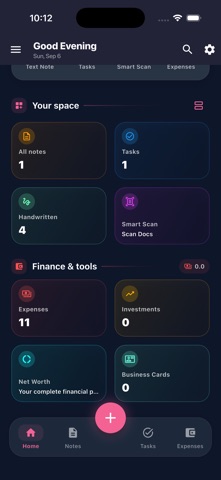
Mangoz Flow brings productivity and personal finance together, helping you capture ideas, plan your day, understand your spending, and follow your financial progress without switching between multiple apps.

SMART NOTES
Create rich-text notes with images, attachments, and voice memos. Organize your content into folders, pin important items, search your notes, review previous versions, and restore deleted content from Trash.

HANDWRITING & DRAWING
Write naturally on a flexible digital canvas, sketch ideas, annotate content, add shapes, and move or resize selected elements. On-device handwriting recognition can extract handwritten content without sending it to external servers.

TASKS & REMINDERS
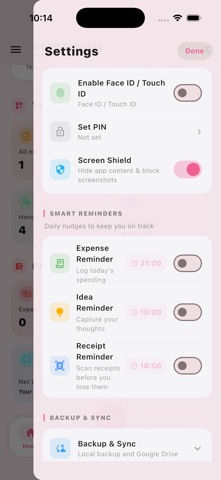
Create tasks and subtasks, organize them by category, set priorities, due dates, reminders, and recurring schedules, and monitor your daily productivity.

EXPENSES & BUDGETS
Record income and expenses, create category budgets, separate fixed and variable spending, and explore monthly summaries and clear financial charts.

INSTALLMENTS & SUBSCRIPTIONS
Track existing or new installments, opening balances, partial payments, remaining amounts, payment history, recurring subscriptions, and upcoming payment reminders.

MULTI-CURRENCY FINANCE
Manage records in different currencies and view converted financial summaries using your selected primary currency.

INVESTMENT TRACKING
Track gold, silver, currencies, and cryptocurrencies. Follow invested cost, current value, portfolio allocation, performance, and custom price alerts.

PDF & EXCEL REPORTS
Export detailed financial reports containing transactions, categories, installments, subscriptions, and payment history to PDF or Excel.

GOOGLE SHEETS EXPORT
Optionally export your financial records to your own Google Sheets in a clear, one-way workflow controlled by you.

SMART DOCUMENT SCANNER
Scan documents and extract text using on-device OCR. Organize scanned content while keeping the processing on your device.

BUSINESS CARD SCANNER
Scan physical business cards, review detected contact information, prevent duplicate entries, and share contacts using vCard or QR codes.

ENCRYPTED BACKUP
Create password-protected backups that can be transferred between devices. Optional Google Drive backup stores an encrypted copy inside your personal Google account.

MAKE IT YOURS
Customize Mangoz Flow with Light, Pink, Midnight Navy, Forest, and OLED themes, accent colors, fonts, wallpapers, and multiple Home Screen app icons.

QUICKER EVERYDAY WORKFLOW
Use the redesigned Home Screen and Quick Actions menu to create notes, handwriting pages, scans, tasks, expenses, investments, and business cards faster.

PRIVACY FIRST
Your notes, tasks, financial records, scans, and investments are stored locally on your device by default. OCR runs on-device, and Mangoz Flow does not use advertising or behavioral tracking SDKs. Protect access using Face ID, device biometrics, or a PIN.

Some advanced features require a one-time Lifetime Premium in-app purchase. No recurring subscription is required.

Download Mangoz Flow and bring your ideas, plans, expenses, and investments together in one organized workspace.

Privacy Policy:
https://mangoz-flow-site.web.app/privacy_page.html
Terms of Use:
https://mangoz-flow-site.web.app/terms_page.html
Show more Show less

Screenshots

Mangoz Flow Screenshot 1 of 6
Mangoz Flow Screenshot 2 of 6
Mangoz Flow Screenshot 3 of 6
Mangoz Flow Screenshot 4 of 6
Mangoz Flow Screenshot 5 of 6
Mangoz Flow Screenshot 6 of 6
Screenshots by Ali Ali, from the the App Store listing
Official page on the App Store

Changelog of Mangoz Flow

No changelog data

Developer information for Ali Ali

Ali Ali

Address:

Share Mangoz Flow

Comments on Mangoz Flow for iOS

We don't have enough comments to show example comments. Please check back later.

App Store Rankings for Mangoz Flow

This app is not ranked

Technologies used by Mangoz Flow

Apps other people are watching Popular Productivity Apps Today's trending apps Top new apps Price drops on Google Play
More hot apps 🔥
Overview Reviews Rankings Technology
AppBrain Intelligence premium content

Subscribe now to get full and unlimited access to AppBrain Intelligence. You'll have access to:

  • App Intelligence dashboard (performance timeline, competitor comparison, country rankings, insight cards)
  • Detailed ranking data per app
  • Full timeline per developer
  • Device market shares data per country
  • Unlimited keyword tracking
1 Month

$75/mo
(billed every month)

SAVE 0%
Subscribe
3 Months

$65/mo
($195 billed every 3 months)

SAVE 13%
Subscribe
1 Year

$57.50/mo
($690 billed every year)

SAVE 23%
Subscribe
Each subscription will automatically renew 3 days before the expiration date for the same time period. Subscriptions can be cancelled at any time before the renewal.

AppBrain is an app data site, we track rankings, ratings, installs for all apps and games on Google Play and the App Store. AppBrain doesn't host app files or APKs, all install links go directly to the official store. All trademarks are owned by their respective owners.

More apps

  • Top Android apps being viewed
  • Weaphonesâ„¢ WW2: Firearms Sim
  • NoomiClone Android App
  • uForage stats

App statistics

  • Android statistics
  • Google Play Developer stats
  • Trending Android Apps
  • Trending iOS apps
  • Top popular Apps
  • Buy the best Android phone
  • Buy & sell app businesses

About AppBrain

  • Contact
  • Privacy
  • Documentation
  • DMCA takedowns
  • Articles
  • Blog
  • How to improve the earnings of your ad units
© 2010-2026 - AppBrain