We don't have enough comments to show example comments. Please check back later.
Store listing
By Ghost Collective LLC, from the App Store
Description by Ghost Collective LLCWritten by the developer, not by AppBrain. Click to read.
ManualCam gives you full control of your iPhone camera, and teaches you how to use it.
Set shutter speed, ISO, focus, white balance, exposure and zoom on smooth dials. Set only the shutter and ISO follows, or only ISO and the shutter follows. Values you set show in amber, so you always know what's manual, and the A button puts everything back on auto.
Built like a camera The Darkroom design keeps the screen dark and quiet, so your eyes stay on the picture. Settings read in crisp mono type, like the markings on a lens. Dials tick as you turn them, with a firmer click on key stops. Controls are square, with thin outlines and nothing glassy in the way.
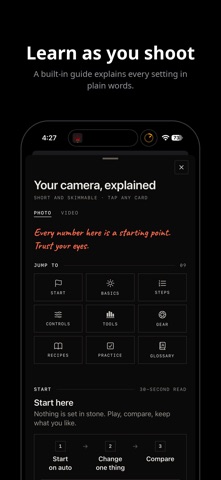
Learn as you shoot A built-in guide explains every setting in plain words, with recipes you can load in one tap. A teacher line offers one tip for the scene in front of you, and practice challenges tick themselves when your shots show you've done them.
Looks and frames • Six film looks built on real film stocks, saved so Photos can undo them • Live look shows the look on the whole picture as you frame • Crop to 3:2, 16:9, 1:1, 4:5 or a panorama • Open a photo in ManualEdit to keep adjusting its look and crop
Tools • Focus peaking and a punch-in, Zones with a spot meter, focus and exposure lock • A level, five grids and video frame guides • Live histogram, zebra stripes and an exposure meter
One press, more pictures • Self-timer, intervals and test strips that step a setting across five frames • Long exposures for silky water and light trails • Scene setups, and four of your own
Photos • HEIC, JPEG, RAW and ProRAW, up to 48 MP • Full-quality 2× from 48 MP cameras
Video • 1080p or 4K, up to 240 fps for slow motion • SDR, HDR or Apple Log, in HEVC, H.264 or ProRes • View assist shows Apple Log with normal contrast while you shoot (HEVC)
Hardware • Volume down takes the picture; Camera Control works as a dial on iPhones that have it
Private by design No account, no ads, no tracking. Your photos and videos stay in your own Photos library. ManualCam never uploads or collects them.
Requires iOS 17 or later. ProRAW, ProRes, Apple Log and 48 MP need a supported iPhone. Formats your iPhone doesn't support won't appear in the menu.
Safety and technology
Found in the app by AppBrain
Price
Free
App size
4.81 MB
Content rating
Everyone
Technologies used by ManualCam – Pro Camera
Releases
Updates seen on the App Store
Version
2.1.1
Launched
November 2026
No changelog data
Rankings
App Store top charts
App Store Rankings for ManualCam – Pro Camera
This app is not ranked
About the app and developer
About ManualCam – Pro Camera
ManualCam – Pro Camera is a photo & video app developed by Ghost Collective LLC.
User Ratings
The app has no ratings yet.
App Information
ManualCam – Pro Camera is freely available from the App Store. The app size is 4.81 MB. The latest version available is 2.1.1. The last update was on November 17, 2026.
Technical Requirements
The app has a content rating of Everyone. The app has been available on the App Store since November 2026.
ManualCam – Pro Camera is made and published by
Ghost Collective LLC.
AppBrain is an independent app data site and isn't affiliated with Ghost Collective LLC.
The app name, icon, screenshots and description belong to Ghost Collective LLC and are shown as published on the App Store.
Each subscription will automatically renew 3 days before the expiration date for
the same time period. Subscriptions can be cancelled at any time before the renewal.