

Map Timeline Visualizer: Video
Map Timeline Visualizer: Video is made and published by Minh Nhat Dang. AppBrain is an independent app data site and isn't affiliated with Minh Nhat Dang. The app name, icon, screenshots and description belong to Minh Nhat Dang and are shown as published on the App Store.
AppBrain's verdict
- Last updated
- September 21, 2026
- Size
- 9.84 MB
User feedback
Ratings and reviews on the App StoreComments on Map Timeline Visualizer: Video for iOS
We don't have enough comments to show example comments. Please check back later.
Store listing
By Minh Nhat Dang, from the App Store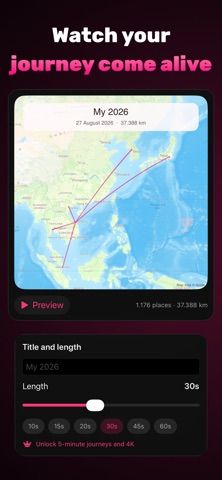

Description by Minh Nhat Dang Written by the developer, not by AppBrain. Click to read.
Everything happens on this iPhone. Your Timeline file is read on the device and never uploaded.
HOW IT WORKS
1. In the Google Maps app, tap your profile picture, choose Your Timeline, then the ⋯ menu, then Location & privacy settings, then Export Timeline data.
2. Save Timeline.json to Files.
3. Open Map Timeline, pick the file, choose a period, and create your video.
The app walks you through all of this the first time.
NO EXPORT YET?
Tap "Try a sample journey" to load a generated demo and see exactly what the app produces. Nothing to download, nothing to sign in to.
PRIVACY, PLAINLY
• No Google account and no sign-in
• No location permission — the app never asks where you are
• Your Timeline file is never uploaded, copied, or changed
• Only the map imagery comes from the network
CHOOSE YOUR JOURNEY
• A range of months, or exact dates for a single trip
• Square, portrait and landscape output
• 10 to 60 seconds free, up to 5 minutes with Premium
• 720p free, 1440p and 2160p with Premium
BUILT FOR REAL TRAVEL HISTORY
• Long flights are drawn as smooth great-circle arcs instead of straight jumps
• Trips are detected automatically, so the camera zooms in when you arrive somewhere and pulls back when you fly
• Steady, fixed or dynamic camera, whichever suits the trip
• A conservative GPS filter ignores impossible out-and-back points and tells you how many it skipped — your file is never modified
• Distances in kilometres or miles
YOUR VIDEOS, YOUR FILES
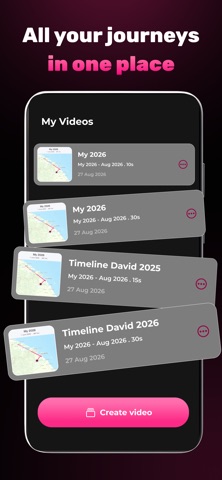
Finished videos land in the Files app and stay in the in-app library with a thumbnail, the period covered and the length. Watch them full screen, share them, or save them to Photos. Videos made before you installed the library can be imported too.
PREMIUM
One purchase, once. No subscription, nothing that renews, nothing to cancel. It removes every ad, unlocks 1440p and 2160p export, and raises the length limit from 60 seconds to 5 minutes.
Map data © Apple. Not affiliated with or endorsed by Google.
Privacy: https://gammapp.com/privacy/
Term of use: https://gammapp.com/terms/
Safety and technology
Found in the app by AppBrain- Price
- Free
- App size
- 9.84 MB
- Content rating
- Everyone
Technologies used by Map Timeline Visualizer: Video
Releases
Updates seen on the App Store- Version
- 1.0
- Launched
- September 2026
No changelog data
Alternatives
Similar apps and more from Minh Nhat DangAlternatives to Map Timeline Visualizer: Video


More from Minh Nhat Dang








Rankings
App Store top chartsApp Store Rankings for Map Timeline Visualizer: Video
About the app and developer
About Map Timeline Visualizer: Video
Map Timeline Visualizer: Video is a photo & video app developed by Minh Nhat Dang.
User Ratings
The app has no ratings yet.
App Information
Map Timeline Visualizer: Video is freely available from the App Store. The app size is 9.84 MB. The latest version available is 1.0. The last update was on September 21, 2026.
Technical Requirements
The app has a content rating of Everyone. The app has been available on the App Store since September 2026.
Developer information for Minh Nhat Dang
Address: