

MarkDeck: PDF EPUB MD Reader
MarkDeck: PDF EPUB MD Reader is made and published by Jeisson Segura. AppBrain is an independent app data site and isn't affiliated with Jeisson Segura. The app name, icon, screenshots and description belong to Jeisson Segura and are shown as published on the App Store.
AppBrain's verdict
- Last updated
- October 31, 2026
- Size
- 101.4 MB
User feedback
Ratings and reviews on the App StoreComments on MarkDeck: PDF EPUB MD Reader for iOS
We don't have enough comments to show example comments. Please check back later.
Store listing
By Jeisson Segura, from the App Store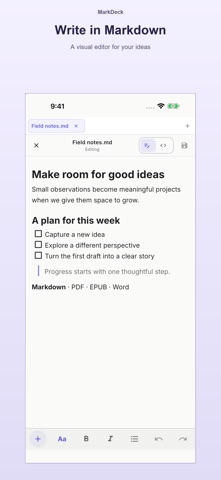




Description by Jeisson Segura Written by the developer, not by AppBrain. Click to read.
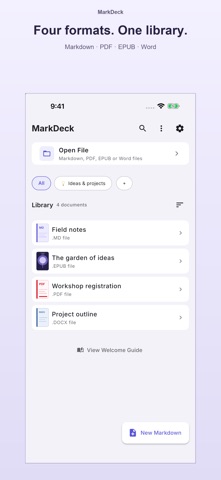
Whether you're a developer viewing README files, a student with PDF handouts, a writer keeping Markdown notes or a book lover with an EPUB library, MarkDeck makes reading a delight.
BEAUTIFUL RENDERING FOR EVERY FORMAT
Markdown rendered with pixel-perfect precision: scrollable tables, syntax-highlighted code, clickable links and inline images. PDFs and EPUB books open in the same calm reader, one library for everything you read.
VISUAL MARKDOWN EDITOR
Write and edit like in a word processor: headings, lists, tasks, quotes, code, links, images and tables edited in place, with the Markdown view one tap away. Create new notes and save them straight into your library.
READ AND EDIT WORD DOCUMENTS (.DOCX)
Edit Word documents on iPhone and iPad, free: fix a typo, rewrite a paragraph, add bold or italic. The file keeps its layout, tables and images.
Open Word documents as real pages, like a PDF: page size, headers and footers, tables, images and charts kept. Search the text, jump through the contents built from its headings and pick up where you left off. With Pro, export them to PDF. Templates (.dotx) and macro-enabled files (.docm, .dotm) open too; macros never run.
SAVE A COPY
Keep any document in Files: choose the folder and the name, and the library copy stays as it is. Free.
FILL PDF FORMS
Fill in interactive PDF forms (text, checkboxes, options and lists) and save a copy while the original stays untouched.
20 READING THEMES
15 themes free (Light, Dark, Sepia, Paper, AMOLED, Nord, Dracula, Solarized, Gruvbox, Tokyo Night and more) plus 5 premium palettes with MarkDeck Pro. Switch themes without leaving the page.
YOUR FONTS, YOUR WAY
One font for the app, another for what you read, so a cozy serif for your book never restyles your menus. Two fonts free, eight more with Pro.
COMFORTABLE PDF READING
Fit-to-width zoom remembered per document, Night and Warm color modes (Pro), password-protected PDFs, and continuous or page-by-page navigation.
FULL-SCREEN READING
One tap hides everything but the page, with a slim progress line so you never lose your place.
BOOKMARKS, HIGHLIGHTS & NOTES
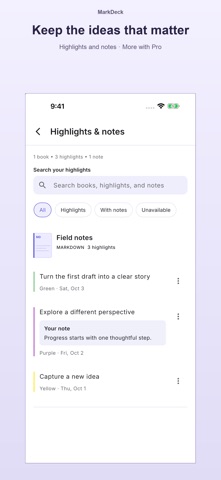
Bookmarks that take you back to the right spot. Highlight any passage, pick a color and add a note (Pro), then find every highlight and note in one place. A table of contents jumps to any chapter.
ORGANIZE YOUR LIBRARY
Group documents into collections, search your library and pick up right where you left off.
READING STATS
Total time, streak and sessions at a glance; Pro adds a full activity heatmap.
OPEN FILES FROM ANY APP
Got a .md, .pdf or .epub in Mail, Files or a chat app? Open it straight into MarkDeck, including documents inside ZIP files.
PASTE & READ, OR IMPORT A LINK
Paste Markdown from any app or AI tool and read it instantly, or paste a web link and MarkDeck turns it into clean, readable text.
SYNC WITH GOOGLE DRIVE (PRO)
Keep your library, highlights and notes in step across your devices with your own Google Drive.
OFFLINE & PRIVATE
No account needed for local reading. Documents stay on your device unless you choose to share them or use Google Drive sync.
MULTILINGUAL
English, Spanish and Portuguese; pick your language independently of your device's.
MARKDECK PRO
Remove ads and unlock every font, all 20 themes, PDF color modes, unlimited bookmarks, color highlights with notes, documents in tabs, PDF export, the full stats dashboard and Google Drive sync. Eligible subscribers get a 7-day free trial on the annual plan.
SUPPORTED FORMATS: .md · .markdown · .txt · .pdf · .epub · .docx · .dotx · .docm · .dotm
Privacy Policy: https://markdeck.dev/privacy.html
Terms of Use (EULA): https://www.apple.com/legal/internet-services/itunes/dev/stdeula/
Safety and technology
Found in the app by AppBrain- Price
- Free
- App size
- 101.4 MB
- Content rating
- Everyone
Technologies used by MarkDeck: PDF EPUB MD Reader
Releases
Updates seen on the App Store- Version
- 2.29.0
- Launched
- July 2026
No changelog data
Alternatives
Similar apps and more from Jeisson Segura


Rankings
App Store top chartsApp Store Rankings for MarkDeck: PDF EPUB MD Reader
About the app and developer
About MarkDeck: PDF EPUB MD Reader
MarkDeck: PDF EPUB MD Reader is a productivity app developed by Jeisson Segura.
User Ratings
The app has no ratings yet.
App Information
MarkDeck: PDF EPUB MD Reader is freely available from the App Store. The app size is 101.38 MB. The latest version available is 2.29.0. The last update was on October 31, 2026.
Technical Requirements
The app has a content rating of Everyone. The app has been available on the App Store since July 2026.
Developer information for Jeisson Segura
Address: