AppBrain
AppBrain
  • Apps
  • Apps being viewed right now Trending apps today Most popular apps All-time most downloaded apps Top rated apps iPhone and iPad apps
  • Intelligence ▾
    Intelligence overview → Track any Android app or your whole market
    Track & analyze
    Keyword Tracker & OptimizerTrack & improve Play rankings App Performance ReportOne-off PDF for any app StatisticsFree Android & Play market stats
    Promote your app
    Featured Apps App Links
  • Intelligence
  • Pricing
  • Dashboard
  • Sign up
  • Log in
Last updated on: 2026-09-29
App Store Apps > Productivity > Markdown Converter - .docx/PDF
App profile · Productivity · Data updated 2026-09-29
Markdown Converter - .docx/PDF icon

Markdown Converter - .docx/PDF

by 倩 李 · $0.99 · Version 1.2.0
Availability On the App Store since December 2025
Rating on App Store
–
Rating
–
0 reviews
Best rank
–
not in the top lists
Last updated
June 2, 2026
1.2.0

Markdown Converter - .docx/PDF is made and published by 倩 李. AppBrain is an independent app data site and isn't affiliated with 倩 李. The app name, icon, screenshots and description belong to 倩 李 and are shown as published on the App Store.

About Markdown Converter - .docx/PDF

Markdown Converter - .docx/PDF is a productivity app developed by 倩 李.

What is the rating of Markdown Converter - .docx/PDF?

Markdown Converter - .docx/PDF has no ratings yet.

Is Markdown Converter - .docx/PDF free?

Markdown Converter - .docx/PDF costs $0.99. The app size is 14.93 MB. The latest version available is 1.2.0. The last update was on June 2, 2026.

What are the requirements for Markdown Converter - .docx/PDF?

The app has a content rating of Everyone. The app has been available on the App Store since December 2025.

Description by 倩 李 (from the App Store)
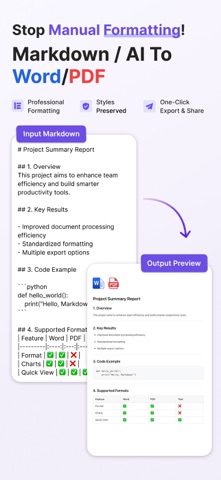
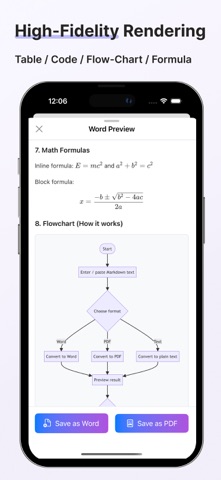
Markdown Converter -- Instantly format and convert Markdown to Word (.docx), PDF, or clean text (with Markdown syntax removed). High-fidelity rendering of tables, code blocks, formulas and Mermaid flowchart / sequence diagram /Gantt charts. Auto-generates PDF outline navigation.

Key Features:

- One-tap conversion: Word/PDF/Clean-Text, with high-fidelity tables and code highlighting
- Mermaid: Supports rendering flowcharts, sequence diagrams, and Gantt charts
- Preview and export: What you see is what you get. Supports sharing and saving
- PDF outline navigation: Accurately locates document sections
- Privacy protection: HTTPS + encrypted transmission, minimal logging
- Lightweight and easy to use: No complex configuration, just paste and convert

Applicable Scenarios:

- Formatting and styling Markdown output from AI models or tools;
- Technical documentation, weekly reports, proposals, meeting notes
- Course handouts, study notes, process instructions
- Text editing scenarios such as articles, papers, reports polished or modified by AI models
- Self-media article layout

We take user privacy very seriously: Core processing is performed locally whenever possible, and remote conversions are transmitted via encrypted connections for added peace of mind. For details, please visit "More > Privacy Policy".
Show more Show less
Price $0.99
Rating No ratings
Ranking Not ranked
Version 1.2.0
App size 14.9 MB
Suitable for Everyone

Screenshots

Markdown Converter - .docx/PDF Screenshot 1 of 5
Markdown Converter - .docx/PDF Screenshot 2 of 5
Markdown Converter - .docx/PDF Screenshot 3 of 5
Markdown Converter - .docx/PDF Screenshot 4 of 5
Markdown Converter - .docx/PDF Screenshot 5 of 5
Screenshots by 倩 李, from the the App Store listing
Official page on the App Store

Changelog of Markdown Converter - .docx/PDF

No changelog data

Developer information for 倩 李

倩 李

Address:

Share Markdown Converter - .docx/PDF

Comments on Markdown Converter - .docx/PDF for iOS

We don't have enough comments to show example comments. Please check back later.

App Store Rankings for Markdown Converter - .docx/PDF

This app is not ranked

Technologies used by Markdown Converter - .docx/PDF

Apps other people are watching Today's trending apps Price drops on Google Play Top new apps Popular Productivity Apps
More hot apps 🔥
Overview Reviews Rankings Technology
AppBrain Intelligence premium content

Subscribe now to get full and unlimited access to AppBrain Intelligence. You'll have access to:

  • App Intelligence dashboard (performance timeline, competitor comparison, country rankings, insight cards)
  • Detailed ranking data per app
  • Full timeline per developer
  • Device market shares data per country
  • Unlimited keyword tracking
1 Month

$75/mo
(billed every month)

SAVE 0%
Subscribe
3 Months

$65/mo
($195 billed every 3 months)

SAVE 13%
Subscribe
1 Year

$57.50/mo
($690 billed every year)

SAVE 23%
Subscribe
Each subscription will automatically renew 3 days before the expiration date for the same time period. Subscriptions can be cancelled at any time before the renewal.

AppBrain is an app data site, we track rankings, ratings, installs for all apps and games on Google Play and the App Store. AppBrain doesn't host app files or APKs, all install links go directly to the official store. All trademarks are owned by their respective owners.

More apps

  • Top Android apps being viewed
  • Mindforge stats
  • Craftaluz : Crafting
  • View INDEX Video

App statistics

  • Android statistics
  • Google Play Developer stats
  • Trending Android Apps
  • Trending iOS apps
  • Top popular Apps
  • Buy the best Android phone
  • Buy & sell app businesses

About AppBrain

  • Contact
  • Privacy
  • Documentation
  • DMCA takedowns
  • Articles
  • Blog
  • Free webpage for your Android app
© 2010-2026 - AppBrain