

Markdown to PDF: Pro Editor
Markdown to PDF: Pro Editor is made and published by Zain Aaban. AppBrain is an independent app data site and isn't affiliated with Zain Aaban. The app name, icon, screenshots and description belong to Zain Aaban and are shown as published on the App Store.
AppBrain's verdict
- Rating on App Store
- 4.44
- 9 ratings
- Last updated
- October 5, 2026
It doesn't have enough ratings yet to judge what users think.
Rankings
App Store top chartsApp Store Rankings for Markdown to PDF: Pro Editor
Competitors
Similar apps and more from Zain AabanAlternatives to Markdown to PDF: Pro Editor


More from Zain Aaban


Releases
Updates seen on the App Store- Version
- 2.33
- Launched
- March 2026
No changelog data
User feedback
Ratings and reviews on the App StoreComments on Markdown to PDF: Pro Editor for iOS
We don't have enough comments to show example comments. Please check back later.
Technology
Found in the app by AppBrain- Price
- Free
- App size
- 9.78 MB
- Content rating
- Everyone
Technologies used by Markdown to PDF: Pro Editor
About the app and developer
About Markdown to PDF: Pro Editor
Markdown to PDF: Pro Editor is a productivity app developed by Zain Aaban.
User Ratings
Markdown to PDF: Pro Editor is rated 4.44 out of 5 stars. The rating is based on 9 ratings.
App Information
Markdown to PDF: Pro Editor is freely available from the App Store. The app size is 9.78 MB. The latest version available is 2.33. The last update was on October 5, 2026.
Technical Requirements
The app has a content rating of Everyone. The app has been available on the App Store since March 2026.
Developer information for Zain Aaban
Address:
Frequently asked questions about Markdown to PDF: Pro Editor
Is Markdown to PDF: Pro Editor free?
Yes. Markdown to PDF: Pro Editor is free on the App Store.
Is Markdown to PDF: Pro Editor still available?
Yes. Markdown to PDF: Pro Editor is on the App Store, and the last update we saw was on October 5, 2026.
How large is Markdown to PDF: Pro Editor?
Markdown to PDF: Pro Editor is 9.78 MB.
Is Markdown to PDF: Pro Editor suitable for children?
App Store rates the content of Markdown to PDF: Pro Editor as suitable for everyone.
How do people rate Markdown to PDF: Pro Editor?
Markdown to PDF: Pro Editor scores 4.44 out of 5 stars, from 9 ratings on the App Store.
Who made Markdown to PDF: Pro Editor?
Markdown to PDF: Pro Editor was developed by Zain Aaban. It is listed in the productivity category on the App Store.
What are the best alternatives to Markdown to PDF: Pro Editor?
People looking at Markdown to PDF: Pro Editor also look at these productivity apps: MDViewer - Markdown Reader, Simark - Markdown Notebook, Analytico, Marko Viewer, Markdown Editor : Md Viewer.
Store listing
By Zain Aaban, from the App Store



Description by Zain Aaban Written by the developer, not by AppBrain. Click to read.
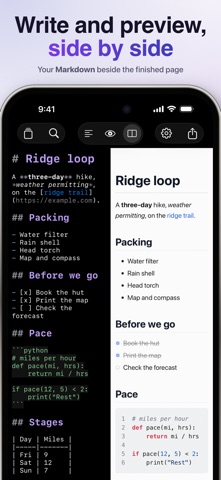
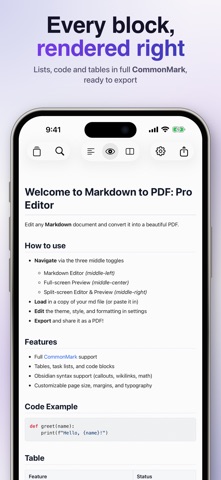
Write or paste your Markdown, see a live preview as you type, and export a polished PDF in seconds. Whether you're turning notes into a document, sharing a README, or exporting class notes, Markdown to PDF handles the formatting so you don't have to. This app will convert more than just basic markdown with support for an extensive list of markdown supersets (i.e. code blocks, highlights, embeds, callouts, etc..).
Conversions:
- Word (DOCX)
- EPUB
- HTML
- Rich Text (RTF)
- Plain Text
- Markdown
Features
- Live preview: see your formatted document update as you type
- Editor and split-screen modes for a comfortable writing experience
- Export to PDF and share or save to Files
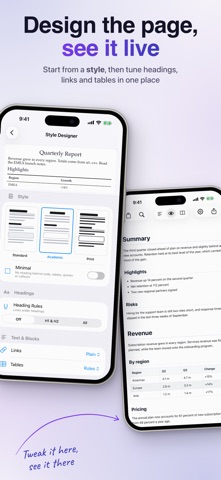
- Multiple page sizes: A4, A3, Letter, Legal, Tabloid
- Portrait and landscape orientation
- Font options: System, Serif, Sans-Serif, Monospace, New York
- Color themes: Light, Dark, Sepia, and 22 more!
- Import existing Markdown files
- Siri & Shortcuts Support: convert a file or text into a PDF
Additional Features
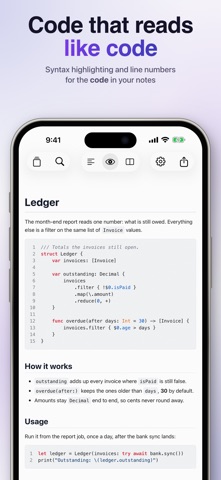
- Syntax highlighting for code blocks
- Table of contents generation
- Page numbers
- Soft line breaks
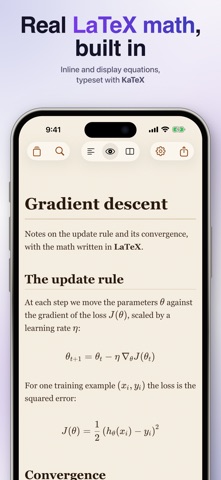
- Obsidian-compatible syntax (callouts, wikilinks, math via KaTeX, highlights)
- Rich Markdown editor with live syntax coloring
- Fit preview to screen width
- Mermaid diagrams (render flowcharts, sequence diagrams, class diagrams, and more)
All current and future "additional features" are available as a monthly or annual subscription, or a one-time lifetime purchase. A 7-day free trial is included with the annual plan.
By downloading this app, you agree to Apple's Standard EULA: https://www.apple.com/legal/internet-services/itunes/dev/stdeula/