Download Android Apps and Games
AppBrain
  • Apps
  • Apps being viewed right now Trending apps today Most popular apps All-time most downloaded apps Top rated apps iPhone and iPad apps
  • Intelligence ▾
    Intelligence overview → Track any Android app or your whole market
    Track & analyze
    Keyword Tracker & OptimizerTrack & improve Play rankings App Performance ReportOne-off PDF for any app StatisticsFree Android & Play market stats
    Promote your app
    Featured Apps App Links
  • Intelligence
  • Pricing
  • Dashboard
  • Sign up
  • Log in
Last updated on: 2026-09-25
App Store Apps > Productivity > Markdown Viewer & Editor
Markdown Viewer & Editor icon

Markdown Viewer & Editor

1.0.0
Masamichi Ueta
0.00
0 reviews
$5.99

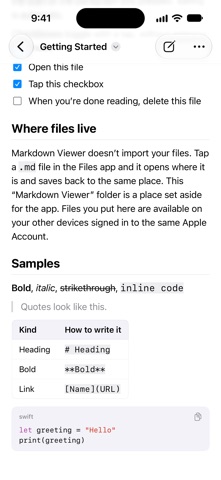
Markdown Viewer & Editor Screenshot 1 of 7
Markdown Viewer & Editor Screenshot 2 of 7
Markdown Viewer & Editor Screenshot 3 of 7
Markdown Viewer & Editor Screenshot 4 of 7
Markdown Viewer & Editor Screenshot 5 of 7
Markdown Viewer & Editor Screenshot 6 of 7
Markdown Viewer & Editor Screenshot 7 of 7
Download from the App Store

About Markdown Viewer & Editor

Markdown Viewer & Editor is a productivity app developed by Masamichi Ueta.

User Ratings

The app has no ratings yet.

App Information

Markdown Viewer & Editor costs $5.99 to download. The download size is 3.56 MB. The latest version available is 1.0.0. The last update was on September 23, 2026.

Technical Requirements

The app has a content rating of Everyone. The app has been available on App Store 1 day ago.

Description
A Markdown reader that shows your files as documents the moment you open them, with a light editor for when you need one.

Tap a .md file in Files on iOS and you get plain text full of punctuation. READMEs, design notes, meeting notes, anything you had a model write for you. The file is right there and you still cannot read it. That is the problem Markdown Viewer & Editor solves.

YOUR FILES STAY YOUR FILES

Markdown Viewer & Editor never imports anything. It opens the file where it already lives, in iCloud Drive or in any third-party file provider, lets you change it, and hands it back. There is no database inside the app, so there is no import step, no proprietary sync, and nothing kept in two places. Stop using Markdown Viewer & Editor and your files are exactly where you left them.

IT SAVES WHAT YOU WROTE

Read a file and save it again and every line you did not touch is byte-for-byte identical. Line endings are not converted, trailing spaces are not stripped, list markers are not normalized. Well-meant reformatting pollutes Git diffs and breaks the peace with whatever else edits these files. Smart quotes and dash substitution are turned off for the same reason.

BUILT FOR READING

- GitHub Flavored Markdown: headings, emphasis, strikethrough, lists, quotes, rules, links, images, autolinks
- Tables scroll sideways and keep their column alignment
- Code blocks carry a language label, syntax coloring for 18 languages, and a copy button
- Task lists toggle on tap. The toggle rewrites a single character in the source, nothing else
- A table of contents built from your headings. Tap to jump
- Find in document, ignoring case, width, and Japanese voiced marks. Every match is highlighted, the current one darker
- Images written as URLs are shown. Tap one to open it full screen and pinch to zoom
- Links open inside the app
- Raw HTML is shown as text, never executed

MAKE IT FIT YOUR EYES

- Serif or sans
- Text size and line spacing, applied on top of your system text size
- System, light, dark, or sepia
- On iPad, cap the measure so lines do not run too wide to track

BUILT FOR FIXING

Tap the pencil, or long-press a paragraph to start editing at its beginning.

- Raw Markdown in a monospaced face, with headings, emphasis, code, links, and list markers colored
- A bar above the keyboard: headings, bold, italic, link, image, code, list, task, quote, indent, undo, redo
- Return on a list line continues the list. Return on an empty item ends it
- Select text and hit bold to wrap it
- Select text and paste a URL to turn it into a link
- Saving is automatic. There is no save button
- Switching between reading and editing keeps your place

TAKE IT WITH YOU

- Share the Markdown source as it is
- Export to PDF in your chosen typeface, text size, and line spacing

WHEN TWO DEVICES DISAGREE

If the same file is changed somewhere else at the same time, Markdown Viewer & Editor shows you both versions with the device that saved each one, when, and how each one starts, and lets you pick.

IPAD

- Several documents side by side in Stage Manager or Split View
- Hardware keyboard shortcuts for reading and editing, find, contents, bold, italic, and link

PRIVACY

- No account
- No server run by the developer. Your files never reach the developer
- No ads, no tracking, no analytics
- The app goes online only to fetch an image a document points at by URL, or to open a link you tap

REQUIREMENTS

Reads .md, .markdown, .mdown, .mkd, and .mdtext, encoded as UTF-8.

Images and files sitting next to your document cannot be read. iOS hands the app only the one file you opened. Point at images by URL.
Show more Show less

More data about Markdown Viewer & Editor

Price $5.99
Rating No ratings
Ranking Not ranked
Version 1.0.0
App download size 3.56 MB
Suitable for Everyone

More from Masamichi Ueta

Runrunrun: Running Journal icon Runrunrun: Running Journal
Masamichi Ueta
0.0
$2.99
AspectFit: Extend to any ratio icon AspectFit: Extend to any ratio
Masamichi Ueta
0.0
$1.99
Kids Homework Tracker icon Kids Homework Tracker
Masamichi Ueta
0.0
Free
TeeNote - Golf Scorecard icon TeeNote - Golf Scorecard
Masamichi Ueta
0.0
Free

Changelog of Markdown Viewer & Editor

No changelog data

Developer information for Masamichi Ueta

Masamichi Ueta

Address:

Share Markdown Viewer & Editor

Comments on Markdown Viewer & Editor for iOS

We don't have enough comments to show example comments. Please check back later.

App Store Rankings for Markdown Viewer & Editor

This app is not ranked

Technologies used by Markdown Viewer & Editor

Frequently asked questions about Markdown Viewer & Editor

Is Markdown Viewer & Editor free?

No. Markdown Viewer & Editor costs $5.99 on App Store.

Is Markdown Viewer & Editor still available?

Yes. Markdown Viewer & Editor is on App Store, and the last update we saw was on September 23, 2026.

How large is the Markdown Viewer & Editor download?

Markdown Viewer & Editor is 3.56 MB to download.

Is Markdown Viewer & Editor suitable for children?

App Store rates the content of Markdown Viewer & Editor as suitable for everyone.

Who made Markdown Viewer & Editor?

Markdown Viewer & Editor was developed by Masamichi Ueta. It is listed in the productivity category on App Store.

Apps on sale Popular Productivity Apps Today's trending apps Top new apps Apps other people are watching
More hot apps šŸ”„

Back to top
AppBrain Intelligence premium content

Subscribe now to get full and unlimited access to AppBrain Intelligence. You'll have access to:

  • App Intelligence dashboard (performance timeline, competitor comparison, country rankings, insight cards)
  • Detailed ranking data per app
  • Full timeline per developer
  • Device market shares data per country
  • Unlimited keyword tracking
1 Month

$75/mo
(billed every month)

SAVE 0%
Subscribe
3 Months

$65/mo
($195 billed every 3 months)

SAVE 13%
Subscribe
1 Year

$57.50/mo
($690 billed every year)

SAVE 23%
Subscribe
Each subscription will automatically renew 3 days before the expiration date for the same time period. Subscriptions can be cancelled at any time before the renewal.

AppBrain is a directory focused on discovering great apps and games. We give statistics, rankings and search options that Google Play and the App Store don't have. All trademarks are owned by their respective owners. AppBrain doesn't offer APKs or binaries, and always lets users install the official version from Google Play or the App Store.

More apps

  • Top Android apps being viewed
  • Bubble Shooter puzzle game Android App
  • Plants vs. Zombiesā„¢ Heroes for Android
  • Rip Rush: Card Collector Arena

App statistics

  • Android statistics
  • Google Play Developer stats
  • Trending Android Apps
  • Trending iOS apps
  • Top popular Apps
  • Buy the best Android phone

About AppBrain

  • Contact
  • Privacy
  • Documentation
  • DMCA takedowns
  • Articles
  • Blog
  • Android Interstitial Ads: Best practices to optimize your app's earnings
© 2010-2026 - AppBrain