Markdown Voice Memos is an overall app developed by Spencer Shwetz.
Download Statistics
User Ratings
Markdown Voice Memos is rated 4.67 out of 5 stars. The rating is based on 6 ratings.
App Information
Markdown Voice Memos is FREE to download. The APK download size is 26.31 MB. The latest version available is 1.2.17. The last update was on July 12, 2026.
Technical Requirements
The app has a content rating of Everyone. The app has been available on Google Play February 2026.
Description
Markdown Voice Memos turns your voice into beautifully structured notes. Record in lossless orcompressed quality, get instant on-device transcription, and export everything as Markdown — ready for Obsidian, Logseq, Notion, or any notes app.
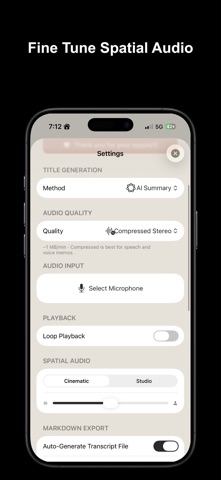
Lossless & Compressed Audio Record in pristine 24-bit Apple Lossless (ALAC) — Choose from five quality modes: Compressed Mono for the smallest files, Compressed Stereo for richer audio at low storage cost, Lossless Mono and Lossless Stereo for studio-quality voice notes, or Spatial Audio on iPhone 16 and later for immersive recordings with ambisonics.
Real-Time Transcription Every recording is transcribed on-device as you speak. Tap any word in the transcript to jump to that moment. Search across all your recordings by what was said, not just the title.
Multiple On-Device Engines Choose the transcription engine for your languages: Parakeet for English and major European languages, SenseVoice for multilingual notes (especially Japanese, Korean, and Cantonese), and Qwen3-ASR for Mandarin and Chinese dialects. A short quiz in Settings helps you pick the right model.
Markdown Export Each recording automatically generates a Markdown file with customizable YAML frontmatter — title, date, duration, location, tags, and more. Start with built-in presets for Default and Obsidian workflows, or create your own custom presets. Drag to reorder properties, add custom fields, and toggle what gets included.
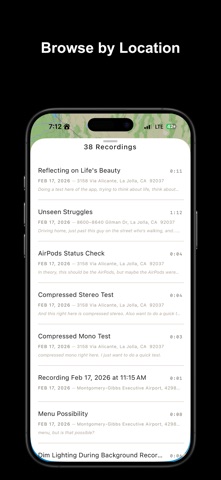
Smart Titles Recordings are automatically named using the method you prefer: date and time, your current location (like "Coffee Shop" or "Downtown"), or an AI-generated summary of what you said — all processed on-device.
Record From Anywhere Start recording from the app, your Apple Watch, Siri, Shortcuts, Control Center, or the Action Button. A Live Activity keeps you in control with recording duration in the Dynamic Island, even after you leave the app.
Apple Watch Record and play back memos directly on your wrist. Recordings sync automatically between iPhone and Apple Watch, including titles and edits.
Spatial Audio Playback On supported devices, adjust spatial recordings with Cinematic Audio Mix — choose between Cinematic and Studio rendering styles and fine-tune the intensity in real time.
Import & Share Import audio files from other apps using the Share Extension. Export recordings as Markdown with embedded audio links and full transcriptions.
Save Anywhere Store recordings in the app or choose any folder — including iCloud Drive — for a seamless knowledge management workflow. Pair your audio with auto-generated Markdown files.
Privacy First All transcription and AI features run entirely on-device. Your recordings and transcripts never leave your phone.
Apple Terms of Use (EULA): https://www.apple.com/legal/internet-services/itunes/dev/stdeula/
Each subscription will automatically renew 3 days before the expiration date for
the same time period. Subscriptions can be cancelled at any time before the renewal.