

MarkerMate: Lab Tracker
MarkerMate: Lab Tracker is made and published by Hongyu Tao. AppBrain is an independent app data site and isn't affiliated with Hongyu Tao. The app name, icon, screenshots and description belong to Hongyu Tao and are shown as published on the App Store.
AppBrain's verdict
- Rating on App Store
- 5.00
- 1 ratings
- Last updated
- October 24, 2026
- Size
- 35.6 MB
It doesn't have enough ratings yet to judge what users think.
User feedback
Ratings and reviews on the App StoreComments on MarkerMate: Lab Tracker for iOS
We don't have enough comments to show example comments. Please check back later.
Store listing
By Hongyu Tao, from the App Store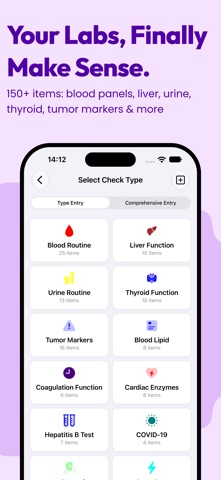


Description by Hongyu Tao Written by the developer, not by AppBrain. Click to read.
▼Problems it solves
□Arrows and abbreviations on a lab report are hard to read — you can't tell which values are worth attention
□Reports end up scattered across your photo library and different hospital portals
□At a follow-up you only have the latest sheet, so you can't say whether things are better or worse than last time
□Records for your parents start to blur together with your own
□Health data ending up somewhere you don't control
▼What you do
Record the numbers from your lab report; the app presents everything else.
▼Core Features
□Scan to record — Photograph a lab report and 140+ indicators fill in automatically, no typing one by one.
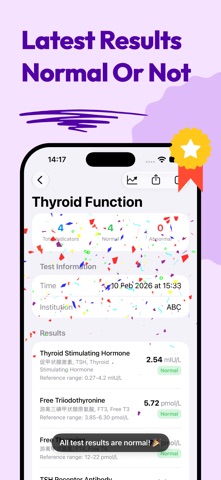
□Abnormal flags — Values are checked against reference ranges, so high, low, and normal read at a glance.
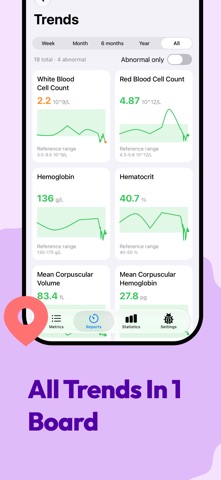
□Trend charts — See how a single indicator moved from last year to this one. Free plans cover the first 6 indicators.
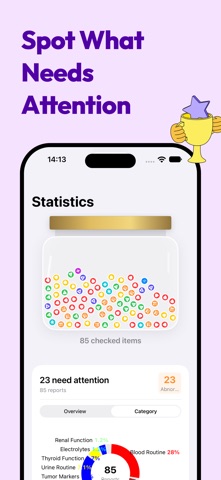
□Statistics insights (Pro) — Abnormal values surface first, so you know where to look.
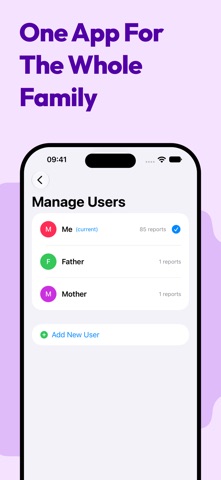
□Family profiles (Pro) — A separate file for each family member, kept apart.
□Pinned mode (Pro) — Pin the markers you follow and compare them side by side.
□Custom standards — New hospital or different reference range? Switch standards and re-evaluate.
□Export & share — PDF, CSV, or plain text, ready to show your doctor.
□Private by design — Data stays on your device, with optional sync across your own devices via private iCloud database.
▼Supported Test Types
□CBC & blood routine (WBC, RBC, hemoglobin, platelets…)
□Lipid panel (total, HDL & LDL cholesterol, triglycerides…)
□Diabetes (fasting glucose, HbA1c…)
□Thyroid (TSH, T3, T4, antibodies…)
□Liver & kidney function, urinalysis, electrolytes
□Hormones, tumor markers, coagulation, cardiac enzymes, hepatitis B…
□Custom standards for anything else
▼Made For
□Anyone tracking cholesterol, blood sugar, or thyroid over time
□People who get an annual physical and want to see the long arc
□Families managing records for parents and kids
□Patients with long-term follow-up
▼About Subscription
□Core features are free: recording, scan-to-record, trends for the first 6 indicators, and data export.
□Pro adds all indicator trends, statistics insights, multiple profiles, and pinned mode.
□Monthly and annual plans both include a 1-week free trial; they renew automatically and can be cancelled anytime in system settings.
□Lifetime is a one-time purchase with permanent access to Pro features.
□Actual prices are shown in the app.
Disclaimer: This app is for personal health record and data tracking purposes only and is not a substitute for professional medical advice, diagnosis, or treatment. If you have any health questions or concerns, please consult a qualified healthcare professional promptly. Always seek your doctor's advice before using this app. All medical information, reference ranges, and clinical significance descriptions provided in this app are for reference only. Please rely on hospital or medical institution test results and professional medical interpretation from your doctor. The app developer assumes no liability for any direct or indirect losses arising from using this app or relying on any information in it. In case of medical emergency, call emergency services or seek medical attention immediately.
Terms of Use: https://www.apple.com/legal/internet-services/itunes/dev/stdeula/
Privacy Policy: https://markermate.pages.dev/privacy.html
Safety and technology
Found in the app by AppBrain- Price
- Free
- App size
- 35.6 MB
- Content rating
- Everyone
Technologies used by MarkerMate: Lab Tracker
Releases
Updates seen on the App Store- Version
- 1.18.0
- Launched
- February 2026
No changelog data
Rankings
App Store top chartsApp Store Rankings for MarkerMate: Lab Tracker
About the app and developer
About MarkerMate: Lab Tracker
MarkerMate: Lab Tracker is a medical app developed by Hongyu Tao.
User Ratings
MarkerMate: Lab Tracker is rated 5.00 out of 5 stars. The rating is based on one rating ratings.
App Information
MarkerMate: Lab Tracker is freely available from the App Store. The app size is 35.63 MB. The latest version available is 1.18.0. The last update was on October 24, 2026.
Technical Requirements
The app has a content rating of Everyone. The app has been available on the App Store since February 2026.
Developer information for Hongyu Tao
Address:
Frequently asked questions about MarkerMate: Lab Tracker
Is MarkerMate: Lab Tracker free?
Yes. MarkerMate: Lab Tracker is free on the App Store.
Is MarkerMate: Lab Tracker still available?
Yes. MarkerMate: Lab Tracker is on the App Store, and the last update we saw was on October 24, 2026.
How large is MarkerMate: Lab Tracker?
MarkerMate: Lab Tracker is 35.63 MB.
Is MarkerMate: Lab Tracker suitable for children?
App Store rates the content of MarkerMate: Lab Tracker as suitable for everyone.
How do people rate MarkerMate: Lab Tracker?
MarkerMate: Lab Tracker has one rating of 5.00 stars on the App Store.
Who made MarkerMate: Lab Tracker?
MarkerMate: Lab Tracker was developed by Hongyu Tao. It is listed in the medical category on the App Store.