

MarkLook - Markdown Reader
MarkLook - Markdown Reader is made and published by 乙丑 蒋. AppBrain is an independent app data site and isn't affiliated with 乙丑 蒋. The app name, icon, screenshots and description belong to 乙丑 蒋 and are shown as published on the App Store.
AppBrain's verdict
- Last updated
- August 21, 2026
Rankings
App Store top chartsApp Store Rankings for MarkLook - Markdown Reader
Competitors
Similar apps and more from 乙丑 蒋Alternatives to MarkLook - Markdown Reader


More from 乙丑 蒋


Releases
Updates seen on the App Store- Version
- 1.3.1
- Launched
- March 2026
No changelog data
User feedback
Ratings and reviews on the App StoreComments on MarkLook - Markdown Reader for iOS
We don't have enough comments to show example comments. Please check back later.
Technology
Found in the app by AppBrain- Price
- Free
- App size
- 15.5 MB
- Content rating
- Everyone
Technologies used by MarkLook - Markdown Reader
About the app and developer
About MarkLook - Markdown Reader
MarkLook - Markdown Reader is an utilities app developed by 乙丑 蒋.
User Ratings
The app has no ratings yet.
App Information
MarkLook - Markdown Reader is freely available from the App Store. The app size is 15.49 MB. The latest version available is 1.3.1. The last update was on August 21, 2026.
Technical Requirements
The app has a content rating of Everyone. The app has been available on the App Store since March 2026.
Developer information for 乙丑 蒋
Address:
Frequently asked questions about MarkLook - Markdown Reader
Is MarkLook - Markdown Reader free?
Yes. MarkLook - Markdown Reader is free on the App Store.
Is MarkLook - Markdown Reader still available?
Yes. MarkLook - Markdown Reader is on the App Store, and the last update we saw was on August 21, 2026.
How large is MarkLook - Markdown Reader?
MarkLook - Markdown Reader is 15.49 MB.
Is MarkLook - Markdown Reader suitable for children?
App Store rates the content of MarkLook - Markdown Reader as suitable for everyone.
Who made MarkLook - Markdown Reader?
MarkLook - Markdown Reader was developed by 乙丑 蒋. It is listed in the utilities category on the App Store.
What are the best alternatives to MarkLook - Markdown Reader?
People looking at MarkLook - Markdown Reader also look at these utilities apps: Markdown File Reader, Rune · 阅读与聆听, Marklit - Markdown Preview, 按时吃药哦, Markdown: Journal and Notes.
Store listing
By 乙丑 蒋, from the App Store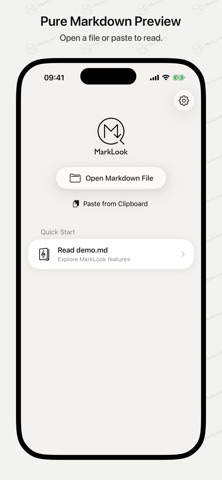


Description by 乙丑 蒋 Written by the developer, not by AppBrain. Click to read.
MarkLook stores no files, offers no editor, requires no account, and has no monthly subscription. It is made for reading.
On iPhone and iPad, choose an .md file from the Files app or paste Markdown from the clipboard. On Mac, open files from Finder, Quick Look, or the Open With menu.
--- FIND YOUR FAVORITE READING VIBE ---
To cater to different reading habits and aesthetic preferences, we offer several built-in themes. For each theme, we've fine-tuned the typography, font sizes, and line spacing to ensure reading is effortless, while specifically optimizing the visual balance when mixing English and non-English text.
We have prepared several built-in appearances (themes) for you:
• Default: The cleanest, foundational system font typography.
• Essay: Looks like a meticulously typeset book, perfect for reading long articles.
• Typewriter: Recreates the monospace texture of a typewriter, bringing back classic manuscript styling.
• Notebook: A rounded, soft notebook style.
• GitHub: The classic style familiar to all programmers.
All built-in themes support Dark Mode.
If you are a loyal Typora user, you can also directly import your commonly used Typora theme packages (.zip or .css formats) to continue your most familiar reading experience.
--- OPTIMIZED MOBILE READING EXPERIENCE ---
Reading documents on mobile devices is often constrained by the system environment or narrow screen layouts. MarkLook has made targeted optimizations:
• Folder Browsing: Add a folder to browse Markdown and TextBundle documents from it and its subfolders in one place, with search by file name, path, or content.
• One-Tap Local Image Authorization: Due to iOS sandbox restrictions, apps cannot read external images by default. With a simple one-tap authorization of your document directory, images in your text appear instantly.
• Immersive Image Preview: Tap an image to go full-screen. Supports pinch-to-zoom and swipe gestures, allowing you to see every detail clearly even on a limited screen.
• Smooth Wide Table Scrolling: Optimized algorithms for narrow screens ensure complex tables are no longer crowded or distorted. Supports horizontal scrolling to view complete data, keeping the text looking as it should.
--- COMPREHENSIVE ADVANCED FEATURE SUPPORT ---
Beyond basic syntax, the following contents are also well-supported:
• Code Highlighting: Supports 180+ programming languages with clear logical presentation.
• Math Equations: Flawless support for LaTeX math, rendering even complex formulas quickly and elegantly.
• Flowcharts & Diagrams: Supports Mermaid flowcharts and sequence diagrams, which can be enlarged for full-screen viewing.
--- ONE-TIME PURCHASE, NO SUBSCRIPTIONS ---
The app offers both a free and a full version. The "Default" theme is completely free with a clean interface. When you try out other built-in themes, a subtle upgrade prompt will appear at the bottom of the preview page.
If you desire a more refined and pure experience, consider a one-time purchase to unlock the full version (no subscriptions, no ads):
• Unlock All Built-in Themes: Switch freely between your favorite typography styles without any prompt bars.
• Unlock Typora Theme Import: Bring in your custom community theme packages (.zip or .css formats).
One-time purchase, universal for iPhone, iPad, and Mac. Simply tap "Restore Purchase" on your other device.
We hope to provide you with a quiet, comfortable little tool for reading. If you happen to read Markdown files frequently, welcome to give it a try.