Markdown, page by page.
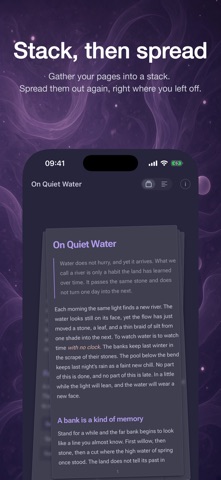
MarkRead makes AI-generated writing easier to read closely, and easier to think through. Every .md reads two ways: Scroll, one continuous page, or Pages, laid out side by side so more fits on screen. Pinch the pages into a stack and spread them out again right where you left off; switch between the two any time without losing your place.
The more AI writes, the more it needs a proper read. MarkRead lays a .md file out as a calm reading page: headings, lists, quotes, code, and tables in clear order, so the point comes out fast and you decide with something solid under you.
Reading in Pages
• Pages, side by side
See more at once and page through long reads. Up to four columns on iPad, two pages on iPhone in landscape, one to four on Mac.
• Stack, then spread
Gather your pages into a stack, then spread them out again, right where you left off. On iPhone and iPad, just pinch and spread.
• Scroll or Pages, one tap
Two ways to read the same document. Switch any time and stay on the same line.
Features
• Open. Start reading.
AI-generated Markdown opens into a clean page for thinking.
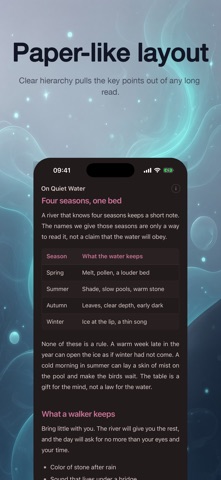
• Paper-like layout
Clear hierarchy pulls the key points out of any long read.
• Tune it your way
Set size and margins until the page matches how you read and judge.
• Back in one tap
Return to recent documents instantly, without losing your train of thought.
• 19 Pro themes (Pro)
Switch the theme, switch the lens you examine the text through.
• Reading Sets (Pro)
Group related AI reports and documents into one organized set.
• Seamless resume (Pro)
Reading progress syncs automatically—switching devices never breaks your focus.
• Export (Pro)
PDF with bookmarks and page numbers, the whole document as one long image, plus Word, ePub, HTML and a LaTeX package ready for Overleaf. Markdown, Plain Text and three more formats export free.
• Privacy
No server, no account. Files stay on the device; what syncs goes through your own iCloud private database.
On iPhone and iPad
• The whole set at a glance
Progress and status for every file, all in one view.
On iPhone Duo
• Two-page spread
Inner display: two pages meet at the hinge as one sheet, and the spine shadow deepens as it half opens.
• Never lose your line
Fold or unfold, and you stay on the same line.
• Fore-edge
Outer display: drag along the edge marks to jump through the outline.
• Reading stand
Half open on a table: text on top, controls below.
On Mac
• Immersive review
A focused window built for deep reading and clear-headed judgment.
• Drop in, start reading
Drag an AI-generated .md onto the window and go straight into review.
• The whole picture
Outline and library on one screen—see it all, then decide.
Who it's for
People who read AI-generated reports, technical docs, notes, and long-form Markdown; people who move between iPhone, iPad, and Mac in the middle of a document; people who would rather keep related files in one set than hunt through folders; people who want more than one page on screen at a time.
MarkRead Pro
Unlocks 19 themes, Reading Sets, reading progress across devices, and export to PDF, long image, Word, ePub, HTML and LaTeX.
Subscribe monthly (1 month) or yearly (1 year), or buy it once, and a one-time purchase never renews. Subscriptions renew automatically. You can switch one off any time in your system subscription settings, and it stops at the end of the period. Prices are shown in the App Store.
Download MarkRead, and give the next long read a page worth reading on.
Privacy Policy: https://markread.cn/privacy/
Terms of Use: https://markread.cn/terms/
Show more
Show less