AppBrain
AppBrain
  • Apps
  • Apps being viewed right now Trending apps today Most popular apps All-time most installed apps Top rated apps iPhone and iPad apps
  • Intelligence ▾
    Intelligence overview → Track any Android app or your whole market
    Track & analyze
    Keyword Tracker & OptimizerTrack & improve Play rankings App Performance ReportOne-off PDF for any app StatisticsFree Android & Play market stats
    Promote your app
    Featured Apps App Links
  • Intelligence
  • Pricing
  • Dashboard
  • Sign up
  • Log in
App Store Apps > Productivity > Markview: Markdown Workspace
Markview: Markdown Workspace icon

Markview: Markdown Workspace

2.0
Ali Bakhshoude
0.00
0 reviews
$0.99

Markview: Markdown Workspace Screenshot 1 of 9
Markview: Markdown Workspace Screenshot 2 of 9
Markview: Markdown Workspace Screenshot 3 of 9
Markview: Markdown Workspace Screenshot 4 of 9
Markview: Markdown Workspace Screenshot 5 of 9
Markview: Markdown Workspace Screenshot 6 of 9
Markview: Markdown Workspace Screenshot 7 of 9
Markview: Markdown Workspace Screenshot 8 of 9
Markview: Markdown Workspace Screenshot 9 of 9
Screenshots by Ali Bakhshoude, from the the App Store listing
View on the App Store

AppBrain's verdict

Last updated
July 23, 2026
Size
15.2 MB
Official page on the App Store

User feedback

Ratings and reviews on the App Store

Comments on Markview: Markdown Workspace for iOS

We don't have enough comments to show example comments. Please check back later.

Store listing

By Ali Bakhshoude, from the App Store
Description by Ali Bakhshoude Written by the developer, not by AppBrain. Click to read.
Markview is a private Markdown reader and document workspace for iPhone and iPad.

Bring your notes, docs, project wikis, and READMEs into one calm library—or connect an existing
folder from Files without copying it. Everything Markview does with your documents happens on device.

Rich rendering, done right
• Syntax-highlighted code blocks
• GitHub-flavored tables and task lists
• LaTeX math (KaTeX)
• Mermaid diagrams
All rendered on-device, with no remote renderer and no executable MDX, R, or Quarto code.

Read and return
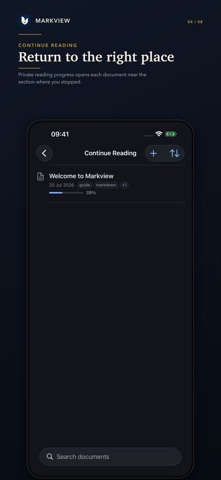
• Continue Reading remembers your position and progress
• Fast full-text search with highlighted results
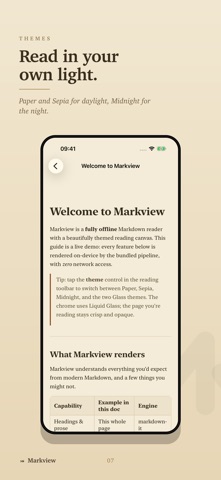
• Premium Paper, Sepia, Midnight, Glass Light, and Glass Dark themes
• Dynamic Type, VoiceOver, and iPad multitasking support

Build a local document wiki
• Open a folder from Files as a library without copying it
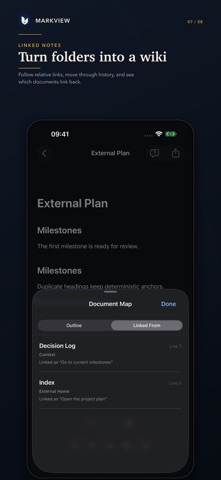
• Follow relative document links, headings, and local images
• Back and forward history plus automatic backlinks
• Clear reconnect, read-only, and external-change handling

Export what you see
• Searchable rendered PDF, with a print-friendly Paper default
• Self-contained, sanitized offline HTML with embedded local images
• Share the original source file at any time

Ask this Document—on device
• Ask one focused question about the open Markdown-family document
• Always see the supporting source passages
• Tappable citations return to the exact rendered evidence
• Apple’s on-device model enhances answers when available; lexical passage search remains useful when it is not
• No question, answer, or transcript history is stored

Organize your way
• Folders, tags, favorites, and recents
• Import from Files or open Markdown from any app
• Light editing, rename, move, and source-aware conflict recovery

More Markdown-family formats
Open .md, .markdown, .mdown, .mkd, .mdx, .rmd, and .qmd. Preview-oriented
formats stay inert: Markview displays their text and never executes components, directives, or code.

Private by design
No account. No advertising. No analytics. No tracking. No Markview server. Markview never uploads
documents or Ask content. A folder you select may still be stored or synced by its own Files provider,
and Apple manages any optional on-device language-model assets through system settings.

Safety and technology

Found in the app by AppBrain
Price
$0.99
App size
15.2 MB
Content rating
Everyone

Technologies used by Markview: Markdown Workspace

Releases

Updates seen on the App Store
Version
2.0
Launched
July 2026

No changelog data

Alternatives

Similar apps and more from Ali Bakhshoude

Alternatives to Markview: Markdown Workspace

STEM Writer icon STEM Writer
Lumven LLC
0.0
Free
AI Academic Writer & Assistant icon AI Academic Writer & Assistant
Devangi Pandya
2.0
Free
1 ratings
MarkView - A Markdown Viewer icon MarkView - A Markdown Viewer
迪 黎
5.0
$0.99
4 ratings
Continue: AI Writer Copilot icon Continue: AI Writer Copilot
Martian Technologies
5.0
Free
4 ratings
ReactorAI icon ReactorAI
AYMAN HAMED
0.0
Free
Glazr DOCX File Editor Pro icon Glazr DOCX File Editor Pro
Ibrahim Amer
1.0
Free
2 ratings
DOCUMENT QUEST - Hero of Note icon DOCUMENT QUEST - Hero of Note
Yoshinori Tsuchiya
0.0
Free
Glazr Docs Maker: CV & Letters icon Glazr Docs Maker: CV & Letters
Ibrahim Amer
5.0
Free
1 ratings

More from Ali Bakhshoude

Tagdawn: NFC Alarm & Habits icon Tagdawn: NFC Alarm & Habits
Ali Bakhshoude
4.7
$9.99
3 ratings

Rankings

App Store top charts

App Store Rankings for Markview: Markdown Workspace

This app is not ranked

About the app and developer

About Markview: Markdown Workspace

Markview: Markdown Workspace is a productivity app developed by Ali Bakhshoude.

User Ratings

The app has no ratings yet.

App Information

Markview: Markdown Workspace costs $0.99. The app size is 15.23 MB. The latest version available is 2.0. The last update was on July 23, 2026.

Technical Requirements

The app has a content rating of Everyone. The app has been available on the App Store since July 2026.

Markview: Markdown Workspace is made and published by Ali Bakhshoude. AppBrain is an independent app data site and isn't affiliated with Ali Bakhshoude. The app name, icon, screenshots and description belong to Ali Bakhshoude and are shown as published on the App Store.

Developer information for Ali Bakhshoude

Ali Bakhshoude

Address:

Share Markview: Markdown Workspace

Popular Productivity Apps Apps other people are watching Top new apps Today's trending apps Price drops on Google Play
STEM Writer icon STEM Writer
AI Academic Writer & Assistant icon AI Academic Writer & Assistant
MarkView - A Markdown Viewer icon MarkView - A Markdown Viewer
Continue: AI Writer Copilot icon Continue: AI Writer Copilot
ReactorAI icon ReactorAI
Glazr DOCX File Editor Pro icon Glazr DOCX File Editor Pro
DOCUMENT QUEST - Hero of Note icon DOCUMENT QUEST - Hero of Note
Glazr Docs Maker: CV & Letters icon Glazr Docs Maker: CV & Letters
Overview Alternatives Reviews Rankings Technology
AppBrain Intelligence premium content

Subscribe now to get full and unlimited access to AppBrain Intelligence. You'll have access to:

  • App Intelligence dashboard (performance timeline, competitor comparison, country rankings, insight cards)
  • Detailed ranking data per app
  • Full timeline per developer
  • Device market shares data per country
  • Unlimited keyword tracking
  • AI assistant access via MCP (Claude, Cursor or any MCP client)
1 Month

$75/mo
(billed every month)

SAVE 0%
Subscribe
3 Months

$65/mo
($195 billed every 3 months)

SAVE 13%
Subscribe
1 Year

$57.50/mo
($690 billed every year)

SAVE 23%
Subscribe
Each subscription will automatically renew 3 days before the expiration date for the same time period. Subscriptions can be cancelled at any time before the renewal.

AppBrain is an app data site, we track rankings, ratings, installs for all apps and games on Google Play and the App Store. AppBrain doesn't host app files or APKs, all install links go directly to the official store. All trademarks are owned by their respective owners.

More apps

  • Top Android apps being viewed
  • eAgent Drivers License Scanner
  • DroidDesktop-Desktop launcher
  • Ody Trips

App statistics

  • Android statistics
  • Google Play Developer stats
  • Trending Android Apps
  • Trending iOS apps
  • Top popular Apps
  • Buy the best Android phone
  • Buy & sell app businesses

About AppBrain

  • Contact
  • Privacy
  • Documentation
  • DMCA takedowns
  • Blog
  • Tips to improve your Android promotional campaign
© 2010-2026 - AppBrain