




AppBrain's verdict
- Last updated
- November 16, 2026
- Size
- 15.7 MB
User feedback
Ratings and reviews on the App StoreComments on Master Camera for Work for iOS
We don't have enough comments to show example comments. Please check back later.
Store listing
By VIDANA ARACHCHIGE ANUPA UDANA DE SILVA, from the App StoreDescription by VIDANA ARACHCHIGE ANUPA UDANA DE SILVA Written by the developer, not by AppBrain. Click to read.
Built for tradespeople, contractors, inspectors and surveyors who are tired of scrolling a camera roll full of unlabelled photos when a client, builder, or insurer asks "show me." And it's free to use — no account, no subscription, no paywall on the day-to-day workflow.
STAMP THE FACTS ONTO THE PHOTO
You choose exactly what gets burned into the image: GPS coordinates, UTM coordinates, street address, timestamp, GPS accuracy, altitude, bearing, lens, zoom, shutter speed, ISO and flash. Set it once per project and every shot carries the same record — plus your logo — so the facts survive even after the photo leaves your phone.
ADD CONTEXT THE SECOND YOU SHOOT
Tap the shutter and the Context Island pops up right above it. Type a note — or just talk, and your voice is transcribed on your device. Mark up the photo, add tags, fill in your project's fields, then swipe it away and keep shooting. No extra screens, no slowing down, and no photo is a mystery weeks later.
FIND ANY SHOT IN SECONDS
Search by note, tag, custom field, job, or street address — and by text in the photo itself, like a serial number on a boiler plate or a label on a panel. Or browse the map and see every geotagged shot pinned to its job site.
REPLICATE THE EXACT SHOT — nobody else does this
Pick any earlier photo and Master Camera walks you back to it. An on-screen compass points you to the exact GPS spot it was taken, then ghost guides in the viewfinder turn green as your direction, level, and tilt line up with the original. The result is a true like-for-like after shot — no more "close enough" before-and-afters. (Premium)
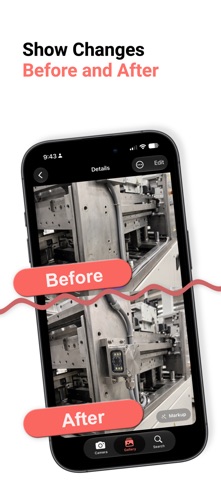
SHOW THE BEFORE AND AFTER
Compare any two shots side by side and export the composite with a labelled banner — the proof a job's done, in a single image you can hand to a client or drop in a report.
• PROVE IT: 12 kinds of capture data, from GPS and UTM to altitude — stamped on the image
• FILE IT NOW: notes, voice notes, markup and tags in the Context Island the moment you shoot
• FIND IT LATER: weighted search, text-in-photo (OCR) search, and a job-site map
• REPLICATE THE SHOT: return to the exact GPS spot, direction and tilt of any earlier photo (Premium)
• BEFORE & AFTER: export a labelled side-by-side in one tap
• MARK IT UP: stamp photos APPROVED, PASSED or FAILED, add arrows, shapes and your own stickers
• BRAND IT AUTOMATICALLY: set your logo once per project — it's baked into every photo
• LOCK IT: keep your gallery behind Face ID or your passcode
• MORE THAN PHOTOS: video, document scanning with auto-capture, and live QR reading
• SHOOT IT STRAIGHT: grid, level and compass guides; launch from the Camera Control button
• SEND IT ANYWHERE: share sheet or zip export with your filename format intact
PRIVATE BY DESIGN
Job photos live in Master Camera's own library, never in your personal camera roll. Turn on Gallery Lock and your photos stay behind Face ID — hand your phone to a client and the camera works, but your gallery stays shut. No account. No backend servers. No analytics. Everything you capture stays on your device until you choose to share it.
FREE FOR THE FULL WORKFLOW — NO SUBSCRIPTION, EVER
Everything above is free: capture, organize, search (including text-in-photo), the map, compare, scan, mark up, Gallery Lock and export. No account to create, no trial that expires, no monthly fee. If you want more room to grow, a single one-time purchase unlocks unlimited stacks, unlimited tags, up to 6 custom fields per stack, custom filename formats, and Replicate — and it's yours for life.
If your camera roll is where job photos go to get lost, put Master Camera on your home screen instead.
Safety and technology
Found in the app by AppBrain- Price
- Free
- App size
- 15.7 MB
- Content rating
- Everyone
Technologies used by Master Camera for Work
Releases
Updates seen on the App Store- Version
- 1.4
- Launched
- August 2026
No changelog data
Alternatives
Similar apps and more from VIDANA ARACHCHIGE ANUPA UDANA DE SILVAAlternatives to Master Camera for Work




Rankings
App Store top chartsApp Store Rankings for Master Camera for Work
About the app and developer
About Master Camera for Work
Master Camera for Work is a photo & video app developed by VIDANA ARACHCHIGE ANUPA UDANA DE SILVA.
User Ratings
The app has no ratings yet.
App Information
Master Camera for Work is freely available from the App Store. The app size is 15.71 MB. The latest version available is 1.4. The last update was on November 16, 2026.
Technical Requirements
The app has a content rating of Everyone. The app has been available on the App Store since August 2026.
Master Camera for Work is made and published by VIDANA ARACHCHIGE ANUPA UDANA DE SILVA. AppBrain is an independent app data site and isn't affiliated with VIDANA ARACHCHIGE ANUPA UDANA DE SILVA. The app name, icon, screenshots and description belong to VIDANA ARACHCHIGE ANUPA UDANA DE SILVA and are shown as published on the App Store.
Developer information for VIDANA ARACHCHIGE ANUPA UDANA DE SILVA
Frequently asked questions about Master Camera for Work
Is Master Camera for Work free?
Yes. Master Camera for Work is free on the App Store.
Is Master Camera for Work still available?
Yes. Master Camera for Work is on the App Store, and the last update we saw was on November 16, 2026.
How large is Master Camera for Work?
Master Camera for Work is 15.71 MB.
Is Master Camera for Work suitable for children?
App Store rates the content of Master Camera for Work as suitable for everyone.
Who made Master Camera for Work?
Master Camera for Work was developed by VIDANA ARACHCHIGE ANUPA UDANA DE SILVA. It is listed in the photo & video category on the App Store.
What are the best alternatives to Master Camera for Work?
People looking at Master Camera for Work also look at these photo & video apps: Field Photos App, Lidr: Photo Management, Easy Desqueezer, Geo Tag Photo & Map Camera, Beastcam - Pro Camera.