Master It is made and published by Farren Domenici. AppBrain is an independent app data site and isn't affiliated with Farren Domenici. The app name, icon, screenshots and description belong to Farren Domenici and are shown as published on the App Store.
AppBrain's verdict
Established- Rating on App Store
- 3.72
- 18 ratings
- Last updated
- March 15, 2026
It doesn't have enough ratings yet to judge what users think.
Rankings
App Store top chartsApp Store Rankings for Master It
Competitors
Similar apps and more from Farren DomeniciAlternatives to Master It
More from Farren Domenici
Releases
Updates seen on the App Store- Version
- 1.7.1
- Launched
- May 2013
No changelog data
User feedback
Ratings and reviews on the App StoreComments on Master It for iOS
We don't have enough comments to show example comments. Please check back later.
Technology
Found in the app by AppBrain- Price
- $6.99
- App size
- 6.20 MB
- Content rating
- Everyone
Technologies used by Master It
About the app and developer
About Master It
Master It is an utilities app developed by Farren Domenici.
User Ratings
Master It is rated 3.72 out of 5 stars. The rating is based on 18 ratings.
App Information
Master It costs $6.99. The app size is 6.20 MB. The latest version available is 1.7.1. The last update was on March 15, 2026.
Technical Requirements
The app has a content rating of Everyone. The app has been available on the App Store since May 2013.
Developer information for Farren Domenici
Address:
Frequently asked questions about Master It
Is Master It free?
No. Master It costs $6.99 on the App Store.
Is Master It still available?
Yes. Master It is on the App Store, and the last update we saw was on March 15, 2026.
How large is Master It?
Master It is 6.20 MB.
Is Master It suitable for children?
App Store rates the content of Master It as suitable for everyone.
How do people rate Master It?
Master It scores 3.72 out of 5 stars, from 18 ratings on the App Store.
Who made Master It?
Master It was developed by Farren Domenici. It is listed in the utilities category on the App Store.
What are the best alternatives to Master It?
People looking at Master It also look at these utilities apps: Black Widow Key Machine, Black Widow Key Machine V2, Triton PLUS™, FileSnap AI, ProxTraq.
Store listing
By Farren Domenici, from the App StoreDescription by Farren Domenici Written by the developer, not by AppBrain. Click to read.
Create and print master key systems in an instant with Master It.
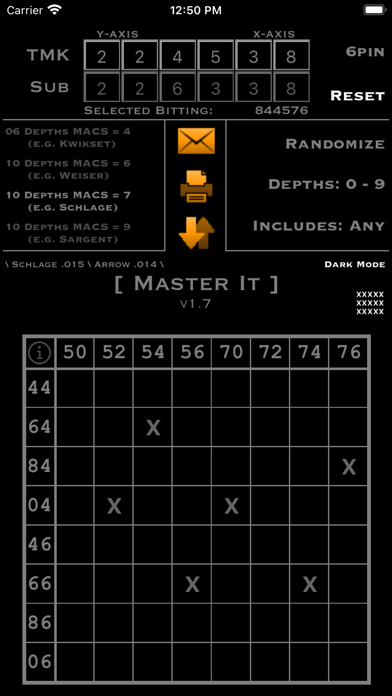
Master It is perfect for small or on-the-fly systems. Create a master key matrix immediately with zero math and zero worries of cross-keying. Either enter in your own TMK or tap Randomize to create a complete master key system containing a single TMK, a single sub master, and up to 64 change keys. Each output delivers a fixed sub master and set of change keys.
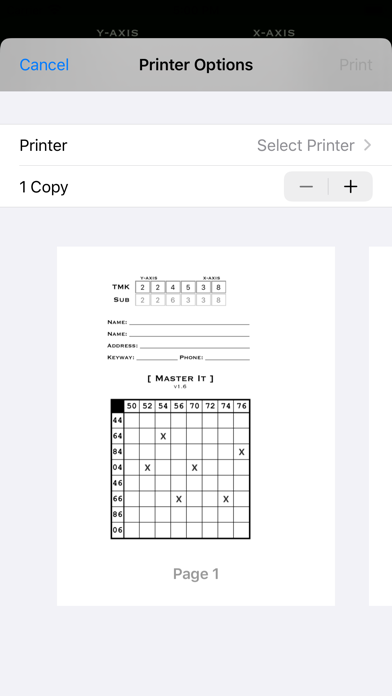
Master It is built to create a system immediately to print and keep in your records at your shop. It is capable of saving and reloading one project at a time. The goal with Master It is to create and AirPrint a system in an instant. If on the road when printing isn't available, email and save features are secondary backups prior to printing. Email is also ideal when a printer is not AirPrint compatible.
Currently supports:
Kwikset .023"
Corbin Russwin .028"
Weiser / Falcon .018"
Ilco-Unican .018"
Schlage .015"
Arrow .014"
Sargent .0125" & .020"
Corbin .014"
Obeys MACS rules for each selected system.
AirPrint, Email, or Save any system created.
Create 5 or 6 pin systems.
Randomize feature to always generate a completely random TMK every time. Use the two filters to restrict the TMK to only shallow depths, or to always include the shallowest and deepest cuts.
Tap anywhere on the matrix to select or deselect a bitting for the key chart.
Shake your iDevice to lock the primary functions on the main screen. This is to prevent unwanted changes (i.e. accidentally tapping Reset). To unlock, just shake again.
All change keys can be individually identified.
Use the Project Name / Keyway box for temporary saving information. The actual printout will allow you to write in the business name, personal name, address, keyway, and phone number conveniently. After printing, the system can be continued manually on paper.
Additionally, you can tap on each change key to display the pinning.
Compatibility: All iPhone, iPad, iPod Touch types and generations with a minimum iOS version of 12.0
Found a bug? Something not working? Have a suggestion? Feel free to contact me via email: farren@phoxlocks.com