

Master Page: Design & Graphics
Master Page: Design & Graphics is made and published by RainbowFactory LTD. AppBrain is an independent app data site and isn't affiliated with RainbowFactory LTD. The app name, icon, screenshots and description belong to RainbowFactory LTD and are shown as published on the App Store.
AppBrain's verdict
- Last updated
- November 3, 2026
- Size
- 185.4 MB
User feedback
Ratings and reviews on the App StoreComments on Master Page: Design & Graphics for iOS
We don't have enough comments to show example comments. Please check back later.
Store listing
By RainbowFactory LTD, from the App Store


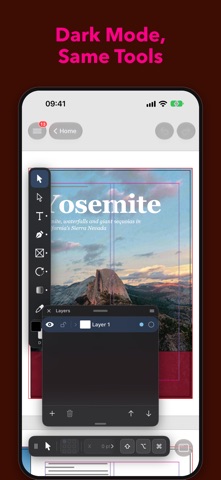


Description by RainbowFactory LTD Written by the developer, not by AppBrain. Click to read.
PAGES AND MASTER PAGES
• Set the page size, margins, columns, bleed and facing spreads
• Add, duplicate, move and delete pages from the Pages palette
• Put headers, footers and page numbers on a master page and apply it to the pages that need it
• Sections and page numbering
TEXT THAT FLOWS
• Thread text frames so a story runs through columns and pages; overset text is flagged
• Character and Paragraph palettes: font, size, leading, tracking, alignment, indents and tabs
• Paragraph, character and object styles, with overrides and style groups
• Text wrap, tables, footnotes, Find/Change with GREP, spell checking and the Story Editor
COLOR
• Swatches palette with process and spot colors, CMYK and RGB, color groups and gradients
• A color picker for fill and stroke
IMAGES AND OBJECTS
• Place photos and artwork, fit them inside frames and keep track of them in the Links palette
• Shapes, lines, pen paths, strokes, fills and layers
• Rulers, guides and smart guides, with Apple Pencil support
LONG DOCUMENTS AND OUTPUT
• Books, table of contents, index, hyperlinks and bookmarks
• Export to PDF, PNG, JPEG and TIFF, and to IDML
• Print, Preflight for missing links and overset text, and Package
OPEN, EDIT, SAVE
• Native IDML files: open, edit and save them — only the parts you changed are rewritten
• Also opens SVG and PDF documents
• Unsaved work is recovered after an unexpected quit
MADE FOR iPHONE AND iPAD
• A compact layout on iPhone, floating palettes on iPad, light and dark appearance
• iCloud Drive and the Files app, and Handoff between your devices
• Shortcuts: hundreds of actions to automate your layouts
• Share and Action extensions, Quick Look previews and thumbnails in Files
• A Recent Documents widget and Control Center controls
• An AI assistant to help with your layout
• Every action is one undo step
Questions or ideas? Use Send Feedback inside the app — we read every message.
Safety and technology
Found in the app by AppBrain- Price
- Free
- App size
- 185.4 MB
- Content rating
- Everyone
Technologies used by Master Page: Design & Graphics
Releases
Updates seen on the App Store- Version
- 27.0
- Launched
- November 2026
No changelog data
Alternatives
Similar apps and more from RainbowFactory LTDMore from RainbowFactory LTD


Rankings
App Store top charts- Highest rank
- #42
- Chart
- New Apps
- Games
- Country
- Poland
App Store Rankings for Master Page: Design & Graphics
About the app and developer
About Master Page: Design & Graphics
Master Page: Design & Graphics is a graphics & design app developed by RainbowFactory LTD.
What is the rating of Master Page: Design & Graphics?
Master Page: Design & Graphics has no ratings yet.
Is Master Page: Design & Graphics free?
Master Page: Design & Graphics is free. The app size is 185.44 MB. The latest version available is 27.0. The last update was on November 3, 2026.
What are the requirements for Master Page: Design & Graphics?
The app has a content rating of Everyone. The app has been available on the App Store since November 2026.
Developer information for RainbowFactory LTD
Address: