

MAX taxi Sebes
MAX taxi Sebes is made and published by SC ENHANCED TERMINALS FOR TELEPHONY EMULATION SRL. AppBrain is an independent app data site and isn't affiliated with SC ENHANCED TERMINALS FOR TELEPHONY EMULATION SRL. The app name, icon, screenshots and description belong to SC ENHANCED TERMINALS FOR TELEPHONY EMULATION SRL and are shown as published on the App Store.
AppBrain's verdict
- Last updated
- August 16, 2025
Rankings
App Store top chartsApp Store Rankings for MAX taxi Sebes
Competitors
Similar apps and more from SC ENHANCED TERMINALS FOR TELEPHONY EMULATION SRLAlternatives to MAX taxi Sebes











Also available on Google Play

Releases
Updates seen on the App Store- Version
- 4.2.3
- Launched
- December 2021
No changelog data
User feedback
Ratings and reviews on the App StoreComments on MAX taxi Sebes for iOS
We don't have enough comments to show example comments. Please check back later.
Technology
Found in the app by AppBrain- Price
- Free
- App size
- 33.4 MB
- Content rating
- High
Technologies used by MAX taxi Sebes
About the app and developer
About MAX taxi Sebes
MAX taxi Sebes is a travel app developed by SC ENHANCED TERMINALS FOR TELEPHONY EMULATION SRL.
What is the rating of MAX taxi Sebes?
MAX taxi Sebes has no ratings yet.
Is MAX taxi Sebes free?
MAX taxi Sebes is free. The app size is 33.44 MB. The latest version available is 4.2.3. The last update was on August 16, 2025.
What are the requirements for MAX taxi Sebes?
The app has a content rating of High Maturity. The app has been available on the App Store since December 2021.
Developer information for SC ENHANCED TERMINALS FOR TELEPHONY EMULATION SRL
Store listing
By SC ENHANCED TERMINALS FOR TELEPHONY EMULATION SRL, from the App Store

Description by SC ENHANCED TERMINALS FOR TELEPHONY EMULATION SRL Written by the developer, not by AppBrain. Click to read.
- Open the "MAX TAXI Sebes" app.
- On the first use, you need to enter a name and phone number.
- The terminal's location is determined automatically. For accurate localization, please enable the location service and WiFi connection.
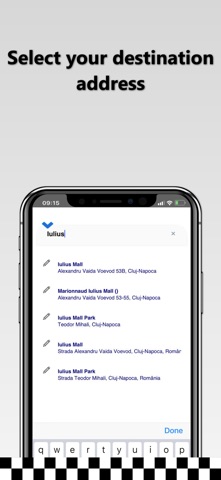
- Enter the destination address in the field "Where would you like to go?" and select a destination address from the displayed options. To choose the precise address, please fill in all details: street, number, block, location name, or landmark.
- If you do not wish to enter the destination address, press the "I want a TAXI here!" button.
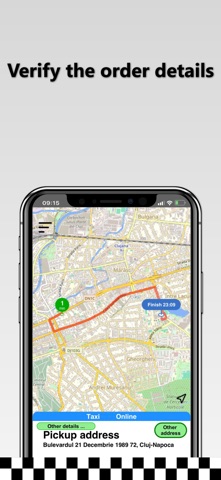
- Press the "Next step" button, check all the order details, and place the taxi order by pressing the "START order" button.
- Wait for the first driver’s confirmation and view the driver's route in real-time as they travel to the requested address.
Thank you and have a pleasant journey!
MAX TAXI Sebes