

md Viewer: Markdown
md Viewer: Markdown is made and published by Eric Pierre Bertrand. AppBrain is an independent app data site and isn't affiliated with Eric Pierre Bertrand. The app name, icon, screenshots and description belong to Eric Pierre Bertrand and are shown as published on the App Store.
AppBrain's verdict
- Last updated
- October 12, 2026
Rankings
App Store top chartsApp Store Rankings for md Viewer: Markdown
Competitors
Similar apps and more from Eric Pierre BertrandAlternatives to md Viewer: Markdown


Releases
Updates seen on the App Store- Version
- 1.6.1
- Launched
- September 2026
No changelog data
User feedback
Ratings and reviews on the App StoreComments on md Viewer: Markdown for iOS
We don't have enough comments to show example comments. Please check back later.
Technology
Found in the app by AppBrain- Price
- Free
- App size
- 9.12 MB
- Content rating
- Everyone
Technologies used by md Viewer: Markdown
About the app and developer
About md Viewer: Markdown
md Viewer: Markdown is a productivity app developed by Eric Pierre Bertrand.
User Ratings
The app has no ratings yet.
App Information
md Viewer: Markdown is freely available from the App Store. The app size is 9.12 MB. The latest version available is 1.6.1. The last update was on October 12, 2026.
Technical Requirements
The app has a content rating of Everyone. The app has been available on the App Store since September 2026.
Developer information for Eric Pierre Bertrand
Address:
Frequently asked questions about md Viewer: Markdown
Is md Viewer: Markdown free?
Yes. md Viewer: Markdown is free on the App Store.
Is md Viewer: Markdown still available?
Yes. md Viewer: Markdown is on the App Store, and the last update we saw was on October 12, 2026.
How large is md Viewer: Markdown?
md Viewer: Markdown is 9.12 MB.
Is md Viewer: Markdown suitable for children?
App Store rates the content of md Viewer: Markdown as suitable for everyone.
Who made md Viewer: Markdown?
md Viewer: Markdown was developed by Eric Pierre Bertrand. It is listed in the productivity category on the App Store.
What are the best alternatives to md Viewer: Markdown?
People looking at md Viewer: Markdown also look at these productivity apps: Markd.ly - Markdown Editor, QuickMark: Markdown Editor, BriskNote, MarkDown Reader - MD Viewer, Merkdown.
Store listing
By Eric Pierre Bertrand, from the App Store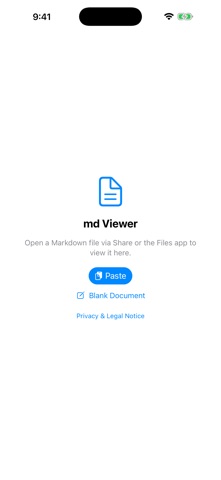




Description by Eric Pierre Bertrand Written by the developer, not by AppBrain. Click to read.
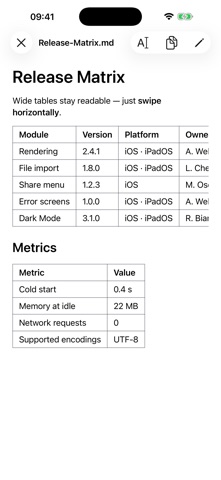
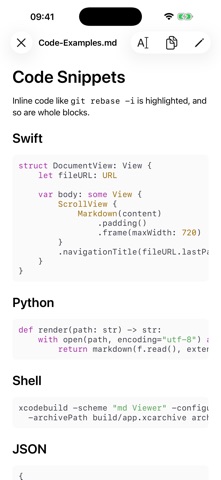
No file browser. No account. No cloud. No tracking. Open a .md or .txt file from the Files app or the share menu. md Viewer renders headings, lists, tables, bold/italic, code blocks with syntax highlighting, and quotes. No raw text, no characters to decode.
CREATE, EDIT, SAVE
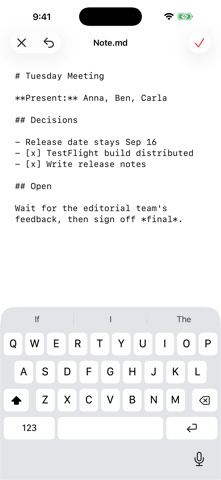
Start without a file: tap Paste on the start screen to take text from the clipboard, or choose Blank Document. The draft opens straight in the editor. The red checkmark saves it as a new .md file; you pick the folder and name in the Files dialog. After that, the checkmark writes to that same file as usual.
Existing files: tap Edit in the top right. The preview turns into a text editor. Save with the red checkmark; after a short confirmation the original file is overwritten. The X discards your changes (after a confirmation), and the arrow steps back through individual changes. No autosave, no export, no second copy.
.txt files open in the app and in the share extension too. When you edit a .txt, the app also offers Save as Markdown.
If you only want to read, none of this gets in the way. Every file opens in the formatted preview first.
WHY SO MINIMAL?
Most Markdown apps today are full editors with file management, cloud sync, and menus. Handy, but too much when you just want to read a file quickly, jot down a quick note, or fix a typo now and then. md Viewer deliberately does only that: tap a file, read, change or create if needed, done.
FEATURES
- Open via Open With in the Files app or straight from the share menu (mail attachments, AirDrop). The share extension shows the document formatted right away, without switching apps
- Create a new document from pasted or typed text and save it as a .md file
- Opens .md and .txt
- Keep several documents open at once: as tabs on iPad, via the Open Documents list on iPhone. Open files come back after a restart
- Find in the document with the magnifying glass or ⌘F, plus Find and Replace while editing
- Clean Markdown rendering: headings, lists, task lists, tables (scroll horizontally), code blocks with syntax highlighting, quotes, links, images
- Edit and save in place in the open file, with a confirmation before overwriting and before closing with unsaved changes
- Full Unicode support: emoji, Arabic and Hebrew (right-to-left), Chinese, Japanese, and Korean characters
- Supports Dynamic Type and VoiceOver
- Automatic Dark Mode / Light Mode
- Runs entirely offline: md Viewer loads nothing from the internet, not even images
PRIVACY
md Viewer collects no data at all. No analytics, no tracking, no account, no cloud sync. Files you open, edit, and create are processed only locally on your device. Only your open documents and folders allowed for images are remembered, locally, and you can remove either at any time. The clipboard is read only when you explicitly tap Paste.
Who is it for? Anyone who regularly receives or manages .md or .txt files (notes, READMEs, technical docs, meeting notes) and wants to read them quickly and cleanly, edit them now and then, or jot down a new one, without opening a full editor.