



AppBrain's verdict
- Last updated
- September 29, 2026
- Size
- 8.84 MB
User feedback
Ratings and reviews on the App StoreComments on MeasureKeep: Photo Measure for iOS
We don't have enough comments to show example comments. Please check back later.
Store listing
By Pixel Works Software SRL, from the App StoreDescription by Pixel Works Software SRL Written by the developer, not by AppBrain. Click to read.
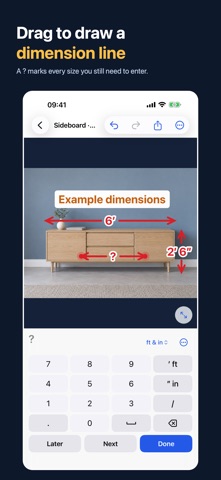
Take or import a picture, drag a line across anything you measured and type the size. MeasureKeep pins lengths, angles and notes to the image, so you always know which number belongs to which wall, window or piece of furniture. Share it all as a clean PDF or JPEG in seconds.
PERFECT FOR
• Furniture shopping: will the sofa, bed or dresser fit?
• Windows, doors, blinds and curtains
• Kitchens, closets, shelves and built-ins
• Renovations, DIY projects and moving
• Site visits, quotes and specs for contractors, carpenters and installers
HOW IT WORKS
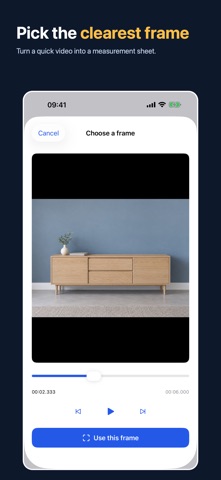
1. Add a picture from Photos, Files or the camera, or pick the clearest frame from a video.
2. Drag across the photo to draw a dimension line. A ? marks it until you enter the size you measured.
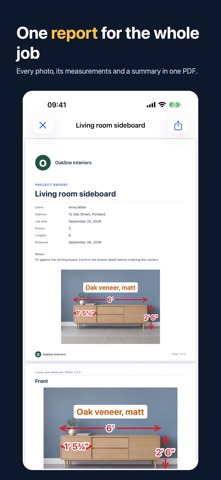
3. Add angles and notes, then share a JPEG, a PDF measurement sheet, or one report for the whole job.
NO TAPE MEASURE HANDY?
Mark a length you know, such as a door, a tile or a sheet of paper, and MeasureKeep estimates other lengths on the same flat surface in a straight-on photo. Estimates are clearly marked with ≈, so they never get confused with sizes you measured yourself.
ONE REPORT FOR THE WHOLE JOB
Keep every photo of a job in one project, with the client, address, date and notes. MeasureKeep Pro turns it into a single PDF report: a cover with your company name or logo, every photo with its numbered list, and a summary table of every measurement, on Letter or A4. Send a project to a colleague as a file they can open and edit, or back up all your projects to Files.
PRECISE WHEN IT MATTERS
• Magnifier while you draw and drag endpoints
• Pinch to zoom and one-pixel nudges
• mm, cm, m, inches and feet, with fractions like 5′ 3½″
• Four line colors, adjustable line weight and text size, and exports that match what you see
• Undo and redo
ORGANIZED AND PRIVATE
Projects save automatically and hold as many photos as the job needs. Mark favorites and find anything by name, client, address or photo. Deleted projects and photos can be restored until you erase them for good. Everything stays on your device: no account, no ads, no tracking. Location and camera details are removed from exported images.
FREE TO START
Create as many projects as you like, enter every measurement and share JPEG sheets for free. Your first PDF sheet is free too. MeasureKeep Pro puts your company name or logo on every sheet, makes PDF sheets unlimited, and adds the project report and project files: pay once, or choose a monthly or yearly auto-renewing subscription. Your projects stay on your device whatever you choose, and opening a project file is always free. Manage or cancel a subscription anytime in your Apple Account settings.
GOOD TO KNOW
MeasureKeep is a measurement notebook, not an AR tape measure: sizes come from you or from a reference you set. Angles are measured in the 2D image. Perspective, depth and lens distortion affect estimates, so check important dimensions before cutting or ordering.
Terms of Use (EULA): https://www.apple.com/legal/internet-services/itunes/dev/stdeula/
Privacy Policy: https://www.pixelworkssoftware.com/privacy/
Safety and technology
Found in the app by AppBrain- Price
- Free
- App size
- 8.84 MB
- Content rating
- Everyone
Technologies used by MeasureKeep: Photo Measure
Releases
Updates seen on the App Store- Version
- 1.1.1
- Launched
- September 2026
No changelog data
Alternatives
Similar apps and more from Pixel Works Software SRLAlternatives to MeasureKeep: Photo Measure


More from Pixel Works Software SRL


Also available on Google Play

Rankings
App Store top chartsApp Store Rankings for MeasureKeep: Photo Measure
About the app and developer
About MeasureKeep: Photo Measure
MeasureKeep: Photo Measure is a productivity app developed by Pixel Works Software SRL.
User Ratings
The app has no ratings yet.
App Information
MeasureKeep: Photo Measure is freely available from the App Store. The app size is 8.84 MB. The latest version available is 1.1.1. The last update was on September 29, 2026.
Technical Requirements
The app has a content rating of Everyone. The app has been available on the App Store since September 2026.
MeasureKeep: Photo Measure is made and published by Pixel Works Software SRL. AppBrain is an independent app data site and isn't affiliated with Pixel Works Software SRL. The app name, icon, screenshots and description belong to Pixel Works Software SRL and are shown as published on the App Store.
Developer information for Pixel Works Software SRL
Address: