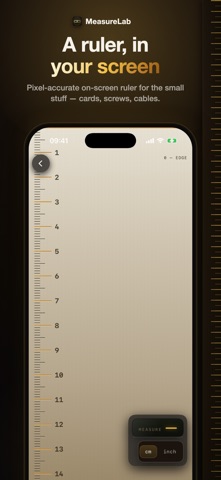
MeasureLab: AR Ruler & Level came out 81 days ago. It doesn't have enough ratings yet to judge what users think.
MeasureLab: AR Ruler & Level is made and published by
Aleyna Irem TAS.
AppBrain is an independent app data site and isn't affiliated with Aleyna Irem TAS.
The app name, icon, screenshots and description belong to Aleyna Irem TAS and are shown as
published on the App Store.
About MeasureLab: AR Ruler & Level
MeasureLab: AR Ruler & Level is an utilities app developed by Aleyna Irem TAS.
User Ratings
MeasureLab: AR Ruler & Level is rated 5.00 out of 5 stars. The rating is based on 2 ratings.
App Information
MeasureLab: AR Ruler & Level is freely available from the App Store. The app size is 12.12 MB. The latest version available is 1.6.2. The last update was on October 18, 2026.
Technical Requirements
The app has a content rating of Everyone. The app has been available on the App Store since July 2026.
Description by Aleyna Irem TAS(from the App Store)
Check a shelf with the bubble level, measure a wall with the AR tape measure, and keep the result for your next project. MeasureLab brings 12 measuring tools together for DIY, fitting furniture and everyday jobs.
LEVEL & ALIGN • Spirit level with a clear bubble display. Read angles in degrees, percent or mm/m, calibrate the zero point, hold a reading and save it. • Visual, haptic and sound feedback when level. Site mode adds a large signal you can see at a glance. • Inclinometer for slopes and angles, a plumb line for vertical alignment, and a two-axis surface check. • Laser level line over the live camera view.
AR TAPE MEASURE • Place points to measure lengths, areas and perimeters. • Aim at an existing corner to continue from that exact point. Close an area by returning to its first corner. • Confirm suggested rectangles with + when a suitable outline and surface are detected, or mark a rectangle yourself. • Keep a completed area and add separate lengths from its corners. • Capture photos with measurement lines and labels. Keep measuring without leaving the camera. • Name AR measurements, add notes and revisit their dimensions and photos in History.
MORE TOOLS FOR THE JOB • AR distance meter: aim at a surface to estimate the distance from the camera, with LiDAR on supported devices. • Screen ruler for small objects such as cards, screws and cables. • Trade calculator for feet-and-inch fractions, unit conversion and area calculations. • Paint, flooring and tile estimates from a measured or entered area. Account for openings, coats, product coverage and waste. • Compass with true north when location information is available, and magnetic north otherwise. • Metal detector using the magnetometer to show magnetic-field changes near magnetic metals such as iron or steel. • Sound meter for approximate dB-SPL readings. • ArchiGPT for questions about dimensions, materials and practical projects.
Camera and microphone tools start when opened once the required permissions are granted. AR recovery keeps your measurement draft while checking its position after an interruption.
Ad-free. No account required. Available in 28 languages.
FREE & MEASURELAB PRO The screen ruler and compass are free. The bubble level and the other measuring tools, material estimates and ArchiGPT are included with a MeasureLab Pro subscription.
Plans, prices and any eligible introductory offers are shown before purchase. Payment is charged to your Apple Account. Subscriptions renew automatically unless canceled at least 24 hours before the current period ends. Manage or cancel your subscription in your Apple Account settings.
Terms of Use (EULA): https://ubiquitous-halva-4c9aed.netlify.app/ Privacy Policy: https://starlit-zuccutto-de382b.netlify.app/
Each subscription will automatically renew 3 days before the expiration date for
the same time period. Subscriptions can be cancelled at any time before the renewal.