AppBrain
AppBrain
  • Apps
  • Apps being viewed right now Trending apps today Most popular apps All-time most installed apps Top rated apps iPhone and iPad apps
  • Intelligence ▾
    Intelligence overview → Track any Android app or your whole market
    Track & analyze
    Keyword Tracker & OptimizerTrack & improve Play rankings App Performance ReportOne-off PDF for any app StatisticsFree Android & Play market stats
    Promote your app
    Featured Apps App Links
  • Intelligence
  • Pricing
  • Dashboard
  • Sign up
  • Log in
App Store Apps > Productivity > Measuring Tape, Photo Ruler
Measuring Tape, Photo Ruler icon

Measuring Tape, Photo Ruler

2.2.17
Grymala sp. z o.o.
4.18
2,633 reviews
Free

Measuring Tape, Photo Ruler Screenshot 1 of 6
Measuring Tape, Photo Ruler Screenshot 2 of 6
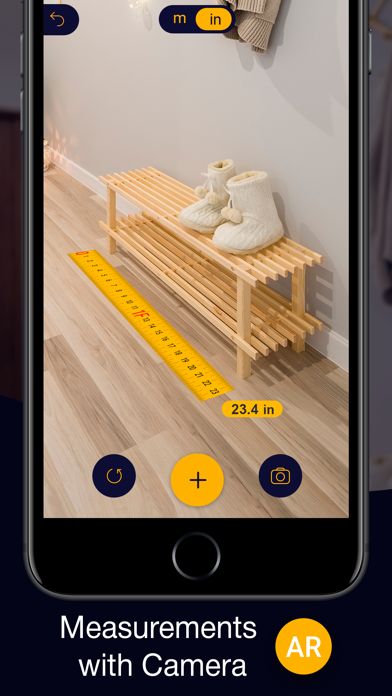
Measuring Tape, Photo Ruler Screenshot 3 of 6
Measuring Tape, Photo Ruler Screenshot 4 of 6
Measuring Tape, Photo Ruler Screenshot 5 of 6
Measuring Tape, Photo Ruler Screenshot 6 of 6
Screenshots by Grymala sp. z o.o., from the the App Store listing
View on the App Store

AppBrain's verdict

EstablishedWell rated
Rating on App Store
4.18
2,633 ratings
Last updated
November 20, 2026
Size
300.9 MB

Users rate it well: 4.2 stars from 2,633 ratings.

Official page on the App Store

User feedback

Ratings and reviews on the App Store

Comments on Measuring Tape, Photo Ruler for iOS

We don't have enough comments to show example comments. Please check back later.

Store listing

By Grymala sp. z o.o., from the App Store
Description by Grymala sp. z o.o. Written by the developer, not by AppBrain. Click to read.
Prime Ruler: AR tape measure, photo ruler, on-screen ruler and bubble level in one app. Measure length, height, distance, area, angles and volume with your camera, or measure small objects right on the screen.

Prime Ruler combines augmented reality (AR) and on-screen tools so you can measure quickly and precisely. Use it for construction and design projects or for everyday tasks at home. Save your measurements as projects and come back to them any time.

AR MEASURING TOOLS
• AR Ruler: measure lengths, areas, angles and volumes with augmented reality.
• Distance Meter: find out how far an object is from you.
• Height: measure the height of an object relative to a surface.
• Area and Perimeter: calculate surface parameters in a few taps.
• Flexible Measuring Tape: measure curved objects and non-standard shapes.
• Slope Measurement: determine angles of inclination, from gentle to steep.
• Angle Lock: handy for repeated measurements, tiling or furniture assembly.

LEVEL TOOLS
• Bubble Level: use your device sensors to check whether a surface is perfectly horizontal or vertical.
• Surface Level: check the flatness of horizontal and vertical surfaces.

MEASURE WITHOUT THE CAMERA
• On-Screen Ruler (1D/2D): place a small object on the screen and adjust the boundaries to get the result.
• Photo Ruler: take a photo of an object, select a reference item such as a credit card or a coin, and adjust the markers.

PROJECTS AND PLANS
• Projects: save, edit and manage your measurements for long-term tasks.
• Plan Mode: visualize results and plan your projects.

HOW IT WORKS
AR tools: activate the camera, aim at a surface and choose the tool you need.
Photo Ruler: take a picture, select a reference item and adjust the markers.
On-Screen Ruler: put the object on the screen and adjust the boundaries.
Bubble Level: hold the device against the surface and read the result.

WHEN PRIME RULER HELPS
• Checking whether furniture fits before you buy it.
• Measuring walls, windows and doors for renovation.
• Checking the slope of a shelf, a floor or a ramp.
• Measuring small parts and objects directly on the screen.

With Prime Ruler, an accurate measuring tool is always at your fingertips.

SUBSCRIPTION
Premium subscription with a 3-day free trial:
• No ads
• Unlimited number of projects

Price may vary by country. You will not be charged if you cancel at least 24 hours before the end of the trial period. An active subscription renews automatically unless it is canceled at least 24 hours before the end of the current period. You can manage subscriptions in your iTunes Account Settings. The subscription is charged through your iTunes account.

CUSTOMER SUPPORT
Questions or feedback? Write to us: support@grymalaltd.com

Terms of Service: https://www.apple.com/legal/internet-services/itunes/dev/stdeula/
Privacy Policy: https://www.grymalaltd.com/

Safety and technology

Found in the app by AppBrain
Price
Free
App size
300.9 MB
Content rating
Everyone

Technologies used by Measuring Tape, Photo Ruler

Releases

Updates seen on the App Store
Version
2.2.17
Launched
September 2015

No changelog data

Alternatives

Similar apps and more from Grymala sp. z o.o.

Alternatives to Measuring Tape, Photo Ruler

My Measures + AR Measure icon My Measures + AR Measure
TOP APP d.o.o.
4.4
Free
3.3K ratings
Photo Measures Lite icon Photo Measures Lite
Cubent
2.2
Free
31 ratings
Tape Measure Camera Ruler 3D icon Tape Measure Camera Ruler 3D
IBN Software GmbH
4.2
Free
774 ratings
magicplan icon magicplan
Technologies magicplan Inc.
4.7
Free
41.4K ratings
RoomScan Pro LiDAR floor plans icon RoomScan Pro LiDAR floor plans
Locometric
4.3
Free
2.1K ratings
Roomle: AI 3D Room Planner icon Roomle: AI 3D Room Planner
Roomle GmbH
4.2
Free
1.5K ratings
Signeasy: Sign PDF Documents icon Signeasy: Sign PDF Documents
Glykka LLC
4.9
Free
34.2K ratings
ArcSite: Quick CAD Floor Plans icon ArcSite: Quick CAD Floor Plans
Arctuition LLC
4.7
Free
9.3K ratings

More from Grymala sp. z o.o.

AR Plan: Measure, Room Scanner icon AR Plan: Measure, Room Scanner
Grymala sp. z o.o.
4.4
Free
1.4K ratings
AR Ruler: Digital Tape Measure icon AR Ruler: Digital Tape Measure
Grymala sp. z o.o.
4.6
Free
978 ratings
AI Calorie Counter: AI-Cal icon AI Calorie Counter: AI-Cal
Grymala sp. z o.o.
4.6
Free
65 ratings
E-signature PDF: sign document icon E-signature PDF: sign document
Grymala sp. z o.o.
3.0
Free
2 ratings
Voice Memo AI: Note-Taking icon Voice Memo AI: Note-Taking
Grymala sp. z o.o.
0.0
Free
LiDAR Scanner 3D: Scan Measure icon LiDAR Scanner 3D: Scan Measure
Grymala sp. z o.o.
0.0
Free
Speak English with AI Tutor icon Speak English with AI Tutor
Grymala sp. z o.o.
0.0
Free
AR Ruler & Tape Measure App icon AR Ruler & Tape Measure App
Grymala sp. z o.o.
0.0
Free

Rankings

App Store top charts

App Store Rankings for Measuring Tape, Photo Ruler

This app is not ranked

About the app and developer

About Measuring Tape, Photo Ruler

Measuring Tape, Photo Ruler is a productivity app developed by Grymala sp. z o.o.

User Ratings

Measuring Tape, Photo Ruler is rated 4.18 out of 5 stars. The rating is based on 2.6 thousand ratings.

App Information

Measuring Tape, Photo Ruler is freely available from the App Store. The app size is 300.88 MB. The latest version available is 2.2.17. The last update was on November 20, 2026.

Technical Requirements

The app has a content rating of Everyone. The app has been available on the App Store since September 2015.

Measuring Tape, Photo Ruler is made and published by Grymala sp. z o.o. AppBrain is an independent app data site and isn't affiliated with Grymala sp. z o.o. The app name, icon, screenshots and description belong to Grymala sp. z o.o. and are shown as published on the App Store.

Developer information for Grymala sp. z o.o.

Grymala sp. z o.o.

Address:

Share Measuring Tape, Photo Ruler

Today's trending apps Popular Productivity Apps Top new apps Apps other people are watching Price drops on Google Play
My Measures + AR Measure icon My Measures + AR Measure
Photo Measures Lite icon Photo Measures Lite
Tape Measure Camera Ruler 3D icon Tape Measure Camera Ruler 3D
magicplan icon magicplan
RoomScan Pro LiDAR floor plans icon RoomScan Pro LiDAR floor plans
Roomle: AI 3D Room Planner icon Roomle: AI 3D Room Planner
Signeasy: Sign PDF Documents icon Signeasy: Sign PDF Documents
ArcSite: Quick CAD Floor Plans icon ArcSite: Quick CAD Floor Plans
Overview Alternatives Reviews Rankings Technology
AppBrain Intelligence premium content

Subscribe now to get full and unlimited access to AppBrain Intelligence. You'll have access to:

  • App Intelligence dashboard (performance timeline, competitor comparison, country rankings, insight cards)
  • Detailed ranking data per app
  • Full timeline per developer
  • Device market shares data per country
  • Unlimited keyword tracking
  • AI assistant access via MCP (Claude, Cursor or any MCP client)
1 Month

$75/mo
(billed every month)

SAVE 0%
Subscribe
3 Months

$65/mo
($195 billed every 3 months)

SAVE 13%
Subscribe
1 Year

$57.50/mo
($690 billed every year)

SAVE 23%
Subscribe
Each subscription will automatically renew 3 days before the expiration date for the same time period. Subscriptions can be cancelled at any time before the renewal.

AppBrain is an app data site, we track rankings, ratings, installs for all apps and games on Google Play and the App Store. AppBrain doesn't host app files or APKs, all install links go directly to the official store. All trademarks are owned by their respective owners.

More apps

  • Top Android apps being viewed
  • Compass Lite: Minimal & Simple
  • Amochiroom Puzzle: Room Sort
  • Dress Color: Paint by Number

App statistics

  • Android statistics
  • Google Play Developer stats
  • Trending Android Apps
  • Trending iOS apps
  • Top popular Apps
  • Buy the best Android phone
  • Buy & sell app businesses

About AppBrain

  • Contact
  • Privacy
  • Documentation
  • DMCA takedowns
  • Blog
  • Discover Android apps
© 2010-2026 - AppBrain