Mechanical Key Sound: KeyJoy is an utilities app developed by Arima Jain.
User Ratings
Mechanical Key Sound: KeyJoy is rated 4.64 out of 5 stars. The rating is based on 11 ratings.
App Information
Mechanical Key Sound: KeyJoy is freely available from the App Store. The app size is 107.25 MB. The latest version available is 1.9. The last update was on October 15, 2026.
Technical Requirements
The app has a content rating of Everyone. The app has been available on the App Store since August 2026.
Description by Arima Jain(from the App Store)
Key Joy is a custom iOS keyboard with mechanical sound packs, beautiful themes, haptic feedback, multilingual typing, and a full emoji picker. Every keystroke can click, thock, or whisper - with haptics to match.
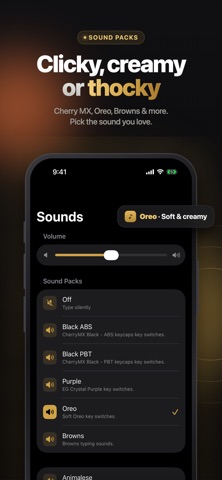
SOUNDS THAT FEEL PHYSICAL
Choose from clicky, tactile, linear, ASMR, and typewriter sound packs. Turn sounds and haptics on or off, adjust the volume, and hold a key for a satisfying press preview.
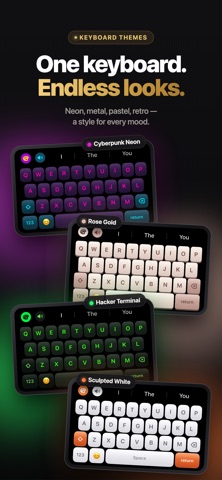
BEAUTIFUL KEYBOARD THEMES
Switch between dozens of keyboard styles, including matte black, snow, sakura, wood, cyberpunk, navy, and more. Choose Classic chunky keycaps or Soft iOS-style glass keys.
TYPE IN YOUR LANGUAGE
Enable the languages you use and quickly switch between them directly from the keyboard.
Supports:
• English • Español • Français • Deutsch • Português • العربية • Русский • Italiano • Bahasa Indonesia • Türkçe
Hold a letter and slide to choose accented characters and special variants.
CUSTOMIZE YOUR SPACE BAR
Make your keyboard yours. Add your name, an emoji, or any custom text to the Space Bar — or use the selected language’s default label.
BUILT FOR REAL TYPING
Use Key Joy in Messages, Notes, Mail, social apps, and anywhere else you type.
• Word suggestions • Full emoji keyboard with recent emojis • Auto-capitalization • Double-tap Space for a period • Double-tap Shift for Caps Lock • Hold Space to move the cursor • Key press previews • Adjustable typing volume • Optional haptic feedback
PRIVATE BY DESIGN
Nothing you type is stored or sent. Key Joy does not use the network. Full Access is used only to enable features such as sounds and haptics while typing in other apps.
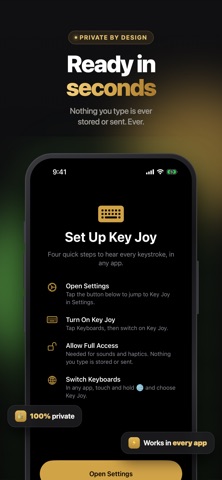
EASY TO SET UP
Add Key Joy in Settings, enable Full Access, then press and hold the globe key and choose Key Joy.
Make typing sound better. Feel better. Look better.
Privacy policy: https://digitalhole.github.io/DHPrivacy.html Standard Apple Terms of Use (EULA): https://www.apple.com/legal/internet-services/itunes/dev/stdeula/
Each subscription will automatically renew 3 days before the expiration date for
the same time period. Subscriptions can be cancelled at any time before the renewal.