

Media Meta is made and published by 栋 陈. AppBrain is an independent app data site and isn't affiliated with 栋 陈. The app name, icon, screenshots and description belong to 栋 陈 and are shown as published on the App Store.
AppBrain's verdict
- Last updated
- April 19, 2026
Rankings
App Store top chartsApp Store Rankings for Media Meta
This app is not ranked
Competitors
Similar apps and more from 栋 陈More from 栋 陈


Releases
Updates seen on the App Store- Version
- 1.5.5
- Launched
- July 2020
No changelog data
User feedback
Ratings and reviews on the App StoreComments on Media Meta for iOS
We don't have enough comments to show example comments. Please check back later.
Technology
Found in the app by AppBrain- Price
- Free
- App size
- 1.15 MB
- Content rating
- Everyone
Technologies used by Media Meta
About the app and developer
About Media Meta
Media Meta is an utilities app developed by 栋 陈.
User Ratings
The app has no ratings yet.
App Information
Media Meta is freely available from the App Store. The app size is 1.15 MB. The latest version available is 1.5.5. The last update was on April 19, 2026.
Technical Requirements
The app has a content rating of Everyone. The app has been available on the App Store since July 2020.
Developer information for 栋 陈
Address:
Store listing
By 栋 陈, from the App Store

Screenshots by 栋 陈, from the the App Store listing
Description by 栋 陈 Written by the developer, not by AppBrain. Click to read.
***Media Meta: Ultimate Metadata Editor for Videos and Audios***
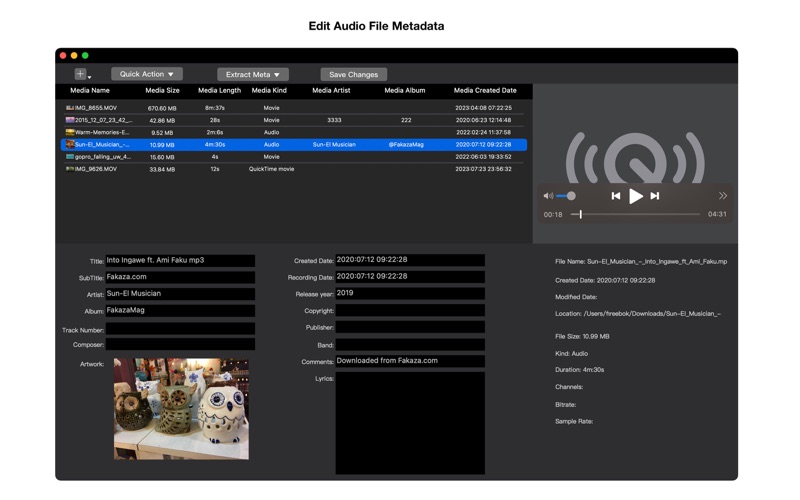
Take full control of your media files with Media Meta, the comprehensive metadata editor for video and audio files. Supporting a wide range of formats including MP4, MOV, M4V, 3GP, MP3, M4A, and more, Media Meta simplifies the process of viewing media detailed info and editing media metadata.
###Key Features###:
***Wide Format Support***: Edit metadata for various file formats including MP4, MOV, M4V, 3GP, MP3, M4A, and more.
***View Video Detailed Info***: Get Video Detailed Information, such as video resolution, rotation, aspect ratio, current scale, color primaries, YCbCr matrix, video and audio encode format, video and audio frame rate, video and audio bit rate, and more.
***Batch Editing***: Efficiently batch edit metadata such as created date, shoot/record date, title, artist, album, artwork, director, actors, producers, publisher, copyright, descriptions, composer, band, comments, release year, track number, lyrics, GPS altitude, GPS latitude, GPS longitude, and more.
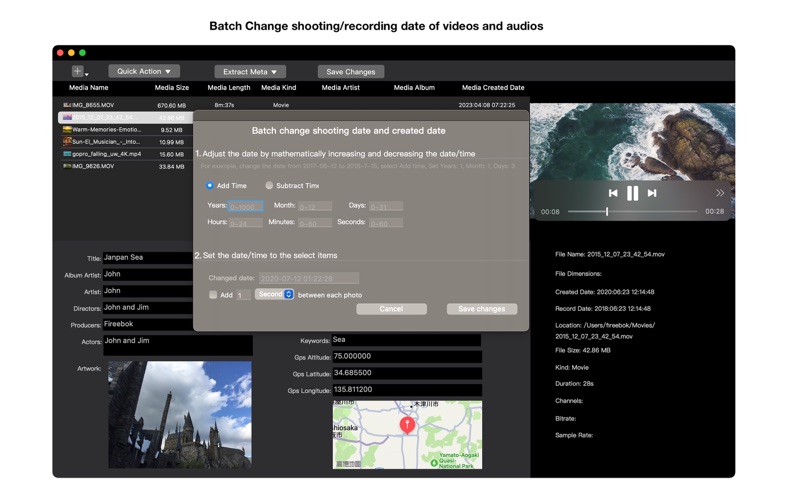
***Smart Date Management***: Easily copy shooting/recording dates to created dates and vice versa, or set dates based on filenames.
***Metadata Cleanup***: Remove all metadata from video and audio files in just a few clicks.
***Artwork Extraction***: Extract artwork images and metadata seamlessly.
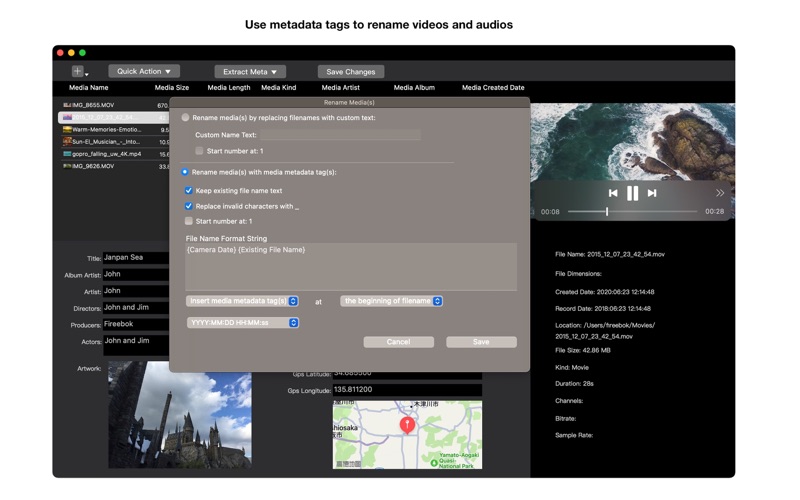
***Advanced Renaming***: Rename your media files using metadata tags for better organization.
***XMP File Support***: Write metadata from XMP files directly to your videos.
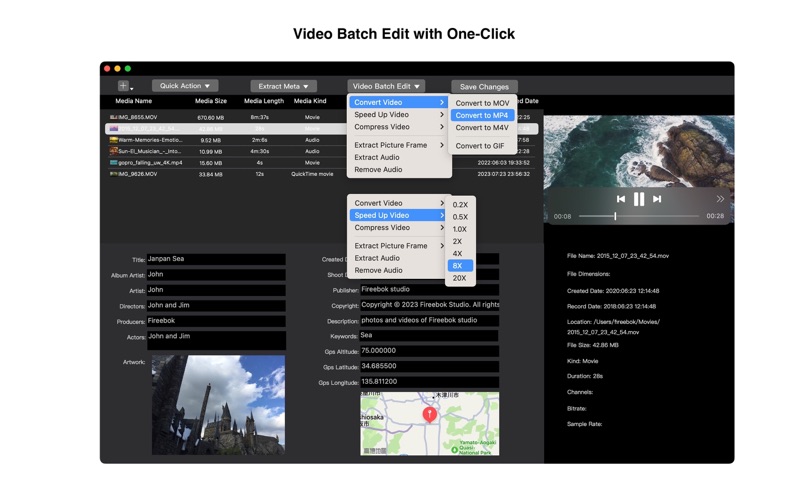
***Media Conversion***: Convert and compress your video files with ease.
***Speed Adjustment***: Speed up your videos for a dynamic viewing experience.
***Frame Extraction***: Extract picture frames from videos to create thumbnails or still images.
***Audio Management***: Extract or remove audio from videos, enhancing your editing flexibility.
Media Meta is your go-to app for managing and editing metadata, ensuring your media files are organized and detailed to your exact specifications. Simplify your workflow and maintain a well-structured media library with ease.
Download Media Meta today and experience the ultimate in media metadata management!
Take full control of your media files with Media Meta, the comprehensive metadata editor for video and audio files. Supporting a wide range of formats including MP4, MOV, M4V, 3GP, MP3, M4A, and more, Media Meta simplifies the process of viewing media detailed info and editing media metadata.
###Key Features###:
***Wide Format Support***: Edit metadata for various file formats including MP4, MOV, M4V, 3GP, MP3, M4A, and more.
***View Video Detailed Info***: Get Video Detailed Information, such as video resolution, rotation, aspect ratio, current scale, color primaries, YCbCr matrix, video and audio encode format, video and audio frame rate, video and audio bit rate, and more.
***Batch Editing***: Efficiently batch edit metadata such as created date, shoot/record date, title, artist, album, artwork, director, actors, producers, publisher, copyright, descriptions, composer, band, comments, release year, track number, lyrics, GPS altitude, GPS latitude, GPS longitude, and more.
***Smart Date Management***: Easily copy shooting/recording dates to created dates and vice versa, or set dates based on filenames.
***Metadata Cleanup***: Remove all metadata from video and audio files in just a few clicks.
***Artwork Extraction***: Extract artwork images and metadata seamlessly.
***Advanced Renaming***: Rename your media files using metadata tags for better organization.
***XMP File Support***: Write metadata from XMP files directly to your videos.
***Media Conversion***: Convert and compress your video files with ease.
***Speed Adjustment***: Speed up your videos for a dynamic viewing experience.
***Frame Extraction***: Extract picture frames from videos to create thumbnails or still images.
***Audio Management***: Extract or remove audio from videos, enhancing your editing flexibility.
Media Meta is your go-to app for managing and editing metadata, ensuring your media files are organized and detailed to your exact specifications. Simplify your workflow and maintain a well-structured media library with ease.
Download Media Meta today and experience the ultimate in media metadata management!