

Meezan Mobile App
Meezan Mobile App is made and published by Meezan Bank. AppBrain is an independent app data site and isn't affiliated with Meezan Bank. The app name, icon, screenshots and description belong to Meezan Bank and are shown as published on the App Store.
AppBrain's verdict
EstablishedLoved by users- Rating on App Store
- 4.64
- 3,102 ratings
- Last updated
- August 4, 2026
Users love it: 4.6 stars from 3,102 ratings.
Rankings
App Store top chartsApp Store Rankings for Meezan Mobile App
Competitors
Similar apps and more from Meezan BankAlternatives to Meezan Mobile App


More from Meezan Bank



Releases
Updates seen on the App Store- Version
- 3.3.16
- Launched
- October 2014
No changelog data
User feedback
Ratings and reviews on the App StoreComments on Meezan Mobile App for iOS
We don't have enough comments to show example comments. Please check back later.
Technology
Found in the app by AppBrain- Price
- Free
- App size
- 524.9 MB
- Content rating
- High
Technologies used by Meezan Mobile App
About the app and developer
About Meezan Mobile App
Meezan Mobile App is a finance app developed by Meezan Bank.
User Ratings
Meezan Mobile App is rated 4.64 out of 5 stars. The rating is based on 3.1 thousand ratings.
App Information
Meezan Mobile App is freely available from the App Store. The app size is 524.94 MB. The latest version available is 3.3.16. The last update was on August 4, 2026.
Technical Requirements
The app has a content rating of High Maturity. The app has been available on the App Store since October 2014.
Developer information for Meezan Bank
Address:
Frequently asked questions about Meezan Mobile App
Is Meezan Mobile App free?
Yes. Meezan Mobile App is free on the App Store.
Is Meezan Mobile App still available?
Yes. Meezan Mobile App is on the App Store, and the last update we saw was on August 4, 2026.
How large is Meezan Mobile App?
Meezan Mobile App is 524.94 MB.
Is Meezan Mobile App suitable for children?
App Store gives Meezan Mobile App a high maturity rating. It is meant for adults.
How do people rate Meezan Mobile App?
Meezan Mobile App scores 4.64 out of 5 stars, from 3,102 ratings on the App Store.
Who made Meezan Mobile App?
Meezan Mobile App was developed by Meezan Bank. It is listed in the finance category on the App Store.
What are the best alternatives to Meezan Mobile App?
People looking at Meezan Mobile App also look at these finance apps: easypaisa – a digital bank, HBL Mobile, NayaPay, Alfa by Bank Alfalah, Faysal DigiBank.
Store listing
By Meezan Bank, from the App Store


Description by Meezan Bank Written by the developer, not by AppBrain. Click to read.
Meezan Bank is one of the best digital banks in Pakistan offering Islamic Banking. Meezan Bank just wants to make your lives easier by taking care of all your financial needs. Meezan has launched a digital banking app for all its customers. Now perform your mobile banking transactions from the tip of your fingers!
Key Features of Meezan Mobile Banking App
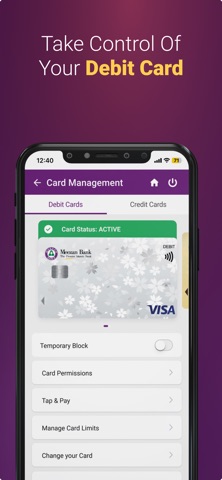
1. Biometric Login: Easy access to your account with biometric login. No need to remember your username and password anymore. Plus, biometric login makes your account details more secure and prevents unauthorized login. 2. Account Statement & Transactions: Stay up to date with your account transactions with the option to download your statements according to your requirements. 3. Send Money: Send money to any bank in Pakistan in just a few taps 4. Pay Bills: No need to stand in long queues anymore. Just login on your App and pay all your utility bills in just a few taps. 5. Pay Fees: Pay all your fees including your children’s school or university fee directly from Meezan’s Mobile App 6. Donations: Pay your Zakat and Sadqat to registered organizations 7. Manage debit cards: Block / Unblock your debit cards according to your preference with just a tap 8. Meezan Tap n Go: Enable Meezan Tap & Go digital cards to make card payments directly from your Mobile App. Just enable Meezan Tap n Go from the debit card menu. 9. QR Payments: Make Visa QR payments directly from the Meezan Mobile App by scanning Visa based QRs 10. Find nearby Meezan Bank Branches / ATMs: Open the Meezan Mobile App to locate nearby Meezan locations.11. Discounts & Promotions: Meezan Bank offers various discount offers and promotional deals for Meezan Bank customers. All such offers can be viewed from the App 12. Qibla Locator: Never stress about locating Qibla anymore with Meezan App’s integrated Qibla locator.
Payment Features of Meezan Digital Banking App:
- Utility bill payments - Mobile top-ups and bill payments - Credit card payments - Internet bills - Education fees and payments - Government payments - Other miscellaneous payments
How To Sign Up on Meezan Mobile App
You can sign up on Meezan mobile banking app following five easy steps:
Step 1: Download the Meezan Mobile App.
Step 2: Open the App and tap on register.
Step 3: Enter the required information.
Step 4: Set up username and password and enter verification code sent on your registered mobile number.
Step 5: Accept terms and conditions.
Welcome to Meezan Mobile Banking App
Follow Us:
YouTube Channel: https://www.youtube.com/channel/UCI2Wf-kQoHingaC2cOFDtBw
Facebook: https://www.facebook.com/MeezanBank
Instagram: https://www.instagram.com/meezanbanklimited/
Twitter: https://twitter.com/MeezanBankLtd
LinkedIn: https://pk.linkedin.com/company/meezan-bank-ltd
Website: https://meezanbank.com/