

Memo – Lock Screen Notes
Memo – Lock Screen Notes is made and published by Toshihiko Arai. AppBrain is an independent app data site and isn't affiliated with Toshihiko Arai. The app name, icon, screenshots and description belong to Toshihiko Arai and are shown as published on the App Store.
AppBrain's verdict
Established- Rating on App Store
- 5.00
- 1 ratings
- Last updated
- October 25, 2026
- Size
- 20.9 MB
It doesn't have enough ratings yet to judge what users think.
User feedback
Ratings and reviews on the App StoreComments on Memo – Lock Screen Notes for iOS
We don't have enough comments to show example comments. Please check back later.
Store listing
By Toshihiko Arai, from the App Store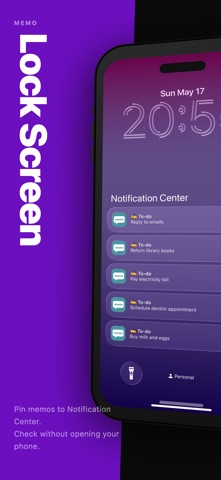
Description by Toshihiko Arai Written by the developer, not by AppBrain. Click to read.
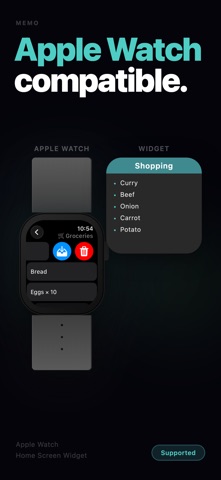
Memo is for short notes you look at repeatedly: shopping lists, things to bring, tasks for today, quick checklists, URLs, and small reminders you do not want buried inside a full note app. Select the notes that matter now and keep them available from the lock screen and Notification Center, so you can check them without opening the app and searching through a long list.
Use it when a reminder is too heavy and a long note is too easy to forget. A grocery list while you are walking through a store. Things to pack before you leave. A short set of steps you need to follow. A URL you want to keep with the rest of your notes. A few tasks that should stay visible today.
What you can do with Memo:
- Add selected notes to Notification Center
- Check frequently viewed notes from the lock screen
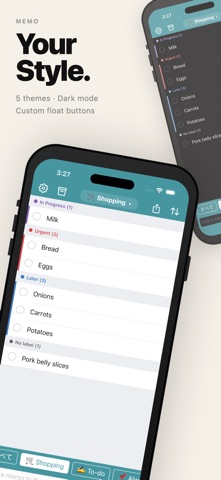
- Organize notes with tags such as shopping, work, home, or travel
- Mark notes as done with strikethrough — completed notes stay visible but dimmed
- Share notes as Markdown with tag headings and checkbox support
- Customize up to four floating action buttons for quick access to your most-used actions
- Save URLs from Safari and other apps with the Share Extension
- Import line-by-line lists from a text file
- Move finished notes to the archive
- Delete notes you no longer need
- Create an iCloud backup and restore it when needed
Memo is intentionally simple. It is not trying to replace a full notebook, calendar, or project manager. It works best for the small pieces of information you want to see quickly and repeatedly. If you need to write a long document, use a note app. If you need an alarm at a specific time, use a reminder. If you want a short note to stay close at hand, use Memo.
Strikethrough lets you mark notes as done without deleting them. A completed shopping item or finished step stays in the list but appears dimmed, so you always know what is left. When you are done, move the checked items to the archive in one step.
When you want to share a set of notes, export them as Markdown. Tags become headings, and notes marked with strikethrough are written as [x] checkboxes. Useful for sending a list to someone else or pasting it into another app.
Tags help keep the list manageable as your notes grow. You can separate shopping, errands, work, home, travel, and personal notes, then choose only the items that should appear in Notification Center. Finished items can be archived so your active list stays focused, while older notes remain available when you need them.
The Share Extension makes it easy to send a URL or text from another app into Memo. When you find a page, product, recipe, or reference you want to check later, save it with a tag and keep moving. Text import is useful for preparing a list on another device or in another app, then bringing it into Memo as individual notes.
For small notes that need to stay visible, not buried, keep them on your lock screen and in Notification Center with Memo.
Safety and technology
Found in the app by AppBrain- Price
- Free
- App size
- 20.9 MB
- Content rating
- Everyone
Technologies used by Memo – Lock Screen Notes
Releases
Updates seen on the App Store- Version
- 26.10.25
- Launched
- September 2018
No changelog data
Alternatives
Similar apps and more from Toshihiko AraiAlternatives to Memo – Lock Screen Notes






More from Toshihiko Arai


Rankings
App Store top chartsApp Store Rankings for Memo – Lock Screen Notes
About the app and developer
About Memo – Lock Screen Notes
Memo – Lock Screen Notes is a productivity app developed by Toshihiko Arai.
User Ratings
Memo – Lock Screen Notes is rated 5.00 out of 5 stars. The rating is based on one rating ratings.
App Information
Memo – Lock Screen Notes is freely available from the App Store. The app size is 20.88 MB. The latest version available is 26.10.25. The last update was on October 25, 2026.
Technical Requirements
The app has a content rating of Everyone. The app has been available on the App Store since September 2018.
Developer information for Toshihiko Arai
Address:
Frequently asked questions about Memo – Lock Screen Notes
Is Memo – Lock Screen Notes free?
Yes. Memo – Lock Screen Notes is free on the App Store.
Is Memo – Lock Screen Notes still available?
Yes. Memo – Lock Screen Notes is on the App Store, and the last update we saw was on October 25, 2026.
How large is Memo – Lock Screen Notes?
Memo – Lock Screen Notes is 20.88 MB.
Is Memo – Lock Screen Notes suitable for children?
App Store rates the content of Memo – Lock Screen Notes as suitable for everyone.
How do people rate Memo – Lock Screen Notes?
Memo – Lock Screen Notes has one rating of 5.00 stars on the App Store.
Who made Memo – Lock Screen Notes?
Memo – Lock Screen Notes was developed by Toshihiko Arai. It is listed in the productivity category on the App Store.
What are the best alternatives to Memo – Lock Screen Notes?
People looking at Memo – Lock Screen Notes also look at these productivity apps: ToDoMemo, simple! QuickTodo+, Quick Notes Widget, Memorandum - Password Manager, 簡単に行動を記録.