

Memodori: Timeline Journal
Memodori: Timeline Journal is made and published by 晓晖 王. AppBrain is an independent app data site and isn't affiliated with 晓晖 王. The app name, icon, screenshots and description belong to 晓晖 王 and are shown as published on the App Store.
AppBrain's verdict
- Rating on App Store
- 5.00
- 1 ratings
- Last updated
- October 16, 2026
It doesn't have enough ratings yet to judge what users think.
Rankings
App Store top chartsApp Store Rankings for Memodori: Timeline Journal
Competitors
Similar apps and more from 晓晖 王Alternatives to Memodori: Timeline Journal


More from 晓晖 王


Releases
Updates seen on the App Store- Version
- 1.30
- Launched
- March 2025
No changelog data
User feedback
Ratings and reviews on the App StoreComments on Memodori: Timeline Journal for iOS
We don't have enough comments to show example comments. Please check back later.
Technology
Found in the app by AppBrain- Price
- Free
- App size
- 7.14 MB
- Content rating
- Everyone
Technologies used by Memodori: Timeline Journal
About the app and developer
About Memodori: Timeline Journal
Memodori: Timeline Journal is a lifestyle app developed by 晓晖 王.
What is the rating of Memodori: Timeline Journal?
Memodori: Timeline Journal is rated 5.00 out of 5 stars, based on one rating ratings.
Is Memodori: Timeline Journal free?
Memodori: Timeline Journal is free. The app size is 7.14 MB. The latest version available is 1.30. The last update was on October 16, 2026.
What are the requirements for Memodori: Timeline Journal?
The app has a content rating of Everyone. The app has been available on the App Store since March 2025.
Developer information for 晓晖 王
Address:
Frequently asked questions about Memodori: Timeline Journal
Is Memodori: Timeline Journal free?
Yes. Memodori: Timeline Journal is free on the App Store.
Is Memodori: Timeline Journal still available?
Yes. Memodori: Timeline Journal is on the App Store, and the last update we saw was on October 16, 2026.
How large is Memodori: Timeline Journal?
Memodori: Timeline Journal is 7.14 MB.
Is Memodori: Timeline Journal suitable for children?
App Store rates the content of Memodori: Timeline Journal as suitable for everyone.
How do people rate Memodori: Timeline Journal?
Memodori: Timeline Journal has one rating of 5.00 stars on the App Store.
Who made Memodori: Timeline Journal?
Memodori: Timeline Journal was developed by 晓晖 王. It is listed in the lifestyle category on the App Store.
What are the best alternatives to Memodori: Timeline Journal?
People looking at Memodori: Timeline Journal also look at these lifestyle apps: LIFLOG, MyChronicles - Life Timeline, Timeline: Z, 时光口袋, LifeMark - 余生短暂,把时间留给对的人和值的事.
Store listing
By 晓晖 王, from the App Store



Description by 晓晖 王 Written by the developer, not by AppBrain. Click to read.
Some things are worth keeping in order. Memodori lays your notes, memories, and the thoughts that pass through along a single timeline you can wander — back through the years, or forward to what's still to come. Like a slip of fine paper, written upon time itself.
# A TIMELINE YOU CAN WANDER
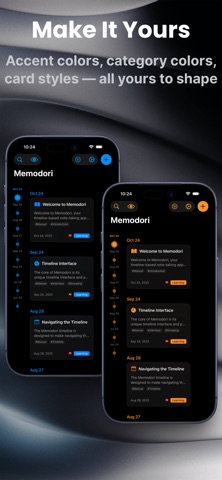
• Browse your notes as dots along time — the bigger the dot, the more a moment mattered
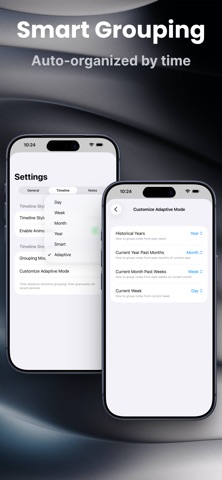
• Group by day, week, month, or year, or let Smart and Adaptive modes shape the view around your note density and the distance in time (Premium can fine-tune the rules)
• Scroll through your notes and the timeline dot follows along, settling into place with a soft haptic tap
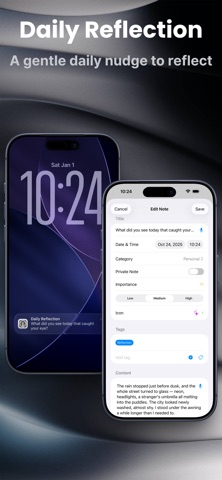
• Write freely with titles, dates, categories, importance, custom icons, and tags
# TEMPLATES FOR WHAT YOU WRITE AGAIN AND AGAIN
• Save a weekly review, your reading notes, or a travel journal as a template — title, text, category, importance, icon, privacy, and tags all ready to go
• Touch and hold + to start a note from a template, or turn any note worth reusing into one
• Set reminders that open the right template on the days and at the time you choose (Premium)
# MEMORIES THAT FIND YOU
• On This Day surfaces what you wrote on this date in years past — a month, six months, a year ago — as a quiet daily card, with an optional reminder at a time you choose
• Daily Reflection brings a gentle once-a-day prompt; tap it and a new note opens with the question already at the top
• Every reflection is tagged on its own, so you can gather them all whenever you'd like to look back
# CAPTURED THE MOMENT IT LANDS
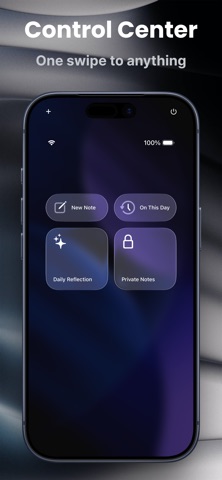
• Quick Capture opens a fresh note in a single tap — from a Home or Lock Screen widget, or from Control Center, which also reaches On This Day, Daily Reflection, and Private Mode (iOS 18)
• Speak your note instead of typing it — voice input turns your words straight into text (Premium)
• Or simply ask Siri, or run a Shortcut, to start a note without opening the app
• A Streak widget keeps a quiet count of the days you've shown up, refreshing on its own at midnight
# FIND ANYTHING, FAST
• Search across everything, and filter by category, tag, importance, date range, or the template a note came from — with a live count of what matches
• Keep it all tidy with custom tags built for easy retrieval
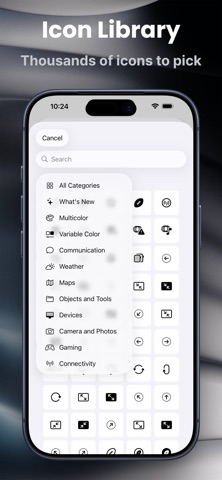
• Personalize each note from a library of thousands of icons — smart categories, bilingual search, and several rendering styles
# PRIVATE, BY CHOICE
• Keep sensitive notes in a separate private space that asks for authentication to open
• Private notes stay fully apart from your timeline until you step into Private Mode
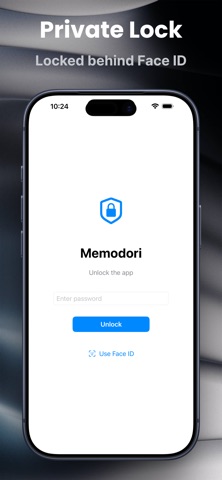
• Lock the whole journal behind Face ID / Touch ID and an app lock
# YOURS, EVERYWHERE, MADE YOURS
• Sync seamlessly across your Apple devices with iCloud — offline-first, catching up the moment you reconnect
• Choose your accent color, timeline style, and font size; settle into light or dark
• Meet Memodori's Liquid Glass look on iOS 26 — note cards, filters, and the timeline itself feel lighter and more tactile (classic look preserved on earlier versions)
• Give each category its own color, and choose exactly what shows on your note cards — icon, tags, badges, and preview length (Premium)
• Export any note as a PDF or image, ready to share or keep outside the app (Premium)
• Enjoy 10+ languages, switched on the fly, with a layout fully at home on iPad
Whether you're keeping personal memories, following a project, or collecting the places you've been, Memodori helps it all settle gently into place — along a timeline that is yours.
We hope you enjoy writing with Memodori.
Terms of Use: https://www.apple.com/legal/internet-services/itunes/dev/stdeula/