

MemoNote is made and published by 以祁 孙. AppBrain is an independent app data site and isn't affiliated with 以祁 孙. The app name, icon, screenshots and description belong to 以祁 孙 and are shown as published on the App Store.
AppBrain's verdict
- Last updated
- July 10, 2026
Rankings
App Store top chartsApp Store Rankings for MemoNote
Releases
Updates seen on the App Store- Version
- 2.0.3
- Launched
- July 2026
No changelog data
User feedback
Ratings and reviews on the App StoreComments on MemoNote for iOS
We don't have enough comments to show example comments. Please check back later.
Technology
Found in the app by AppBrain- Price
- Free
- App size
- 4.83 MB
- Content rating
- Everyone
Technologies used by MemoNote
About the app and developer
About MemoNote
MemoNote is a productivity app developed by 以祁 孙.
User Ratings
The app has no ratings yet.
App Information
MemoNote is freely available from the App Store. The app size is 4.83 MB. The latest version available is 2.0.3. The last update was on July 10, 2026.
Technical Requirements
The app has a content rating of Everyone. The app has been available on the App Store since July 2026.
Developer information for 以祁 孙
Address:
Frequently asked questions about MemoNote
Is MemoNote free?
Yes. MemoNote is free on the App Store.
Is MemoNote still available?
Yes. MemoNote is on the App Store, and the last update we saw was on July 10, 2026.
How large is MemoNote?
MemoNote is 4.83 MB.
Is MemoNote suitable for children?
App Store rates the content of MemoNote as suitable for everyone.
Who made MemoNote?
MemoNote was developed by 以祁 孙. It is listed in the productivity category on the App Store.
Store listing
By 以祁 孙, from the App Store

Description by 以祁 孙 Written by the developer, not by AppBrain. Click to read.
It brings everyday notes, class work, meeting minutes, reading markup, and visual thinking into one focused app:
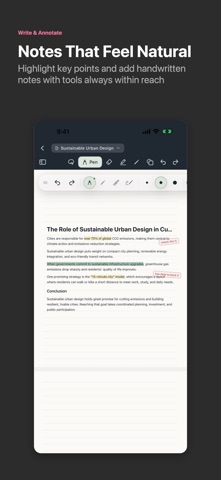
- Write with Apple Pencil or your finger, highlight, erase, and select strokes with lasso tools
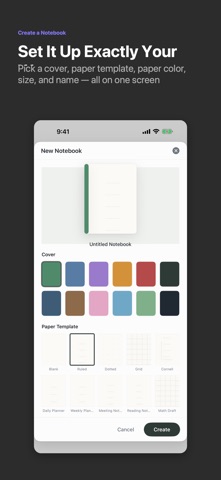
- Start from blank, ruled, dotted, grid, Cornell, daily planner, weekly planner, meeting, reading, math, and music paper templates
- Import PDFs, annotate directly, then export PDFs with the background, annotations, stickers, or watermark options you choose
- Add photos, scanned images, text objects, shapes, stickers, and reusable page elements
- Record audio notes for classes, interviews, and meetings
- Organize notebooks, PDFs, quick notes, folders, and infinite canvas documents in the library
- Work through long documents with continuous pages, thumbnails, document tabs, and a customizable toolbar
CopperNote stores note content on device by default. It does not require an account and does not track you for advertising. It is built for students, creators, and knowledge workers who want a quiet, direct place to keep long-lived notes.
Terms of Use: https://www.apple.com/legal/internet-services/itunes/dev/stdeula/