

Memoth: AI Note Taker
Memoth: AI Note Taker is made and published by Rotem Doron. AppBrain is an independent app data site and isn't affiliated with Rotem Doron. The app name, icon, screenshots and description belong to Rotem Doron and are shown as published on the App Store.
AppBrain's verdict
- Last updated
- October 4, 2026
Rankings
App Store top chartsApp Store Rankings for Memoth: AI Note Taker
Competitors
Similar apps and more from Rotem DoronAlternatives to Memoth: AI Note Taker


More from Rotem Doron
Releases
Updates seen on the App Store- Version
- 1.0.32
- Launched
- May 2026
No changelog data
User feedback
Ratings and reviews on the App StoreComments on Memoth: AI Note Taker for iOS
We don't have enough comments to show example comments. Please check back later.
Technology
Found in the app by AppBrain- Price
- Free
- App size
- 92.5 MB
- Content rating
- Everyone
Technologies used by Memoth: AI Note Taker
About the app and developer
About Memoth: AI Note Taker
Memoth: AI Note Taker is a productivity app developed by Rotem Doron.
User Ratings
The app has no ratings yet.
App Information
Memoth: AI Note Taker is freely available from the App Store. The app size is 92.50 MB. The latest version available is 1.0.32. The last update was on October 4, 2026.
Technical Requirements
The app has a content rating of Everyone. The app has been available on the App Store since May 2026.
Developer information for Rotem Doron
Address:
Frequently asked questions about Memoth: AI Note Taker
Is Memoth: AI Note Taker free?
Yes. Memoth: AI Note Taker is free on the App Store.
Is Memoth: AI Note Taker still available?
Yes. Memoth: AI Note Taker is on the App Store, and the last update we saw was on October 4, 2026.
How large is Memoth: AI Note Taker?
Memoth: AI Note Taker is 92.50 MB.
Is Memoth: AI Note Taker suitable for children?
App Store rates the content of Memoth: AI Note Taker as suitable for everyone.
Who made Memoth: AI Note Taker?
Memoth: AI Note Taker was developed by Rotem Doron. It is listed in the productivity category on the App Store.
What are the best alternatives to Memoth: AI Note Taker?
People looking at Memoth: AI Note Taker also look at these productivity apps: TalkTidy - Voice to Notes, VoiceKey: AI Voice Keyboard, nocal - calendar reinvented, Blurto: AI Voice To Do Planner, Clerk App.
Store listing
By Rotem Doron, from the App Store




Description by Rotem Doron Written by the developer, not by AppBrain. Click to read.
In seconds, Memoth helps you understand what was said, what matters, what was decided, and what needs to happen next.
— HOW IT WORKS —
1. Tap record on your iPhone, iPad, Mac, or Apple Watch
2. AI transcribes and analyzes speakers, topics, decisions, and tasks
3. Get your transcript, summary, insights, and action items
No re-listening. No forgetting what was said.
— WHAT EVERY RECORDING INCLUDES —
• Full transcript with speaker identification and timestamps
• Clear summary of key topics, decisions, and highlights
• Action items with due dates and reminders
• Smart title to keep your library organized
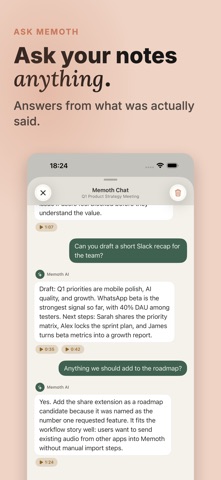
• Chat with the recording — ask anything and get answers from the transcript
— OR TYPE IT YOURSELF —
Prefer typing to talking? Create a note from scratch with a block editor — headings, lists, checklists, quotes, and images. Check off a checklist item and it becomes a task, synced with everything else.
— REAL-TIME TRANSCRIPTION —
Watch your words appear on screen live as you speak. Real-Time mode streams the transcript during meetings, lectures, and interviews — with live speaker labels, in 23 languages. Choose Fastest, Balanced, or Most accurate to tune speed against precision. A Pro feature.
— CHAT WITH ANY RECORDING —
Ask questions about your recording and get instant answers from the transcript. Request a shorter summary, find a specific decision, ask who said what, pull out a discussed task, or clarify something that came up in the conversation.
Instead of searching through a long transcript - just ask.
— RECORD ANYWHERE —
• In a meeting — start recording with one tap, even in the background
• At a lecture — capture every word while you focus on learning
• On a walk — save a quick idea from your Apple Watch
• From WhatsApp — forward a voice message to the Memoth bot and get a full transcript plus a clear summary
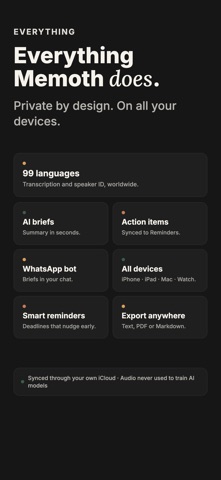
99 languages with automatic detection. Just speak.
— AUTOMATIC TRANSLATION —
Translate conversations, summaries, and transcripts into many languages with one tap. Record in one language and get the result in another — perfect for international meetings, lectures, interviews, voice messages, and conversations across languages.
— TASKS THAT WRITE THEMSELVES —
Every recording suggests action items — review each one and keep it, save it for later, or dismiss it. Confirmed tasks land in one place. Filter by overdue, today, or this week. Set early reminders and sync tasks with Apple Reminders.
Mark a task done in Reminders and it is done in Memoth too. And vice versa.
— WHATSAPP BOT —
Forward any voice message to the Memoth bot on WhatsApp. Get a full transcript, summary, and action items directly in the chat. No app switching. Perfect for long voice messages you do not have time to listen to.
— SYNCS EVERYWHERE —
iPhone. iPad. Mac. Apple Watch. Your recordings, notes, transcripts, summaries, and tasks sync through iCloud and follow you across your devices.
— PRIVATE BY DEFAULT —
Your recordings are stored locally on your device and can sync through your private iCloud account. If you use cloud processing features, audio is uploaded temporarily only to process transcription and then deleted.
• We do not use your recordings or notes to train AI models
• Delete means delete — removed from your devices
• Sync across devices through iCloud
— ALSO —
• Import audio files via Share Extension
• Export summaries, transcripts, and tasks
• Background recording
• Dark mode, light mode, or system mode
Stop scribbling notes. Just record — or type. Memoth handles the rest.
Terms of Service: https://memoth.com/terms-of-service