

Meow - Custom Widgets is made and published by 鑫 吴. AppBrain is an independent app data site and isn't affiliated with 鑫 吴. The app name, icon, screenshots and description belong to 鑫 吴 and are shown as published on the App Store.
AppBrain's verdict
Established- Rating on App Store
- 3.83
- 12 ratings
- Last updated
- January 31, 2025
It doesn't have enough ratings yet to judge what users think.
Rankings
App Store top chartsApp Store Rankings for Meow - Custom Widgets
Competitors
Similar apps and more from 鑫 吴Alternatives to Meow - Custom Widgets





More from 鑫 吴




Releases
Updates seen on the App Store- Version
- 3.34
- Launched
- February 2020
No changelog data
User feedback
Ratings and reviews on the App StoreComments on Meow - Custom Widgets for iOS
We don't have enough comments to show example comments. Please check back later.
Technology
Found in the app by AppBrain- Price
- Free
- App size
- 12.8 MB
- Content rating
- Everyone
Technologies used by Meow - Custom Widgets
About the app and developer
About Meow - Custom Widgets
Meow - Custom Widgets is an utilities app developed by 鑫 吴.
User Ratings
Meow - Custom Widgets is rated 3.83 out of 5 stars. The rating is based on 12 ratings.
App Information
Meow - Custom Widgets is freely available from the App Store. The app size is 12.79 MB. The latest version available is 3.34. The last update was on January 31, 2025.
Technical Requirements
The app has a content rating of Everyone. The app has been available on the App Store since February 2020.
Developer information for 鑫 吴
Address:
Store listing
By 鑫 吴, from the App Store




Description by 鑫 吴 Written by the developer, not by AppBrain. Click to read.
Of course, the large number is not the point. The point is no matter how to match it. , The results are all elegant and beautiful, and you can easily get the widgets you like.
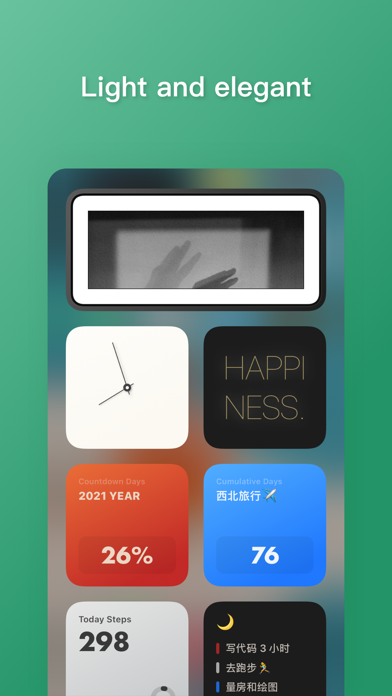
In the current version, "Meow" provides 9 widgets, which are composed of 8 desktop widgets and 1 keyboard extension. These functions are "Quote", "Time Note", "Launch" and "Task List", "Photo", "Today Steps", "Clock", "Calendar" and "Quick Phrase", these small tools are not limited to good-looking, most of them are also very useful. Even if they are separated from the desktop widgets, they have relatively complete functions in the app.
Function Quick View
- Quote: Display a paragraph of text input on the widget, which can be used for self-excitation, motto, simple reminders, etc.; you can also choose your favorite style for different content texts.
-Time Note: Almost all-round countdown day tool, supports countdown days, cumulative days, percentage progress display, cycle cycles, multi-color themes, etc.
- Quick Phrase: Expand the shortcut phrases on the keyboard. The simple design fits the original interface. You can enter frequently used phrases into the app. When you need to use it, you only need to long press to switch the keyboard and quickly click to use it.
- Launch: Support custom URL Schemes launch tool, built-in dozens of unified styles and beautifully designed icons, which are efficient and beautiful.
- Task List: A concise tool that can be used alone in the app, suitable for recording some simple to-do items.
- Photo: Add your favorite photos, and select the frame style to present on the desktop; some styles provide the function of displaying the date, making this not a simple display of photos.
- Today Steps: A widget showing the daily steps, you can set your own goals, and you can also generate a static map.
- Clock: The design concept is mainly decoration, provides a number of interesting clock styles, and is continuously updated.
Privacy
Meow optionally integrates with Apple’s HealthKit API. This data is used to display your step on today steps widget.
Subscription
- Become Meow Pro to unlock all Meow features.
- Subscription membership costs $1.49 per year, with a 7-day free trial.
Payment will be made directly through your iTunes Account at confirmation of purchase. After the purchase or trial, the renewal will be carried out automatically, and the Apple iTunes account will be deducted within 24 hours before the expiration. After the deduction is successful, the subscription cycle will be extended by 1 subscription cycle. You can modify the automatic subscription settings in the system account settings. If you need to cancel the renewal, please do so at least 24 hours before the current billing period.
Privacy Policy: https://shimo.im/docs/904wG0xy2jErhOf8/
Terms of Use: https://shimo.im/docs/G2luo02rR7Y9COXx/