

MeshFind is made and published by Casey Mondoux. AppBrain is an independent app data site and isn't affiliated with Casey Mondoux. The app name, icon, screenshots and description belong to Casey Mondoux and are shown as published on the App Store.
AppBrain's verdict
- Last updated
- September 21, 2026
Rankings
App Store top chartsApp Store Rankings for MeshFind
Competitors
Similar apps and more from Casey MondouxAlternatives to MeshFind


Releases
Updates seen on the App Store- Version
- 1.3
- Launched
- August 2026
No changelog data
User feedback
Ratings and reviews on the App StoreComments on MeshFind for iOS
We don't have enough comments to show example comments. Please check back later.
Technology
Found in the app by AppBrain- Price
- Free
- App size
- 22.8 MB
- Content rating
- Everyone
Technologies used by MeshFind
About the app and developer
About MeshFind
MeshFind is an utilities app developed by Casey Mondoux.
User Ratings
The app has no ratings yet.
App Information
MeshFind is freely available from the App Store. The app size is 22.77 MB. The latest version available is 1.3. The last update was on September 21, 2026.
Technical Requirements
The app has a content rating of Everyone. The app has been available on the App Store since August 2026.
Developer information for Casey Mondoux
Address:
Frequently asked questions about MeshFind
Is MeshFind free?
Yes. MeshFind is free on the App Store.
Is MeshFind still available?
Yes. MeshFind is on the App Store, and the last update we saw was on September 21, 2026.
How large is MeshFind?
MeshFind is 22.77 MB.
Is MeshFind suitable for children?
App Store rates the content of MeshFind as suitable for everyone.
Who made MeshFind?
MeshFind was developed by Casey Mondoux. It is listed in the utilities category on the App Store.
What are the best alternatives to MeshFind?
People looking at MeshFind also look at these utilities apps: Phantom - Mesh Comms, MeshCoreScanner, Ecoforest Control, Priv Pro, Ecoforest.
Store listing
By Casey Mondoux, from the App Store



Description by Casey Mondoux Written by the developer, not by AppBrain. Click to read.
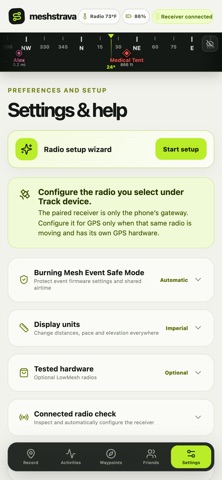
MeshFind connects directly to a paired Meshtastic radio over Bluetooth and records the GPS positions supplied by the radio you choose. Create detailed route maps without cell service, review distance, time, pace, and elevation, then export a standard GPX file for Strava or another compatible service.
RECORD YOUR MOVEMENT
• Track the connected radio automatically or select another GPS node on your mesh
• Request high-detail local GPS fixes without increasing high-frequency mesh broadcasts
• Keep recordings alive while the app is in the background
• Use Wander Mode to pause lingering time and GPS drift, then resume automatically when you move
NAVIGATE OFFLINE
• Create, color-code, tag, edit, import, and export waypoints
• See waypoints and selected friends on a live heading band
• Open a full-screen directional arrow with bearing and distance remaining
• Select exact map squares to download before leaving service
FIND FRIENDS AND RADIOS
• Show only the mesh nodes you explicitly select as friends
• Exchange your associated radios with another Meshstrava user by QR code
• Rename friend devices and request an updated position when network rules allow
• Remember paired radios and their last received positions as findable waypoints
RADIO-AWARE SETUP
• Review connected-radio GPS, channel, firmware, battery, and supported temperature telemetry
• Use a guided provisioning wizard and plain-language setup checks
• Protect event-managed configurations with Burning Mesh Event Safe Mode
• Reconnect automatically to a remembered Bluetooth radio
Meshstrava is local-first. No Meshstrava account or web server is required for core recording and navigation. Meshtastic-compatible GPS radio hardware is required for live radio features. Device capabilities and update frequency depend on the radio, firmware, configuration, and mesh conditions.
Meshstrava is an independent app and is not affiliated with or endorsed by Meshtastic, Strava, LowMesh, or OpenStreetMap.