

Meshwise is made and published by Luke Dutton. AppBrain is an independent app data site and isn't affiliated with Luke Dutton. The app name, icon, screenshots and description belong to Luke Dutton and are shown as published on the App Store.
AppBrain's verdict
New- Rating on App Store
- 5.00
- 1 ratings
- Last updated
- September 15, 2026
- Size
- 6.15 MB
Meshwise came out 35 days ago. It doesn't have enough ratings yet to judge what users think.
User feedback
Ratings and reviews on the App StoreComments on Meshwise for iOS
We don't have enough comments to show example comments. Please check back later.
Store listing
By Luke Dutton, from the App Store



Description by Luke Dutton Written by the developer, not by AppBrain. Click to read.
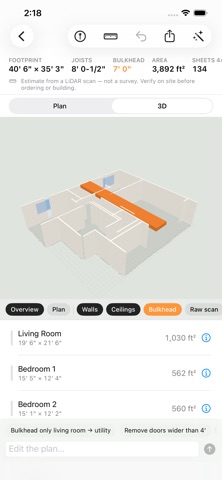
Meshwise turns a walk through an unfinished room into a dimensioned floor plan and a drywall takeoff. Walls are measured to the stud face, bulkheads and soffits are picked up as objects with their own drop, and the app estimates how many sheets of drywall the job needs. Scans are processed on the device and stay there. There is no account, no upload and no subscription.
WHAT YOU GET
• A dimensioned floor plan with every room named and measured
• Wall dimensions taken at the stud face, the surface the drywall will hang on
• Bulkheads and soffits as objects on the plan, with drop and clearance
• A drywall takeoff per room: wall, ceiling and bulkhead square footage, with sheet counts at 4×8 and 4×12 and a waste factor
• Ceiling joist height for the space
• A two-point measure tool in the plan and in 3D
• Markers for the electrical panel, sump, floor drain, egress window and Lally columns
BUILT FOR UNFINISHED SPACES
Most scanning apps expect flat painted drywall and a finished ceiling. Meshwise was written for open studs, exposed joists, batt insulation, ductwork and a basement full of stored boxes. It finds a wall from where the LiDAR returns meet the floor and the joists rather than from how smooth the surface looks.
EXPORTS
PDF plan sheet, DXF and IFC for CAD and BIM, plan JSON, OBJ, GLB, USDZ for AR Quick Look, an STL model at 1:100, LAS and PLY point clouds, a takeoff CSV and a self-contained web page. Object scans export as a printable STL in millimeters with a closed base, Z-up, ready for a slicer.
EDIT THE PLAN BY TYPING
On a device that supports Apple Intelligence, type the change you want, such as "rename Stairs to Stairwell" or "remove the bulkhead in the utility room", and Meshwise applies it. The model runs on the device and the plan is never sent anywhere. On other devices the same edits are available from the manual controls.
PRIVACY
Meshwise contains no networking code, no account system, no analytics, no advertising and no third-party SDKs. Scans are stored in the app's folder on your device, where the Files app can reach them. An optional switch in Settings, off by default, copies scans to your own iCloud Drive. The App Store privacy label reads "Data Not Collected".
NINE LANGUAGES
English, Spanish, Arabic, German, French, Hindi, Korean, Simplified Chinese and Traditional Chinese. Lengths and areas in feet and inches or in meters.
FREE AND PRO
Scanning, plan extraction, room naming, the 2D plan, the 3D view, the measure tool, markers, the ceiling clearance map and the Apple Intelligence editor are free with no limit on rooms. The PDF plan sheet, plan JSON and takeoff CSV are free as well, so the numbers can be checked before anything is paid for. Meshwise Pro is a single one-time purchase that unlocks the CAD and 3D formats (DXF, IFC, OBJ, GLB, USDZ, STL, LAS, PLY), the web page, the everything zip and iCloud Drive backup. Family Sharing is supported.
ACCURACY
Meshwise is an estimating and visualization aid. Dimensions are estimates from a consumer LiDAR scan, typically within about 1 inch and up to 3 inches or more in poor light, on dark or reflective surfaces, or in cluttered spaces. Material quantities are estimates and include an assumed waste factor. Meshwise is not a survey and is not suitable for permits, structural or engineering decisions, legal descriptions or property boundaries. Verify critical dimensions on site with a tape measure before ordering materials or building.
Terms of Use: https://meshwise.jolleytech.com/terms
Privacy Policy: https://meshwise.jolleytech.com/privacy
Support: https://meshwise.jolleytech.com/support
Safety and technology
Found in the app by AppBrain- Price
- Free
- App size
- 6.15 MB
- Content rating
- Everyone
Technologies used by Meshwise
Releases
Updates seen on the App Store- Version
- 1.0
- Launched
- September 2026
No changelog data
Alternatives
Similar apps and more from Luke DuttonAlternatives to Meshwise


Rankings
App Store top chartsApp Store Rankings for Meshwise
About the app and developer
About Meshwise
Meshwise is an utilities app developed by Luke Dutton.
What is the rating of Meshwise?
Meshwise is rated 5.00 out of 5 stars, based on one rating ratings.
Is Meshwise free?
Meshwise is free. The app size is 6.15 MB. The latest version available is 1.0. The last update was on September 15, 2026.
What are the requirements for Meshwise?
The app has a content rating of Everyone. The app has been available on the App Store since September 2026.
Developer information for Luke Dutton
Address:
Frequently asked questions about Meshwise
Is Meshwise free?
Yes. Meshwise is free on the App Store.
Is Meshwise still available?
Yes. Meshwise is on the App Store, and the last update we saw was on September 15, 2026.
How large is Meshwise?
Meshwise is 6.15 MB.
Is Meshwise suitable for children?
App Store rates the content of Meshwise as suitable for everyone.
How do people rate Meshwise?
Meshwise has one rating of 5.00 stars on the App Store.
Who made Meshwise?
Meshwise was developed by Luke Dutton. It is listed in the utilities category on the App Store.
What are the best alternatives to Meshwise?
People looking at Meshwise also look at these utilities apps: SKANNA by LiDAR3D, LiDAR Room Scanner: Measure, myNoark+, Lagarsoft LiDAR Scanner, Segai Sync.