

Message Catalogue
Message Catalogue is made and published by Workflow Network. AppBrain is an independent app data site and isn't affiliated with Workflow Network. The app name, icon, screenshots and description belong to Workflow Network and are shown as published on the App Store.
AppBrain's verdict
Established- Rating on App Store
- 5.00
- 2 ratings
- Last updated
- May 3, 2022
It doesn't have enough ratings yet to judge what users think.
Rankings
App Store top chartsApp Store Rankings for Message Catalogue
Competitors
Similar apps and more from Workflow NetworkAlternatives to Message Catalogue


More from Workflow Network


Releases
Updates seen on the App Store- Version
- 1.9.1
- Launched
- September 2018
No changelog data
User feedback
Ratings and reviews on the App StoreComments on Message Catalogue for iOS
We don't have enough comments to show example comments. Please check back later.
Technology
Found in the app by AppBrain- Price
- Free
- App size
- 21.7 MB
- Content rating
- Everyone
Technologies used by Message Catalogue
About the app and developer
About Message Catalogue
Message Catalogue is a reference app developed by Workflow Network.
User Ratings
Message Catalogue is rated 5.00 out of 5 stars. The rating is based on 2 ratings.
App Information
Message Catalogue is freely available from the App Store. The app size is 21.65 MB. The latest version available is 1.9.1. The last update was on May 3, 2022.
Technical Requirements
The app has a content rating of Everyone. The app has been available on the App Store since September 2018.
Developer information for Workflow Network
Address:
Frequently asked questions about Message Catalogue
Is Message Catalogue free?
Yes. Message Catalogue is free on the App Store.
Is Message Catalogue still available?
Yes. Message Catalogue is on the App Store, and the last update we saw was on May 3, 2022.
How large is Message Catalogue?
Message Catalogue is 21.65 MB.
Is Message Catalogue suitable for children?
App Store rates the content of Message Catalogue as suitable for everyone.
How do people rate Message Catalogue?
Message Catalogue scores 5.00 out of 5 stars, from 2 ratings on the App Store.
Who made Message Catalogue?
Message Catalogue was developed by Workflow Network. It is listed in the reference category on the App Store.
What are the best alternatives to Message Catalogue?
People looking at Message Catalogue also look at these reference apps: J&SLatVocab, English Lao Translator, Captional, Allaso Ranch, Message Search.
Store listing
By Workflow Network, from the App Store




Description by Workflow Network Written by the developer, not by AppBrain. Click to read.
### WHAT IS MESSAGE CATALOGUE?
Finally, one place to keep everything about your messages.
With this powerful new digital catalogue, you can group your messages by series and search by keyword or Scripture reference, all while personalizing your catalogue to fit your needs with graphics, outlines, supporting message illustrations and more.
Trying to remember or find a previous talk? You can fully search titles, keywords, notes, and many other attributes to help you find your content.
With each entry, you can load your photos, audio, video, documents and any other supporting items. Anything that has text, like a transcript or outline, will become searchable as well!
- - - - - - - - - - - - - - - - - - - - -
### ABOUT THE iOS APP:
The Message Catalogue iOS app is the best way to view and search for your message content. Being built fully natively for iPhone and iPad technologies, you will discover a fast and intuitive experience.
General Features:
• See all of your messages grouped by series.
• Message entries are marked if they are a favorite, work in-progress, or not in a default location to help you easily identify them.
• Switch to the search / list view to browse individually.
• Sort your browsing by the message date, to help you find your oldest messages.
• **See your history or recently viewed messages.
• Filter by default locations or work in-progress.
• To do an exact search simply add a quote at the beginning or end, or anywhere in your search phrase.
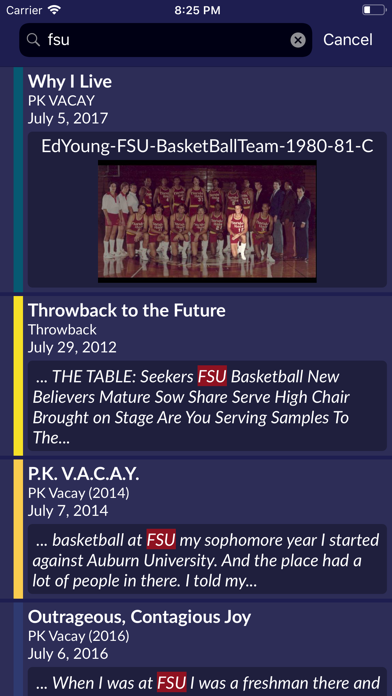
• When searching, see a preview text preview if the phrase was found in a document.
• Search results will show a preview or tags if the phrase is found in the message data.
• On the iPad, support for split screen and other layouts.
• If your device is signed in with iCloud, you can “handoff” from one device to another. For instance, if you are looking at a message on a different device, the handoff icon will show on your mac’s dock. When clicking it, Message Catalogue will then open with that message entry in the viewer.
Message / Entry View Features:
• Use the “heart” image to mark a favorite message which will sync with your account on other devices.
• If your message has a link to a related plan with Planning Center Services, you can click the Planing Center icon to quickly take you there.
• View the entry photos from the filmstrip and click on one to show it in a separate window.
• Important assets are “starred” at the top of your file list so you can quickly get to then.
• Web link assets will play in a video player window if able, or go straight to the web site.
- - - - - - - - - - - - - - - - - - - - -
For more information about Message Catalogue, how it works, or go in depth more about the features, feel free to send us a note at support@messagecatalogue.com
Enjoy!
- Message Catalogue Team @WorfklowNetwork