

MetaMoJi ClassRoom
MetaMoJi ClassRoom is made and published by MetaMoJi Corporation. AppBrain is an independent app data site and isn't affiliated with MetaMoJi Corporation. The app name, icon, screenshots and description belong to MetaMoJi Corporation and are shown as published on the App Store.
AppBrain's verdict
Established- Rating on App Store
- 5.00
- 1 ratings
- Last updated
- October 6, 2026
It doesn't have enough ratings yet to judge what users think.
Rankings
App Store top chartsApp Store Rankings for MetaMoJi ClassRoom
Competitors
Similar apps and more from MetaMoJi CorporationAlternatives to MetaMoJi ClassRoom







More from MetaMoJi Corporation








Releases
Updates seen on the App Store- Version
- 3.15.2
- Launched
- February 2015
No changelog data
User feedback
Ratings and reviews on the App StoreComments on MetaMoJi ClassRoom for iOS
We don't have enough comments to show example comments. Please check back later.
Technology
Found in the app by AppBrain- Price
- Free
- App size
- 152.2 MB
- Content rating
- Everyone
Technologies used by MetaMoJi ClassRoom
About the app and developer
About MetaMoJi ClassRoom
MetaMoJi ClassRoom is an education app developed by MetaMoJi Corporation.
What is the rating of MetaMoJi ClassRoom?
MetaMoJi ClassRoom is rated 5.00 out of 5 stars, based on one rating ratings.
Is MetaMoJi ClassRoom free?
MetaMoJi ClassRoom is free. The app size is 152.22 MB. The latest version available is 3.15.2. The last update was on October 6, 2026.
What are the requirements for MetaMoJi ClassRoom?
The app has a content rating of Everyone. The app has been available on the App Store since February 2015.
Developer information for MetaMoJi Corporation
Address:
Store listing
By MetaMoJi Corporation, from the App Store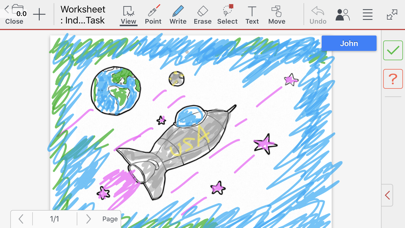
Description by MetaMoJi Corporation Written by the developer, not by AppBrain. Click to read.
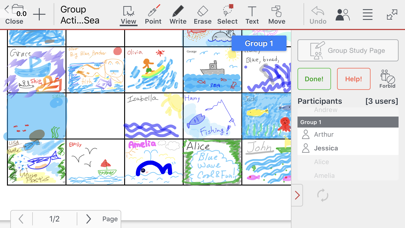
As students work through the lesson plans, teachers can monitor their progress with a virtual look over the shoulder. Since all results of document markup are displayed in real-time, student engagement in lesson plans can become highly interactive. For distance learning situations, the cloud-based streaming environment provides an ideal way for instructor and student to work closer together. All work is displayed as it is entered in real-time, making it easier to illustrate and share lessons and ideas.
MetaMoJi ClassRoom allows teachers to distribute a “Class Note” to their students. The note is either created from scratch with the powerful tools within the app or by importing files from PDF or Microsoft Office formats. Opening the Class Note starts a class. The students can write answers, sketch drawings or import photos and graphics to illustrate their ideas. Teachers can monitor how each student or group is progressing through the lesson. Easy management controls even allow the teacher to pass presentation control to the student to demonstrate their work.
Following the lesson presented in class, students can join collaborative study groups and work through their homework together by checking in to the same document and sharing ideas within it. Teachers can used the platform for wraparound tutoring opportunities, helping students individually or in a group in virtual sessions. Teachers can even run an interactive lecture with their remote students.
The winner of two Envisioneering awards at CES Showstoppers 2014, MetaMoJi ClassRoom is based on the same framework as the multi-award winning MetaMoJi Share.
Key Features:
•Teachers can monitor up to 50 students working in real-time within each session
•The vast palette of tools allow you to enter text, handwriting, drawings, photos, audio files and web pages – all in high resolution scalable vector graphics
•Teachers can develop lessons from scratch or by marking up imported PDF or Microsoft Office files via Google Drive
•Teachers can control the lesson session so that all students will view the same page and zoomed area and use highlighter options to emphasize a point
•Video and audio recording options can capture an accurate record of the lesson session
•Notes and folders can be automatically synchronized and stored to our cloud service allowing you to back-up and manage your documents across multiple devices
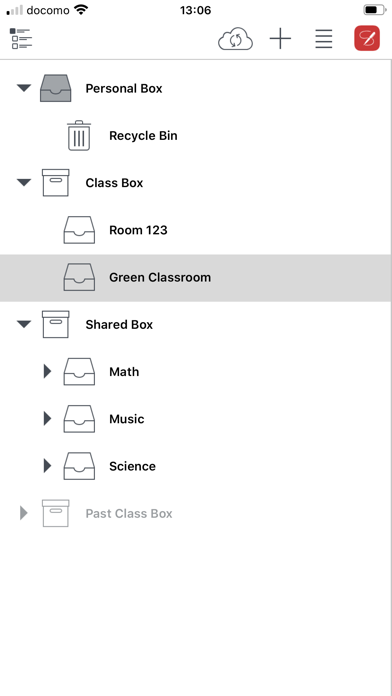
•The Shared Box and Class Box capability allows co-editing and ownership of documents
•Interactively browse the web from within the app and mark up sites
•Password protect documents for privacy and organize in tagged folders which can be automatically synchronized
•Shapes tool provides editable shapes
•Shape recognition converts your drawing to a basic shape
•Smart cropping tool vastly extends photo editing
•Notes can be exported and imported via an WebDAV server or Storage Provider
•The InOutBox tool transfer files between the app and a PC
•The Class Coordinator tool to deliver class materials from a web browser
•User management tools facilitate adding students and groups and assigning permissions