

MetricViewer is made and published by Agustin Lopez. AppBrain is an independent app data site and isn't affiliated with Agustin Lopez. The app name, icon, screenshots and description belong to Agustin Lopez and are shown as published on the App Store.
AppBrain's verdict
- Last updated
- August 11, 2026
- Size
- 56.5 MB
User feedback
Ratings and reviews on the App StoreComments on MetricViewer for iOS
We don't have enough comments to show example comments. Please check back later.
Store listing
By Agustin Lopez, from the App Store
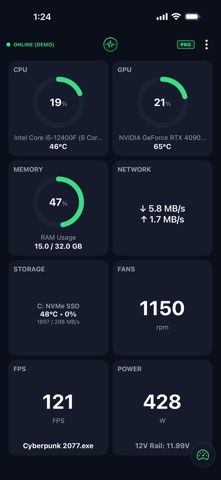

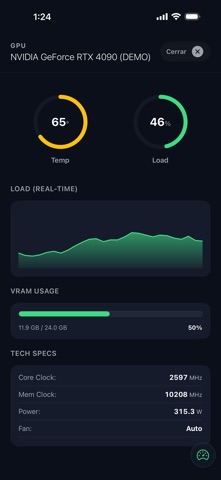
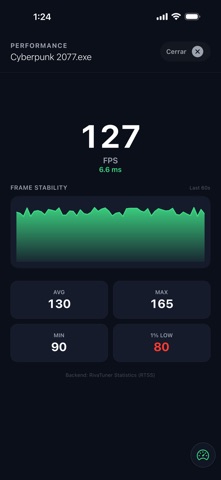

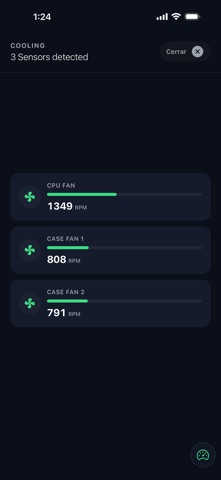


Description by Agustin Lopez Written by the developer, not by AppBrain. Click to read.
KEY FEATURES
• CPU & GPU Telemetry: Monitor temperatures, utilization, and clock speeds in real-time.
• Power Consumption & Graphs: Track your system's power draw (Watts) with beautiful, independent real-time graphs for both CPU and GPU.
• In-Game Performance: Track your FPS while you play to ensure a smooth gaming experience.
• System Memory & Storage: Keep an eye on your RAM usage and disk read/write speeds.
• Network Stats: Monitor your upload and download speeds.
• Customizable Grid: Rearrange the layout to prioritize the metrics that matter most to you.
• Dark Mode UI: A gorgeous, battery-friendly interface that looks amazing on any setup.
DEMO MODE INCLUDED
Not sure how it looks? MetricViewer includes a built-in Demo Mode with simulated data. Explore the full UI, test the animations, and see the app in all its glory before even installing the PC client!
HOW IT WORKS
Download this app on your iPhone or iPad.
Download and run the lightweight, free MetricViewer Windows Client from our official website (metricviewer.app).
Connect both devices to the same local Wi-Fi network, scan the QR code, and you are ready to go!
LIFETIME PRO LICENSE (NO SUBSCRIPTIONS)
We hate monthly fees as much as you do. MetricViewer operates on a "Try before you buy" model. Test the connection and basic metrics for free, and if you love it, unlock the full potential of the app with a single, one-time Lifetime PRO purchase.
HARDWARE DISCLAIMER
Advanced metrics (such as precise voltages, individual core temps, and fan speeds) rely on low-level motherboard drivers and third-party APIs. Due to the vast variety of PC components on the market, some specific sensors may not be available on all setups.
Safety and technology
Found in the app by AppBrain- Price
- Free
- App size
- 56.5 MB
- Content rating
- Everyone
Technologies used by MetricViewer
Releases
Updates seen on the App Store- Version
- 1.3.0
- Launched
- March 2026
No changelog data
Alternatives
Similar apps and more from Agustin LopezAlternatives to MetricViewer


Also available on Google Play

Rankings
App Store top chartsApp Store Rankings for MetricViewer
About the app and developer
About MetricViewer
MetricViewer is an utilities app developed by Agustin Lopez.
What is the rating of MetricViewer?
MetricViewer has no ratings yet.
Is MetricViewer free?
MetricViewer is free. The app size is 56.47 MB. The latest version available is 1.3.0. The last update was on August 11, 2026.
What are the requirements for MetricViewer?
The app has a content rating of Everyone. The app has been available on the App Store since March 2026.
Developer information for Agustin Lopez
Address:
Frequently asked questions about MetricViewer
Is MetricViewer free?
Yes. MetricViewer is free on the App Store.
Is MetricViewer still available?
Yes. MetricViewer is on the App Store, and the last update we saw was on August 11, 2026.
How large is MetricViewer?
MetricViewer is 56.47 MB.
Is MetricViewer suitable for children?
App Store rates the content of MetricViewer as suitable for everyone.
Who made MetricViewer?
MetricViewer was developed by Agustin Lopez. It is listed in the utilities category on the App Store.
What are the best alternatives to MetricViewer?
People looking at MetricViewer also look at these utilities apps: LagOps, FPS Booster Gaming Performance, BMS CLOUD, Swol, Cores: Remote Hardware Monitor.