

Metron (Pro Metronome)
Metron (Pro Metronome) is made and published by Antonio Nunes. AppBrain is an independent app data site and isn't affiliated with Antonio Nunes. The app name, icon, screenshots and description belong to Antonio Nunes and are shown as published on the App Store.
AppBrain's verdict
Established- Rating on App Store
- 3.46
- 13 ratings
- Last updated
- October 9, 2026
It doesn't have enough ratings yet to judge what users think.
Rankings
App Store top chartsApp Store Rankings for Metron (Pro Metronome)
Competitors
Similar apps and more from Antonio NunesAlternatives to Metron (Pro Metronome)







Releases
Updates seen on the App Store- Version
- 4.0.2
- Launched
- before 2010
No changelog data
User feedback
Ratings and reviews on the App StoreComments on Metron (Pro Metronome) for iOS
We don't have enough comments to show example comments. Please check back later.
Technology
Found in the app by AppBrain- Price
- Free
- App size
- 16.8 MB
- Content rating
- Everyone
Technologies used by Metron (Pro Metronome)
About the app and developer
About Metron (Pro Metronome)
Metron (Pro Metronome) is a music app developed by Antonio Nunes.
User Ratings
Metron (Pro Metronome) is rated 3.46 out of 5 stars. The rating is based on 13 ratings.
App Information
Metron (Pro Metronome) is freely available from the App Store. The app size is 16.77 MB. The latest version available is 4.0.2. The last update was on October 9, 2026.
Technical Requirements
The app has a content rating of Everyone. The app has been available on the App Store since before 2010.
Developer information for Antonio Nunes
Address:
Store listing
By Antonio Nunes, from the App Store




Description by Antonio Nunes Written by the developer, not by AppBrain. Click to read.
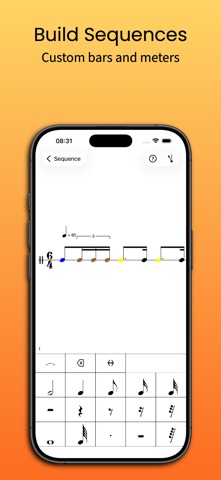
The brainchild of a classically trained musician, Metron aids in the practice of runs, excerpts and complete compositions. Featuring an intuitive front panel, you can launch and start practicing instantly, like with any basic metronome. A back panel provides single tap access to an ample variety of commonly used time signatures, and allows you to define new or edit existing sequences, with full access to its powerful and unique features (Pro).
Metron offers mixed time signatures with beat grouping, tempo scaling and dynamic accellerando and ritardando through a high precision playback engine. A notation based sequencer offers detailed control over tempo, time signature changes, rhythmic patterns with tuplets, individual beat sounds, volume control and more. You can even play two voices at once, so you can hear three against two or five against four, or more complicated polyrhythms.
A first run walkthrough helps you get oriented quickly and a comprehensive user manual is available.
Free to download and use, with a one-time Metron Pro unlock for the more advanced features; pre 4.0 customers keep full access.
Features in detail:
Metronome:
• Portrait and landscape mode.
• Tempo from 1 to 999 Beats Per Minute nominally (effectively between 0.25 and 1998 bpm).
• Option to change tempo by traditional increments.
• Accelerando and ritardando ("Variance").
• Tempo scaling. (Handy for elaborate sequences.)
• Polyrhythms (two voices at once).
• Specify a factor between one quarter (0.25) and double (2.0) the current tempo. (Useful when practicing sequences which contain tempo settings.)
• Tap-pad to set the metronome tempo by tapping with a finger.
• Accuracy: Samples are laid down just-in-time with absolute accuracy.
• Maintains accuracy when the screen is locked.
• Setlist control.
• Optionally allow Metron to keep playing when switching to the background.
• Record Metron sessions to audio files and share the recordings or the sequences themselves.
• Export MIDI tempo tracks — take your practice tempo map straight into a DAW
• Navigate long sequences through rehearsal numbers.
Sequencer:
• Create your own library with any number of sequences. A set with the most commonly used time signatures is included by default.
• Create sequences with any number of bars. (Each bar can have its own simple or complex time signature. Mix metres and tempi freely. Have accents on any beat you wish.)
• Each sequence can set a countdown, and also whether the metronome stops at the end of the sequence or continuously repeats the sequence. You can also choose to have the countdown repeated with every repeat of the sequence.
• Each bar consists of one or more time signatures and can set tempi and accelerando or ritardando on any beat.
• A time signature can have between 1 and 64 beats over a dotted or undotted denominator.
• A time signature can be subdivided into beat groups, allowing you to set an accent on any beat you wish, since grouping beats affects metronome playback. Metron differentiates between the first beat, stressed beats and unstressed beats, so you always know where in the bar you are.
• Freely enter notes into bars to create rhythm patterns (like triplets or swing, or most any pattern you like). You can assign a custom color, sound and volume to any beat or any rhythmic component of a beat. You are in control. You can keep it as simple as you like, or make it as intricate as you need.
• Editing is done in a single staff score, with room for two voices, using traditional western music notation. You can either drag and drop elements into the score or become even faster using the cursor based insert mode (with optional keyboard entry support).
Pitch Pipe:
• Metronome includes a pitch pipe, that helps you tune your instrument. Easily choose any pitch within 9 octaves.