

Metronome++: BPM Finder
Metronome++: BPM Finder is made and published by Dongkyu Kim. AppBrain is an independent app data site and isn't affiliated with Dongkyu Kim. The app name, icon, screenshots and description belong to Dongkyu Kim and are shown as published on the App Store.
AppBrain's verdict
- Last updated
- October 15, 2026
Rankings
App Store top chartsApp Store Rankings for Metronome++: BPM Finder
Releases
Updates seen on the App Store- Version
- 1.3.1
- Launched
- August 2026
No changelog data
User feedback
Ratings and reviews on the App StoreComments on Metronome++: BPM Finder for iOS
We don't have enough comments to show example comments. Please check back later.
Technology
Found in the app by AppBrain- Price
- Free
- App size
- 12.4 MB
- Content rating
- Everyone
Technologies used by Metronome++: BPM Finder
About the app and developer
About Metronome++: BPM Finder
Metronome++: BPM Finder is a music app developed by Dongkyu Kim.
User Ratings
The app has no ratings yet.
App Information
Metronome++: BPM Finder is freely available from the App Store. The app size is 12.36 MB. The latest version available is 1.3.1. The last update was on October 15, 2026.
Technical Requirements
The app has a content rating of Everyone. The app has been available on the App Store since August 2026.
Developer information for Dongkyu Kim
Address:
Store listing
By Dongkyu Kim, from the App Store



Description by Dongkyu Kim Written by the developer, not by AppBrain. Click to read.
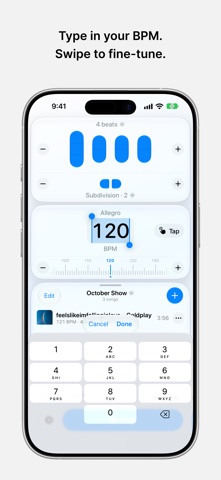
Search Apple Music for songs, artists, albums, and playlists. Metronome++ finds a useful BPM, adds the track length to your metronome setup, and saves everything for your next practice.
Set Up Every Song
• Adjust tempo, beats, subdivisions, and accents
• Find the BPM with Tap Tempo
• Save your metronome settings for each song
Build Your Setlists
• Organize songs for practice, rehearsal, or performance
• Arrange every setlist in your own song order
• Add the same saved song to multiple setlists
• Move through songs in the current setlist order
Practice by Bars or Time
• Divide a song into multiple parts
• Give each part its own BPM and rhythm
• Run a part indefinitely, for a number of bars, or for an exact duration
• Move to the next part automatically
• Import a song’s track length from Apple Music
Stay in Control
• Control playback and tempo with Home Screen widgets
• Follow the beat with Live Activities and Dynamic Island
• Use media controls on the Lock Screen and in Control Center
• Keep other audio playing alongside the metronome
Make It Yours
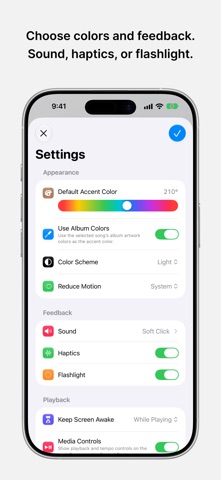
• Choose sound, haptics, or flashlight feedback
• Match the interface to the album artwork
• Practice with a polished Liquid Glass design
• Keep the screen awake while you practice
From finding a song to building the set and practicing every part, Metronome++ keeps everything you need close at hand.