MiaoNote: AI Meeting Notes is a productivity app developed by 子欣 陈.
What is the rating of MiaoNote: AI Meeting Notes?
MiaoNote: AI Meeting Notes is rated 5.00 out of 5 stars, based on one rating ratings.
Is MiaoNote: AI Meeting Notes free?
MiaoNote: AI Meeting Notes is free. The app size is 8.66 MB. The latest version available is 1.1.1. The last update was on October 24, 2026.
What are the requirements for MiaoNote: AI Meeting Notes?
The app has a content rating of Everyone. The app has been available on the App Store since October 2026.
MiaoNote: AI Meeting Notes is made and published by
子欣 陈.
AppBrain is an independent app data site and isn't affiliated with 子欣 陈.
The app name, icon, screenshots and description belong to 子欣 陈 and are shown as published on the App Store.
Description by 子欣 陈(from the App Store)
Keep the recording. Turn the discussion into meeting notes you can review and act on. MiaoNote brings recording, audio import, transcription, personal notes and AI summaries to Mac, iPhone and iPad. Capture a thought on Apple Watch and transfer the recording to its paired iPhone.
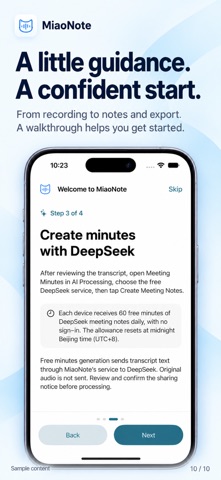
60 minutes of free DeepSeek meeting summaries each day No MiaoNote account or personal DeepSeek API key is required for the built-in free service. Each device gets 3,600 seconds per day, resetting at midnight Beijing time (UTC+8). Usage is based on the recording duration rounded up to the next whole second, not word count or processing time. If a recording exceeds your remaining allowance, that free summary request will not run.
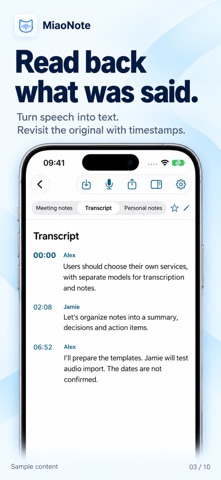
Transcribe first, then summarize Apple on-device speech recognition turns audio into text without using your free summary allowance. Availability depends on your device, system, language and required speech assets. The free DeepSeek service summarizes existing transcript text; it does not transcribe audio. Choose a standard, action-focused or decision-focused template to organize summaries, topics, decisions, action items and open questions. Check transcription and AI output against the original recording.
A guide for your first recording A four-page guide in Simplified Chinese and English covers recording and import, on-device transcription, free summaries and data sharing, then reviewing, editing and exporting. Skip it or reopen it in Settings. Updates do not force the guide on users with an existing meeting library. Reading the guide does not upload meeting content.
Know where your text goes Explicit confirmation is required before your first cloud call. For free summaries, transcript text passes through MiaoNote’s Cloudflare service to DeepSeek. Original audio is not uploaded through this free-summary route. The service retains generated results for 24 hours for task recovery; notes already saved on your device remain available. Quota, task and deduplication metadata are also retained. Upstream handling and retention follow the provider’s policies.
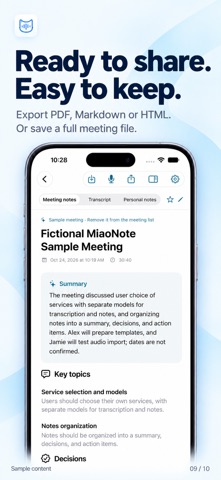
Review, edit and take your notes with you Recordings and meeting records are stored on your device by default. Play back audio, follow transcript timestamps, add personal notes, edit summaries and tasks, and export PDF, Markdown, HTML, JSON or a complete meeting file. Check for sensitive information before sharing.
You can still configure your own services for custom models and prompts. These may require your own provider account and API key, with separate provider charges. They are outside the built-in free allowance and remain subject to provider limits. Data sharing depends on your selected service; audio transcription services may need to receive audio. Your own credentials stay in the system Keychain and are excluded from meeting exports.
Free summaries require internet access and are subject to remaining allowance, input limits, service capacity and availability. Apple Watch recordings are transcribed and summarized on a paired iPhone or another supported device.
Each subscription will automatically renew 3 days before the expiration date for
the same time period. Subscriptions can be cancelled at any time before the renewal.