Download Android Apps and Games
AppBrain
  • Apps
  • Apps being viewed right now Trending apps today Most popular apps All-time most downloaded apps Top rated apps
  • Intelligence ▾
    Intelligence overview → Track any Android app or your whole market
    Track & analyze
    Keyword Tracker & OptimizerTrack & improve Play rankings App Performance ReportOne-off PDF for any app StatisticsFree Android & Play market stats
    Promote your app
    Featured Apps App Links
  • Intelligence
  • Pricing
  • Dashboard
  • Sign up
  • Log in
Last updated on: 2026-06-27
App Store Apps > Productivity > Microsoft Authenticator
Microsoft Authenticator icon

Microsoft Authenticator

6.8.49
Microsoft Corporation
4.72
662,232 reviews
Free

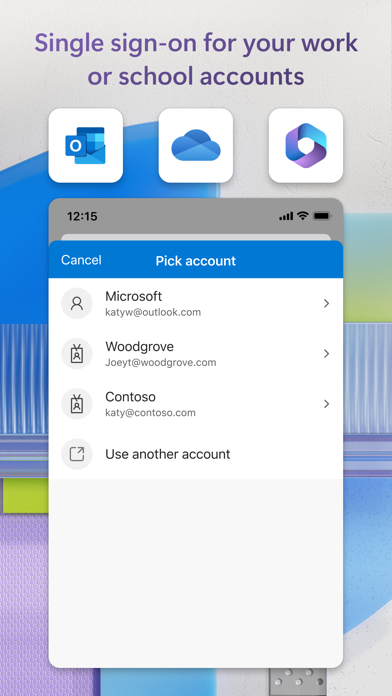
Microsoft Authenticator Screenshot 1 of 7
Microsoft Authenticator Screenshot 2 of 7
Microsoft Authenticator Screenshot 3 of 7
Microsoft Authenticator Screenshot 4 of 7
Microsoft Authenticator Screenshot 5 of 7
Microsoft Authenticator Screenshot 6 of 7
Microsoft Authenticator Screenshot 7 of 7
Download from the App Store

About Microsoft Authenticator

Microsoft Authenticator is an overall app developed by Microsoft Corporation.

Download Statistics

User Ratings

Microsoft Authenticator is rated 4.72 out of 5 stars. The rating is based on 660 thousand ratings.

App Information

Microsoft Authenticator is FREE to download. The APK download size is 164.20 MB. The latest version available is 6.8.49. The last update was on June 11, 2026.

Technical Requirements

The app has a content rating of Everyone. The app has been available on Google Play May 2015.

Description
Use Microsoft Authenticator for easy, secure sign-ins for all your online accounts using multi-factor authentication, passwordless, or password autofill. You also have additional account management options for your Microsoft personal, work or school accounts.

Getting started with multi-factor authentication

Multi factor authentication (MFA)provides a second layer of security. When enabled, during login after entering your password, you’ll be asked for an additional way to prove it’s really you. Either approve the notification sent to the Microsoft Authenticator, or enter the one-time password (OTP) generated by the app. The OTP codes have a 30 second timer counting down. This timer is so you never have to use the same time-based one-time password (TOTP) twice and you don’t have to remember the number. The OTP doesn’t require you to be connected to a network, and it won’t drain your battery. You can add multiple accounts to your app, including non-Microsoft accounts like Facebook, Amazon, Dropbox, Google, LinkedIn, GitHub, and more.

Getting started with passwordless

Use your phone, not your password, to log into your Microsoft account. Just enter your username, then approve the notification sent to your phone. Your fingerprint, face ID, or PIN will provide a second layer of security in this two-step verification process. After you’ve signed in with two factor authentication (2FA), you’ll have access to all your Microsoft products and services, such as Outlook, OneDrive, Office, and more.

Getting started with autofill

Microsoft Authenticator app can also autofill passwords for you. Sign-in on the Passwords tab inside the Authenticator app with your personal Microsoft account to start syncing passwords, including the passwords saved in Microsoft Edge. Make Microsoft Authenticator the default autofill provider and start autofilling passwords on apps and sites you visit on your mobile. Your passwords are protected with multi-factor authentication in the app. You will need to prove yourself with your fingerprint, face ID, or PIN to access and autofill passwords on your mobile. You can also import passwords from Google Chrome and other password managers.

Microsoft personal, work or school accounts

Sometimes your work or school might ask you to install the Microsoft Authenticator when accessing certain organization resources. You will need to register your device to your organization through the app and add your work or school account. Microsoft Authenticator supports cert-based authentication by issuing a certificate on your device. This will let your organization know that the sign-in request is coming from a trusted device and help you seamlessly and securely access additional Microsoft apps and services without needing to log into each.
Show more Show less

More data about Microsoft Authenticator

Price Free to download
Rating 4.72 based on 660 thousand ratings
Ranking Top ranked
Version 6.8.49
App download size 164.2 MB
Suitable for Everyone

Alternative downloads for the Microsoft Authenticator app

Authenticator App icon Authenticator App
2Stable
4.6
Free
47.1K ratings
LastPass Authenticator icon LastPass Authenticator
LastPass US LP
4.6
Free
44.2K ratings
SafePass: Accounts Manager icon SafePass: Accounts Manager
ZYSOFT LIMITED
4.7
Free
1.5K ratings
2FA Authenticator (2FAS) icon 2FA Authenticator (2FAS)
Two Factor Authentication Service Inc.
4.7
Free
34.2K ratings
PingID icon PingID
Ping Identity Corporation
2.2
Free
347 ratings
Authenticator App+ icon Authenticator App+
Rocket Apps GmbH
4.8
Free
11.8K ratings
LastPass Password Manager icon LastPass Password Manager
LastPass US LP
4.4
Free
57.0K ratings
Bitwarden Password Manager icon Bitwarden Password Manager
Bitwarden Inc
4.7
Free
28.6K ratings

More from Microsoft Corporation

Microsoft Outlook icon Microsoft Outlook
Microsoft Corporation
4.8
Free
9.0M ratings
Microsoft Teams icon Microsoft Teams
Microsoft Corporation
4.8
Free
3.4M ratings
Microsoft Word icon Microsoft Word
Microsoft Corporation
4.7
Free
2.9M ratings
XBOX icon XBOX
Microsoft Corporation
4.7
Free
1.7M ratings
Microsoft Excel icon Microsoft Excel
Microsoft Corporation
4.8
Free
1.4M ratings
Microsoft 365 Copilot icon Microsoft 365 Copilot
Microsoft Corporation
4.7
Free
1.3M ratings
Microsoft OneNote icon Microsoft OneNote
Microsoft Corporation
4.7
Free
1.0M ratings
Intune Company Portal icon Intune Company Portal
Microsoft Corporation
4.7
Free
700.1K ratings

Changelog of Microsoft Authenticator

No changelog data

Developer information for Microsoft Corporation

Microsoft Corporation

Address:

Share Microsoft Authenticator

Comments on Microsoft Authenticator for iOS

We don't have enough comments to show example comments. Please check back later.

App Store Rankings for Microsoft Authenticator

Top rankings

Rank Country Category List
4 United States Productivity Top Free
4 Canada Productivity Top Free
3 Switzerland Productivity Top Free
6 Germany Productivity Top Free
6 France Productivity Top Free
4 Australia Productivity Top Free
4 Belgium Productivity Top Free
4 Finland Productivity Top Free
4 United Kingdom Productivity Top Free
4 Iran Productivity Top Free

Ranking history in United States

AppBrain offers valuable information about your app and those of your competitors. Join AppBrain for free and claim this app to view more ranking data, view history etc.
I'm the developer of this app

Technologies used by Microsoft Authenticator

Apps on sale Popular Overall Apps other people are watching Today's trending apps Top new apps
Authenticator App icon Authenticator App
LastPass Authenticator icon LastPass Authenticator
SafePass: Accounts Manager icon SafePass: Accounts Manager
2FA Authenticator (2FAS) icon 2FA Authenticator (2FAS)
PingID icon PingID
Authenticator App+ icon Authenticator App+
LastPass Password Manager icon LastPass Password Manager
Bitwarden Password Manager icon Bitwarden Password Manager

Back to top
AppBrain Intelligence premium content

Subscribe now to get full and unlimited access to AppBrain Intelligence. You'll have access to:

  • App Intelligence dashboard (performance timeline, competitor comparison, country rankings, insight cards)
  • Detailed ranking data per app
  • Full timeline per developer
  • Device market shares data per country
1 Month

$75/mo
(billed every month)

SAVE 0%
Subscribe
3 Months

$65/mo
($195 billed every 3 months)

SAVE 13%
Subscribe
1 Year

$57.50/mo
($690 billed every year)

SAVE 23%
Subscribe
Each subscription will automatically renew 3 days before the expiration date for the same time period. Subscriptions can be cancelled at any time before the renewal.

AppBrain is a directory focused on discovering great apps and games. We give statistics, rankings and search options that Google Play and the App Store don't have. All trademarks are owned by their respective owners. AppBrain doesn't offer APKs or binaries, and always lets users install the official version from Google Play or the App Store.

More apps

  • Top Android apps being viewed
  • Math Land: Kids Addition Games
  • MindWorkout Android App
  • Zombie Forest 3: Underground

Android Statistics

  • Android statistics
  • Google Play Developer stats
  • Trending Android Apps
  • Top popular Apps
  • Buy the best Android phone

About AppBrain

  • Contact
  • Privacy
  • Documentation
  • DMCA takedowns
  • Articles
  • Blog
  • Top Free Games Apps for your iPhone or iPad
© 2010-2026 - AppBrain