

Microwave Link Calculator
Microwave Link Calculator is made and published by Tien Hoang. AppBrain is an independent app data site and isn't affiliated with Tien Hoang. The app name, icon, screenshots and description belong to Tien Hoang and are shown as published on the App Store.
AppBrain's verdict
- Last updated
- October 11, 2026
Rankings
App Store top chartsApp Store Rankings for Microwave Link Calculator
Competitors
Similar apps and more from Tien HoangAlternatives to Microwave Link Calculator



More from Tien Hoang


Releases
Updates seen on the App Store- Version
- 2.4.0
- Launched
- May 2024
No changelog data
User feedback
Ratings and reviews on the App StoreComments on Microwave Link Calculator for iOS
We don't have enough comments to show example comments. Please check back later.
Technology
Found in the app by AppBrain- Price
- Free
- App size
- 16.5 MB
- Content rating
- Everyone
Technologies used by Microwave Link Calculator
About the app and developer
About Microwave Link Calculator
Microwave Link Calculator is an utilities app developed by Tien Hoang.
User Ratings
The app has no ratings yet.
App Information
Microwave Link Calculator is freely available from the App Store. The app size is 16.54 MB. The latest version available is 2.4.0. The last update was on October 11, 2026.
Technical Requirements
The app has a content rating of Everyone. The app has been available on the App Store since May 2024.
Developer information for Tien Hoang
Address:
Store listing
By Tien Hoang, from the App Store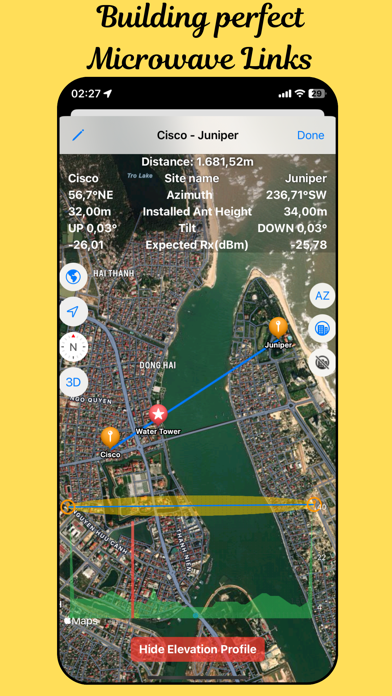



Description by Tien Hoang Written by the developer, not by AppBrain. Click to read.
Built for telecom and transmission engineers, Microwave Link Calculator turns two site coordinates into everything you need on the tower: distance, azimuth, tilt, Fresnel zone, terrain profile and expected receive level. It works with links from any vendor, such as NEC Pasolink, SIAE, Ceragon, Ericsson MINI-LINK and Huawei.
NEW IN THIS UPDATE
• Site library: import your sites from a CSV or text file, paste a list, or add them one by one.
• GPS autofill: start typing a site name in a link and pick it from the suggestions. Its coordinates are filled in for you, and you can still edit them.
• Map crosshair: move the map under the crosshair and tap to place a site exactly where you want it.
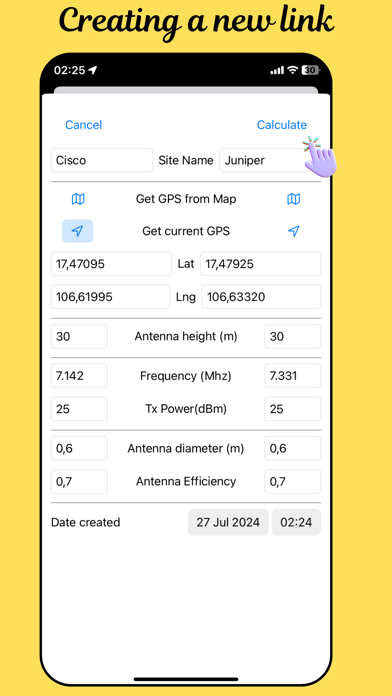
• Redesigned link form: Site A and Site B side by side, one "Set" button per site (pick on map, current GPS or paste coordinates), and quick + / − buttons for antenna height and Tx power.
• Smart checks: warnings when antenna efficiency is outside 0.5–0.8 or both sites have the same name.
• Elevation profiles for links of any length, including links over 100 km.
• Available in 13 languages.
LINK CALCULATIONS
• Distance, azimuth and tilt (up/down) between the two sites.
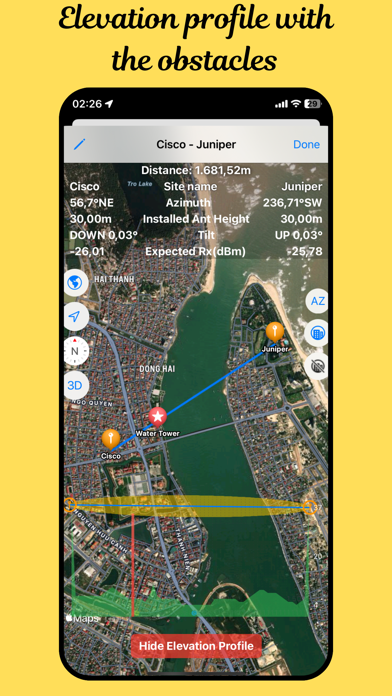
• Fresnel zone and terrain elevation along the whole path.
• Antenna gain and expected received power in free-space conditions, based on frequency, Tx power, antenna diameter and efficiency.
• Antenna height above sea level for each site.
• Metric or imperial units (m / ft, and m / ft / in for antenna diameter).
MAP AND FIELD TOOLS
• See your link on Apple Maps with standard, satellite or satellite-with-roads styles, and line it up with nearby landmarks.
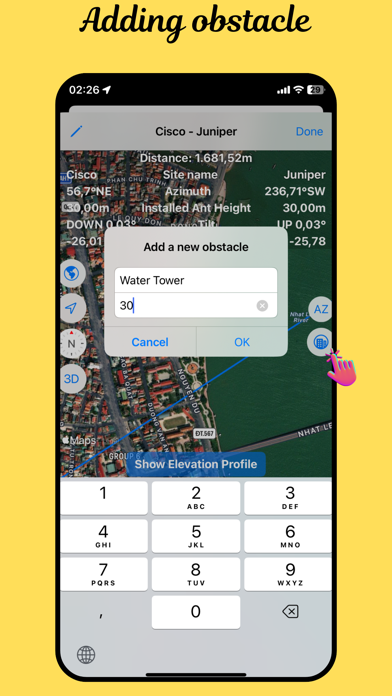
• Add obstacles such as new buildings or trees and see them on the elevation profile.
• Built-in compass with haptic feedback for precise azimuth alignment when you're on site.
• Pick a site by tapping the map, using the crosshair, or searching for a place.
YOUR DATA, EVERYWHERE
Links and saved sites are stored on your device and synced through iCloud, so they're ready on all your iPhones and iPads.
Some features, such as the elevation profile, obstacles and the compass, require a Pro subscription.
Learn more: https://hmtienptithcm.wixsite.com/microwavelinkcalcula/about-4
Subscription Details:
Unlock all features with auto-renewable subscriptions:
• Choose from 1 month ($4.99), 3 month ($12.99) and 12 month ($45.99) durations
• Your subscription will be charged to your iTunes account at confirmation of purchase and will automatically renew (at the duration selected) unless auto-renew is turned off at least 24 hours before the end of the current period.
• Current subscription may not be cancelled during the active subscription period; however, you can manage your subscription and/or turn off auto-renewal by visiting your iTunes Account Settings after purchase.
Your Privacy Matters:
• View our Privacy Policy: https://hmtienptithcm.wixsite.com/microwavelinkcalcula/policy
• And Terms of Use:https://www.apple.com/legal/internet-services/itunes/dev/stdeula/
Download the Microwave Link Calculator now and elevate your telecommunications projects with precision and efficiency!