

Mifos Pay is made and published by Mifos. AppBrain is an independent app data site and isn't affiliated with Mifos. The app name, icon, screenshots and description belong to Mifos and are shown as published on the App Store.
AppBrain's verdict
- Last updated
- February 12, 2026
Rankings
App Store top chartsApp Store Rankings for Mifos Pay
This app is not ranked
Competitors
Similar apps and more from Mifos





Releases
Updates seen on the App Store- Version
- 1.1.0
- Launched
- August 2025
No changelog data
User feedback
Ratings and reviews on the App StoreComments on Mifos Pay for iOS
We don't have enough comments to show example comments. Please check back later.
Technology
Found in the app by AppBrain- Price
- Free
- App size
- 60.9 MB
- Content rating
- Everyone
Technologies used by Mifos Pay
About the app and developer
About Mifos Pay
Mifos Pay is a finance app developed by Mifos.
What is the rating of Mifos Pay?
Mifos Pay has no ratings yet.
Is Mifos Pay free?
Mifos Pay is free. The app size is 60.86 MB. The latest version available is 1.1.0. The last update was on February 12, 2026.
What are the requirements for Mifos Pay?
The app has a content rating of Everyone. The app has been available on the App Store since August 2025.
Developer information for Mifos
Address:
Store listing
By Mifos, from the App Store

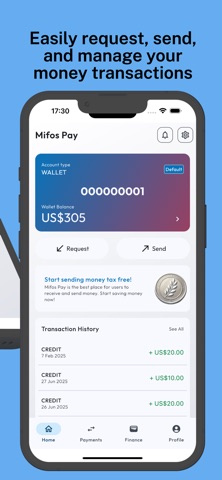


Screenshots by Mifos, from the the App Store listing
Description by Mifos Written by the developer, not by AppBrain. Click to read.
Mifos Pay is a simple, secure way to send, request, and track money. Create a wallet account, add a card, share a QR to get paid, set standing instructions for recurring transfers, and manage invoices—all from one clean, modern app.
WHAT YOU CAN DO
• Sign up as a customer or merchant and complete a guided registration
• Create a wallet savings account (subject to approval) and see your balance at a glance
• Send money using a Virtual Payment Address (VPA), mobile number, or account number
• Request money with your personal QR code; optionally set the amount and currency before sharing
• Add and manage cards; view masked details and remove or edit when needed
• Track everything in Payments: filter History by debits or credits, view statements, and see real-time notifications
• Set SI (Standing Instructions) for automatic transfers on a fixed schedule (weeks, months, years)
• Create and review invoices; see invoice status, items, and transaction IDs
• Keep profile details up to date—name, address, phone, VPA—and link a bank account
• Upload documents for KYC or support directly in the app
• Get help fast with built-in FAQs
WHAT YOU CAN DO
• Sign up as a customer or merchant and complete a guided registration
• Create a wallet savings account (subject to approval) and see your balance at a glance
• Send money using a Virtual Payment Address (VPA), mobile number, or account number
• Request money with your personal QR code; optionally set the amount and currency before sharing
• Add and manage cards; view masked details and remove or edit when needed
• Track everything in Payments: filter History by debits or credits, view statements, and see real-time notifications
• Set SI (Standing Instructions) for automatic transfers on a fixed schedule (weeks, months, years)
• Create and review invoices; see invoice status, items, and transaction IDs
• Keep profile details up to date—name, address, phone, VPA—and link a bank account
• Upload documents for KYC or support directly in the app
• Get help fast with built-in FAQs