

Millennium bim Smart IZI
Millennium bim Smart IZI is made and published by Millennium bcp. AppBrain is an independent app data site and isn't affiliated with Millennium bcp. The app name, icon, screenshots and description belong to Millennium bcp and are shown as published on the App Store.
AppBrain's verdict
Established- Rating on App Store
- 4.06
- 16 ratings
- Last updated
- October 12, 2026
It doesn't have enough ratings yet to judge what users think.
Rankings
App Store top chartsApp Store Rankings for Millennium bim Smart IZI
Competitors
Similar apps and more from Millennium bcpAlternatives to Millennium bim Smart IZI


More from Millennium bcp


Releases
Updates seen on the App Store- Version
- 4.22.0
- Launched
- January 2013
No changelog data
User feedback
Ratings and reviews on the App StoreComments on Millennium bim Smart IZI for iOS
We don't have enough comments to show example comments. Please check back later.
Technology
Found in the app by AppBrain- Price
- Free
- App size
- 166.3 MB
- Content rating
- Everyone
Technologies used by Millennium bim Smart IZI
About the app and developer
About Millennium bim Smart IZI
Millennium bim Smart IZI is a finance app developed by Millennium bcp.
What is the rating of Millennium bim Smart IZI?
Millennium bim Smart IZI is rated 4.06 out of 5 stars, based on 16 ratings.
Is Millennium bim Smart IZI free?
Millennium bim Smart IZI is free. The app size is 166.32 MB. The latest version available is 4.22.0. The last update was on October 12, 2026.
What are the requirements for Millennium bim Smart IZI?
The app has a content rating of Everyone. The app has been available on the App Store since January 2013.
Developer information for Millennium bcp
Address:
Frequently asked questions about Millennium bim Smart IZI
Is Millennium bim Smart IZI free?
Yes. Millennium bim Smart IZI is free on the App Store.
Is Millennium bim Smart IZI still available?
Yes. Millennium bim Smart IZI is on the App Store, and the last update we saw was on October 12, 2026.
How large is Millennium bim Smart IZI?
Millennium bim Smart IZI is 166.32 MB.
Is Millennium bim Smart IZI suitable for children?
App Store rates the content of Millennium bim Smart IZI as suitable for everyone.
How do people rate Millennium bim Smart IZI?
Millennium bim Smart IZI scores 4.06 out of 5 stars, from 16 ratings on the App Store.
Who made Millennium bim Smart IZI?
Millennium bim Smart IZI was developed by Millennium bcp. It is listed in the finance category on the App Store.
What are the best alternatives to Millennium bim Smart IZI?
People looking at Millennium bim Smart IZI also look at these finance apps: e-Daki, e-Mola, Standard Bank QuiQ App, Nedbank Moçambique, Absa Moçambique.
Store listing
By Millennium bcp, from the App Store


Description by Millennium bcp Written by the developer, not by AppBrain. Click to read.
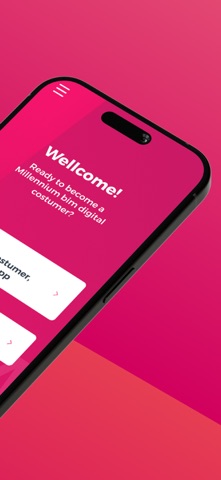
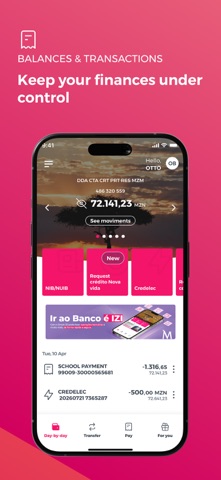
The first great feature of this new version is the Look and Feel, which comes along with new colours, layouts, as well as new menus and buttons.
The new Smart IZI layout offers you a different navigation mode from the previous one. Now, after logging in, you can slide to the left or right on the products carousel and have an overview of all your products: accounts, cards, savings and loans. To make it even easier to navigate through the App, the new version of Smart IZI has a fixed navigation bar at the bottom of the screen where you can quickly access to "day-by-day", "transfer", " pay" and "more".
Privacy mode
The new version of Smart IZI brings with it the Privacy mode. Designed to ensure a higher confidentiality level of your financial information. With this new mode, you can always choose whether to hide or not your account balances after authentication.
Quick Access
Because simplifying is "making it more IZI", the new app has quick navigation options in the top right corner of the "day-by-day" feature: Alerts, Settings and Exit button.
Segment Theme/Colors
Now your App can distinguish your segment and define the colours of the visual components according to the Segment to which you belong.
Alerts / Push Notifications
Getting useful information about your assets and news about your Bank has become easier! Simply select the alert icon on the main page. Make sure to access settings first and enable the reception of Push-Notifications.
Settings
In this private area, you can easily:
View and delete favourites;
View authorization codes;
Change the IZI PIN;
Register / Update e-mail;
Reset your Internet Banking password * (new);
Enable / Disable the biometric configuration
Enable / Disable the reception of Push-Notifications (Alerts)
Products Carousel
Navigating left or right, you will be able to view all your products (accounts, cards, savings, savings and loans) and also perform some specific operations for each product. You can also check movements, balances or details of the specific product by selecting the “More details” option.
Transfer
Performing transfer operations has never been easier, this option is also in the navigation bar. See here the type of transfers available for you:
Intrabank Transfers
Interbank Transfers
Transfer for Phone
Mobile Transfers
M-Pesa
E-Mola * (new);
Schedules
Pay
Whenever you want to pay for a service, just click on “Pay” on the navigation bar. Here you can make the following payments:
Credelec;
Vouchers for Phone;
Packages for TV;
Bill Payments;
INSS payment * (new);
Cash Directo.
More
Here we have other no less important operations available to you, such as:
Read QR Code;
Generate QR Code;
Savings
IZI Withdrawal
Request Check Book
Send Invitations (only available to Prestige Customers)
You can also view our Contacts, Branches and the current exchange rate.
Patrimony
You will be able to view your assets and liabilities in a graphic and intuitive way, just by clicking on the Patrimony button right below the product carousel.
Favourites
Paying and transferring can be even faster! Save your favourite transactions and re-use them whenever you want to make a next transaction. To do this, just select the option "Add as Favourite", at the end of the transaction, and that's it!
Access requirements
You can access Smart IZI through any device with the application installed. Use your mobile banking credentials to access the application, namely, cell phone number associated with the channel and the 4-digit access PIN, known as IZI PIN.
Millennium bim. Aqui Consigo.