Milo Cleaner: Photo Cleanup is a productivity app developed by Flying Rainbow Network Technology Limited.
User Ratings
The app has no ratings yet.
App Information
Milo Cleaner: Photo Cleanup is freely available from the App Store. The app size is 29.94 MB. The latest version available is 1.0.1. The last update was on November 1, 2026.
Technical Requirements
The app has a content rating of Everyone. The app has been available on the App Store since October 2026.
Milo Cleaner: Photo Cleanup is made and published by
Flying Rainbow Network Technology Limited.
AppBrain is an independent app data site and isn't affiliated with Flying Rainbow Network Technology Limited.
The app name, icon, screenshots and description belong to Flying Rainbow Network Technology Limited and are shown as published on the App Store.
Description by Flying Rainbow Network Technology Limited(from the App Store)
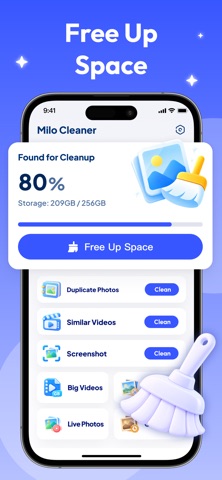
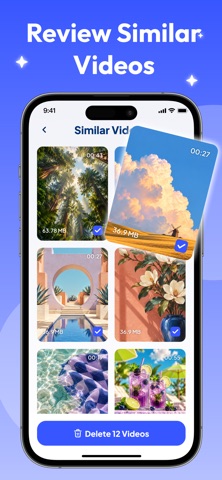
Hello App Review Team,Running out of iPhone storage? Milo Cleaner helps you uncover photo-library clutter—duplicate photos, similar videos, screenshots, blurry photos, large videos, Live Photos, and old photos—so you can review what matters and free up space without endless scrolling. PHOTO & VIDEO CLEANUP • Duplicate Photos — Compare matching photos in groups and choose which ones to keep. • Similar Videos — Find related videos and remove the copies you no longer want. • Screenshots — Bring old screenshots together for a faster review. • Large Videos — See space-heavy videos from largest to smallest. • Blurry Photos — Surface blurry shots that may not be worth keeping. • Live Photos — Find Live Photos you no longer need. • Old Photos — Revisit older memories from oldest to newest. KNOW WHAT TAKES UP SPACE See your device’s total capacity, used capacity, and storage usage percentage at a glance. Tap Free Up Space or choose a cleanup category to begin reviewing your photo library. YOU DECIDE WHAT GOES Preview photos and videos before removing anything. Select or deselect individual items, adjust selections in bulk, and compare grouped results. For duplicate and similar content, Milo Cleaner keeps one item unselected by default—and you can change every choice. CONFIRM BEFORE DELETION Before cleanup, review the number of selected items and their combined size. If you change your mind, cancel and return to your results with the selection preserved. iOS may also ask you to confirm the deletion. SEE WHAT CHANGED After a successful cleanup, see what was deleted and the device space actually freed when that information is available. Return home to view refreshed storage details. Photo-library access is required to scan and review your photos and videos. If you grant limited access, Milo Cleaner scans only the media you make available. Spend less time scrolling and more time keeping the photos and videos that matter—with Milo Cleaner.
Each subscription will automatically renew 3 days before the expiration date for
the same time period. Subscriptions can be cancelled at any time before the renewal.