

miMind - Mind Map & Brainstorm
miMind - Mind Map & Brainstorm is made and published by CryptoBees LLC. AppBrain is an independent app data site and isn't affiliated with CryptoBees LLC. The app name, icon, screenshots and description belong to CryptoBees LLC and are shown as published on the App Store.
AppBrain's verdict
- Last updated
- October 26, 2026
- Size
- 67.7 MB
User feedback
Ratings and reviews on the App StoreComments on miMind - Mind Map & Brainstorm for iOS
We don't have enough comments to show example comments. Please check back later.
Store listing
By CryptoBees LLC, from the App Store




Description by CryptoBees LLC Written by the developer, not by AppBrain. Click to read.
MAKE IT LOOK THE WAY YOU THINK
• Dozens of layout schemes — radial, tree, org chart, balanced — or place every node by hand
• Nearly 30 map themes and dozens of color schemas, plus custom palettes, backgrounds and shadows
• Node shapes: rounded rectangle, ellipse, diamond, hexagon, octagon, cloud, star, heart and more
• Connection styles: straight, curved, dashed or tapered, with arrows, labels and colors
• Animated connections — traveling dashes, pulses, glows, or an emoji riding along the line
NODES THAT HOLD MORE THAN TEXT
• Rich text — fonts, sizes, colors, alignment — plus long-form notes
• Images, animated GIFs, stickers and emoji, or sketch your own with the drawing tool
• Video and audio players; record a voice note straight into a node
• Data tables, pie charts, bar graphs and line graphs
• Checklists, check boxes, radio buttons and lists
• Real-world locations with an interactive map and address
• Hyperlinks that generate their own previews
• File and document attachments
• Calendar events and reminders on your device's calendar
• Links from one map to another
NEW — THE AI ASSISTANT
• Describe a topic and watch a complete map build itself, node by node
• Paste meeting notes, an article or a link and get it back as structure
• Chat with the map that's open — the assistant sees your nodes and the one you selected
• Ask for pictures, videos, tables, checklists or notes — the real content lands on the nodes, not links to it
• Ask "what am I missing?" and suggestions appear as ghost nodes you keep or drop
• One tap undoes an entire AI turn, however many nodes it touched
• Attach images, files and links to the conversation, and pick the model that fits the job
• Available with the miMind AI subscription
BUILT FOR REAL WORK
• Outline view — read and edit the whole map as a list
• Find text anywhere in a large map
• Multi-select editing to restyle many nodes at once
• Undo/redo, collapse/expand, copy/paste, duplicate, drag to re-attach
• Smooth zoom and pan, auto-save and a distraction-free View Mode
• Presentation mode to walk an audience through a map step by step
• Templates for starting new maps
• 28 languages
• No ads. No sign-up required to start.
YOUR MAPS, ON EVERY DEVICE
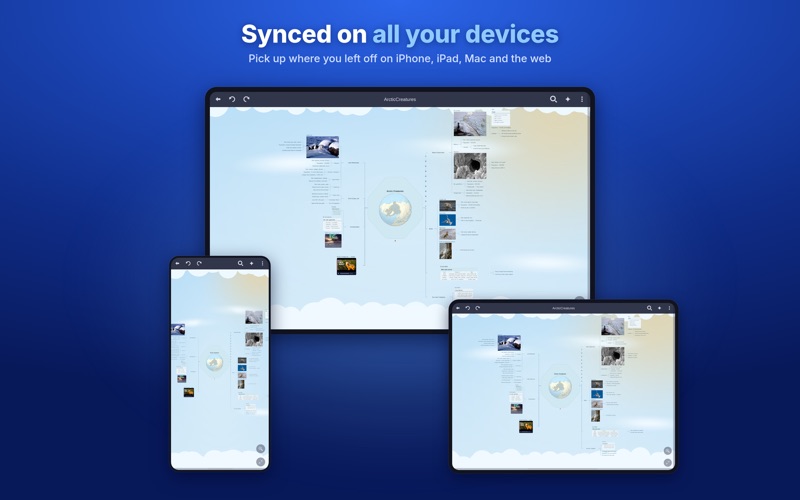
• iPhone, iPad, Mac, Windows and Linux — and right in a browser at mimind.app
• One account keeps every map in sync, organized in folders
• Or keep them in iCloud, Google Drive, Dropbox or OneDrive
• Sign in with Google, Apple, Microsoft or Facebook
• Password-encrypt maps that hold sensitive information
IMPORT AND EXPORT ANYTHING
• Import: miMind, FreeMind (.mm), XMind, OPML, Markdown, XML, JSON, CSV
• Export: PNG, JPG, BMP, TGA, PDF, SVG, HTML, Word, Markdown, text outline, OPML, XML, JSON, CSV
• High-resolution exports, printing, email and share sheet
WHAT PEOPLE BUILD WITH IT
Study notes and flash cards. Project plans, roadmaps and meeting notes. Business plans, org charts and process flows. Decision trees, family trees and UML-style diagrams. Trip itineraries, budgets and to-do lists. Novel outlines, speeches and essays.
FREE TO START
Core mind mapping is free and ad-free. miMind Premium unlocks cloud sync across your devices, tables, locations, video and audio, attachments, encryption, presentation mode, every theme and high-definition exports. miMind AI adds the built-in AI assistant.
Subscriptions renew automatically unless cancelled at least 24 hours before the end of the period. Manage or cancel anytime in your account settings.
Website: https://mimind.app
AI guide: https://mimind.app/docs-ai.html
Terms of Use (EULA): https://mimind.cryptobees.com/terms.html
Privacy: https://mimind.cryptobees.com/privacy.html
Safety and technology
Found in the app by AppBrain- Price
- Free
- App size
- 67.7 MB
- Content rating
- Everyone
Technologies used by miMind - Mind Map & Brainstorm
Releases
Updates seen on the App Store- Version
- 26.10.23
- Launched
- September 2018
No changelog data
Alternatives
Similar apps and more from CryptoBees LLCMore from CryptoBees LLC


Rankings
App Store top chartsApp Store Rankings for miMind - Mind Map & Brainstorm
About the app and developer
About miMind - Mind Map & Brainstorm
miMind - Mind Map & Brainstorm is a productivity app developed by CryptoBees LLC.
User Ratings
The app has no ratings yet.
App Information
miMind - Mind Map & Brainstorm is freely available from the App Store. The app size is 67.69 MB. The latest version available is 26.10.23. The last update was on October 26, 2026.
Technical Requirements
The app has a content rating of Everyone. The app has been available on the App Store since September 2018.
Developer information for CryptoBees LLC
Address:
Frequently asked questions about miMind - Mind Map & Brainstorm
Is miMind - Mind Map & Brainstorm free?
Yes. miMind - Mind Map & Brainstorm is free on the App Store.
Is miMind - Mind Map & Brainstorm still available?
Yes. miMind - Mind Map & Brainstorm is on the App Store, and the last update we saw was on October 26, 2026.
How large is miMind - Mind Map & Brainstorm?
miMind - Mind Map & Brainstorm is 67.69 MB.
Is miMind - Mind Map & Brainstorm suitable for children?
App Store rates the content of miMind - Mind Map & Brainstorm as suitable for everyone.
Who made miMind - Mind Map & Brainstorm?
miMind - Mind Map & Brainstorm was developed by CryptoBees LLC. It is listed in the productivity category on the App Store.