

Mind Exporter
Mind Exporter is made and published by Jiangsu Mingbin Jingzhi Technology Co., Ltd. AppBrain is an independent app data site and isn't affiliated with Jiangsu Mingbin Jingzhi Technology Co., Ltd. The app name, icon, screenshots and description belong to Jiangsu Mingbin Jingzhi Technology Co., Ltd and are shown as published on the App Store.
AppBrain's verdict
- Last updated
- August 14, 2026
Rankings
App Store top chartsApp Store Rankings for Mind Exporter
Competitors
Similar apps and more from Jiangsu Mingbin Jingzhi Technology Co., Ltd


Releases
Updates seen on the App Store- Version
- 1.0.1
- Launched
- July 2026
No changelog data
User feedback
Ratings and reviews on the App StoreComments on Mind Exporter for iOS
We don't have enough comments to show example comments. Please check back later.
Technology
Found in the app by AppBrain- Price
- Free
- App size
- 10.9 MB
- Content rating
- Everyone
Technologies used by Mind Exporter
About the app and developer
About Mind Exporter
Mind Exporter is a productivity app developed by Jiangsu Mingbin Jingzhi Technology Co., Ltd.
User Ratings
The app has no ratings yet.
App Information
Mind Exporter is freely available from the App Store. The app size is 10.85 MB. The latest version available is 1.0.1. The last update was on August 14, 2026.
Technical Requirements
The app has a content rating of Everyone. The app has been available on the App Store since July 2026.
Developer information for Jiangsu Mingbin Jingzhi Technology Co., Ltd
Store listing
By Jiangsu Mingbin Jingzhi Technology Co., Ltd, from the App Store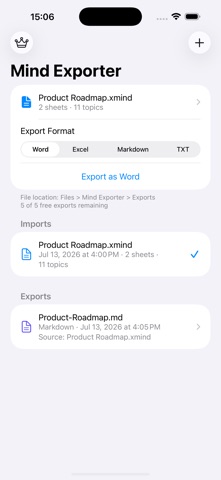
Description by Jiangsu Mingbin Jingzhi Technology Co., Ltd Written by the developer, not by AppBrain. Click to read.
Import XMind, FreeMind, OPML, and Markdown outlines. Review your import history, choose an export format, and keep every exported file organized in the Files app.
Export to TXT, Markdown, Word, or Excel. When exporting to Excel, each map becomes its own worksheet and every topic is placed in the column that matches its hierarchy level.
Your source files, import records, and exports stay in the app's Files folder for easy access.