

Mind Pod · APP is made and published by 浩齐 宋. AppBrain is an independent app data site and isn't affiliated with 浩齐 宋. The app name, icon, screenshots and description belong to 浩齐 宋 and are shown as published on the App Store.
AppBrain's verdict
- Last updated
- July 17, 2026
Rankings
App Store top chartsApp Store Rankings for Mind Pod · APP
Competitors
Similar apps and more from 浩齐 宋Alternatives to Mind Pod · APP


Releases
Updates seen on the App Store- Version
- 2.1.1
- Launched
- May 2026
No changelog data
User feedback
Ratings and reviews on the App StoreComments on Mind Pod · APP for iOS
We don't have enough comments to show example comments. Please check back later.
Technology
Found in the app by AppBrain- Price
- Free
- App size
- 64.1 MB
- Content rating
- Everyone
Technologies used by Mind Pod · APP
About the app and developer
About Mind Pod · APP
Mind Pod · APP is an utilities app developed by 浩齐 宋.
User Ratings
The app has no ratings yet.
App Information
Mind Pod · APP is freely available from the App Store. The app size is 64.08 MB. The latest version available is 2.1.1. The last update was on July 17, 2026.
Technical Requirements
The app has a content rating of Everyone. The app has been available on the App Store since May 2026.
Developer information for 浩齐 宋
Address:
Frequently asked questions about Mind Pod · APP
Is Mind Pod · APP free?
Yes. Mind Pod · APP is free on the App Store.
Is Mind Pod · APP still available?
Yes. Mind Pod · APP is on the App Store, and the last update we saw was on July 17, 2026.
How large is Mind Pod · APP?
Mind Pod · APP is 64.08 MB.
Is Mind Pod · APP suitable for children?
App Store rates the content of Mind Pod · APP as suitable for everyone.
Who made Mind Pod · APP?
Mind Pod · APP was developed by 浩齐 宋. It is listed in the utilities category on the App Store.
What are the best alternatives to Mind Pod · APP?
People looking at Mind Pod · APP also look at these utilities apps: Light Ideas: Thought Board, ViralSaver: Video AI Analyzer, LifeScript-人生教练,人格测试&目标管理&财富资产, EarthMaster-RPG World Creator, PilotBox.
Store listing
By 浩齐 宋, from the App Store
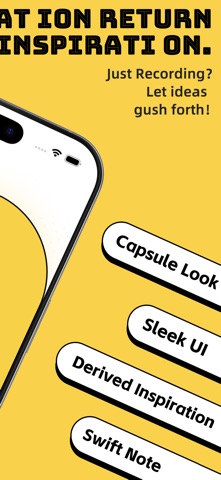

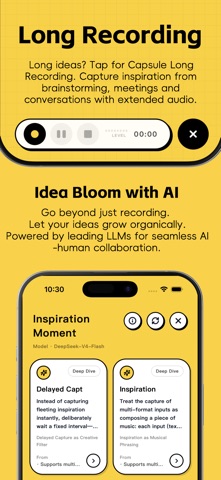

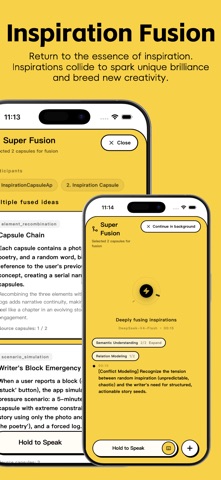
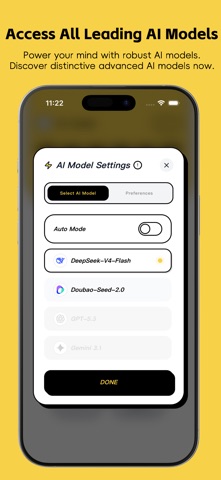

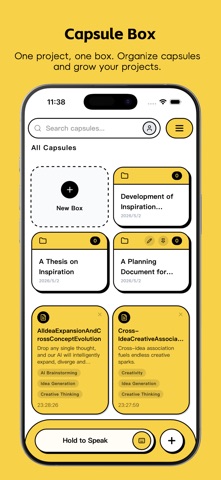

Description by 浩齐 宋 Written by the developer, not by AppBrain. Click to read.
In an era of expanding AI capabilities, we believe human inspiration is the irreplaceable core competitive edge.
We don’t want to be just another “idea memo app” — we aim to be your pocket-sized inspiration sidekick.
Why "Capsule"?
Every spark of inspiration is designed as a unique capsule.
Recording an idea creates your personal capsule.
Organize them in "boxes" like folders to manage creative projects.
The entire UI is built around the capsule theme, making recording fun and delightful.
————————————————————————
What matters more than recording is growing your inspiration
Most idea tools stop at "recording."
What makes Inspire Capsule different?
· Inspiration Expansion (Single Idea Derivation)
Select any saved inspiration, and our AI will generate 7 new ideas based on cognitive and creativity research.
Adopt, discard, or jot down new thoughts right in the expansion interface — no screen switching, keep your flow uninterrupted.
· Super Fusion (Multi-Idea Collision)
Select multiple capsules and let the AI merge them to spark unexpected connections.
Cross-disciplinary, cross-topic combinations are often the birthplace of groundbreaking creativity.
· Inspiration Library (Full Library Divergence)
Our AI continuously expands your entire library with associations, deep derivations, and cross-domain combinations in the background.
Browse AI-nurtured new ideas like scrolling through a feed in the Inspiration Library.
Even better, virtual capsules may automatically appear when you record an idea — waiting for you to "activate" them into real inspiration. Growth happens effortlessly.
————————————————————————
Capture ideas faster than you can think
Hold to Speak: The most intuitive way to record. No learning curve — just hold and talk, it saves instantly.
Native iPhone Speech Recognition: Powered by Apple’s advanced tech, with accurate transcriptions in quiet environments.
Optimized Keyboard Input: Smooth, efficient typing for drafting and editing ideas.
Capture from Photos/Gallery/Files: Turn photos, PDFs, or screenshots into capsules instantly.
Long Recording Mode: Record entire brainstorms, meetings, or conversations without missing a spark — just hit record and set your phone aside.
————————————————————————
Your "superpowers" for creativity
Switch Between Top AI Models: Choose from the latest, most powerful models and switch quickly from the main screen, no complex setup needed.
Local Security & Backup: Your ideas are stored locally by default, never uploaded for AI training. Enable cloud backup in settings, and easily export or back up data for hassle-free migration.
Hidden Easter Eggs & Fun Interactions: We’ve tucked playful surprises throughout the app — every tap brings a little joy.
————————————————————————
In the AI era, your inspiration deserves to be taken seriously
Unlike traditional note-taking apps that only "record," Inspire Capsule lets your ideas grow, collide, and evolve.
Record, expand, merge, and diverge — turn fleeting thoughts into tangible, actionable creative assets.
Privacy Policy: https://www.termsfeed.com/live/9e88c673-9939-47e5-ad16-6b1dfd461d4a
Terms of Service: https://relieved-swamp-daa.notion.site/AI-34f9a010ae76803d8db7dc2d11ff7c80?source=copy_link