Mindhive Mindmaps & Flashcards is made and published by
广州数迪科技有限公司.
AppBrain is an independent app data site and isn't affiliated with 广州数迪科技有限公司.
The app name, icon, screenshots and description belong to 广州数迪科技有限公司 and are shown as
published on the App Store.
About Mindhive Mindmaps & Flashcards
Mindhive Mindmaps & Flashcards is a productivity app developed by 广州数迪科技有限公司.
User Ratings
The app has no ratings yet.
App Information
Mindhive Mindmaps & Flashcards is freely available from the App Store. The app size is 311.84 MB. The latest version available is 2.0.2. The last update was on October 14, 2026.
Technical Requirements
The app has a content rating of Everyone. The app has been available on the App Store since March 2025.
Description by 广州数迪科技有限公司(from the App Store)
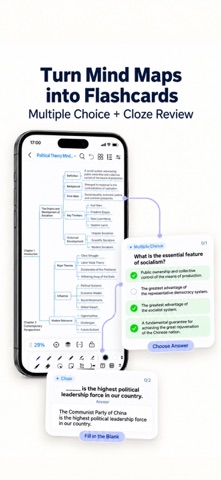
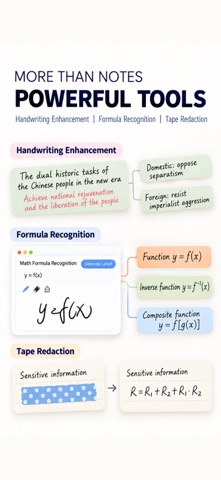
Mindhive brings handwritten mind maps, card-based notes, and flashcard review together in one app. Organize class notes, reading highlights, and exam topics on an infinite canvas on your iPad, then turn your mind map content into flashcards for review. Build a structure with your keyboard and write directly on the same card, without opening a separate handwriting box. Add formulas, annotations, and sketches by hand, connect ideas, and review key points with multiple-choice and fill-in-the-blank practice. TYPE AND WRITE ON THE SAME CARD Use your keyboard to build a framework, then add handwritten formulas, diagrams, and annotations. Record your thinking in your own way, from mathematical steps and chemical structures to key concepts. Choose from fountain pens, pencils, highlighters, and other drawing tools, with pressure-sensitive erasing and real-time handwriting smoothing. Link a drawing area to a card so it moves with the card and keeps related content together. TURN MIND MAPS INTO FLASHCARDS Use the knowledge you have organized for active recall. Check what you know and what needs another look. * Multiple-choice questions: Turn knowledge nodes into questions, with optional AI-generated distractors. * Cloze practice: Hide key words or phrases, recall the answer, then check. * Handwritten content: Review formulas, sketches, and handwritten notes in flashcards. * Anki import: Bring in existing cards and swap the question and answer sides. Use mind maps to see the big picture and flashcards to review individual concepts. EXPLORE IDEAS ON AN INFINITE WHITEBOARD Create and arrange cards freely. Connect related concepts, expand details with child cards, and organize topics across multiple levels. Choose vertical, horizontal, tree, fishbone, or free-form layouts for chapter summaries, problem-solving, and brainstorming. SWITCH BETWEEN MIND MAPS AND OUTLINES Use the outline view to focus on text and hierarchy, then return to the mind map to see how ideas connect. Link across cards and mind maps to connect chapters, resources, and topics into your own knowledge network. KEEP YOUR RESOURCES TOGETHER Organize screenshots, web content, and images into cards alongside the relevant ideas. Keep examples, reading excerpts, and reference images in one place. Search text in handwritten notes and images to find details within your mind maps. MAKE IT YOUR OWN Start with built-in mind map and note templates. Customize backgrounds, themes, and card styles to distinguish chapters and highlight important content. ORGANIZE ON A TABLET. REVIEW ON A PHONE. CONTINUE ON A COMPUTER. Use Mindhive on phones, tablets, and computers, with mind map and note syncing through Baidu Netdisk. One membership works across all platform. Export to PDF, images, Markdown, and outline formats for saving, sharing, and further editing. Start with one card. Capture your thinking by hand, organize your knowledge with mind maps, and review key points with flashcards.
Each subscription will automatically renew 3 days before the expiration date for
the same time period. Subscriptions can be cancelled at any time before the renewal.