

Mindor: AI Brain Dump
Mindor: AI Brain Dump is made and published by Gianmarco Colagrossi. AppBrain is an independent app data site and isn't affiliated with Gianmarco Colagrossi. The app name, icon, screenshots and description belong to Gianmarco Colagrossi and are shown as published on the App Store.
AppBrain's verdict
- Last updated
- May 8, 2026
- Size
- 11.8 MB
User feedback
Ratings and reviews on the App StoreComments on Mindor: AI Brain Dump for iOS
We don't have enough comments to show example comments. Please check back later.
Store listing
By Gianmarco Colagrossi, from the App Store


Description by Gianmarco Colagrossi Written by the developer, not by AppBrain. Click to read.
Mindor turns scattered thoughts, ideas and to-dos into a clear, calm plan — in seconds. Just speak or type, and let the AI shape the chaos into tasks you can actually do.
Built for busy minds, side-project people, students, parents and anyone who thinks faster than they can write.
— WHY MINDOR —
Most task apps assume you already know what to do. Mindor doesn't.
You dump everything in your head, and Mindor organizes it for you.
• Fast brain dump — speak, type, or use Siri
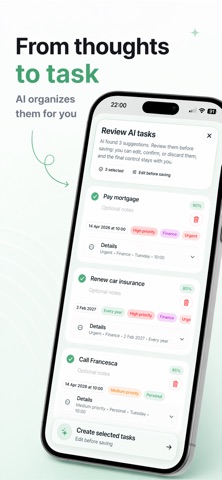
• AI that turns rambling thoughts into structured tasks
• Smart priorities, dates and categories — suggested, not forced
• Daily plan, clean and focused
• Widgets, Siri Shortcuts, voice input
• Optional Apple Calendar sync
• Designed for iOS — fast, fluid, premium
— THE AI THAT GETS YOU —
Drop a paragraph of messy thoughts. Mindor reads it, breaks it down, and proposes:
• the tasks worth doing
• when to do them
• how to prioritize
You review. You edit. You decide.
Nothing is saved without your confirmation. Your data stays yours.
— BUILT FOR CLARITY —
No bloat. No clutter. No overwhelm.
A clean, premium space that respects your attention.
Mindor is the calmest way to capture, plan and finish what matters.
— FROM MENTAL CHAOS TO A CLEAR PLAN —
Open Mindor when your head is full.
Close it with a plan.
— PRIVACY FIRST —
Your thoughts are personal. We treat them that way.
Apple-native. Local-first storage. No tracking.
Got feedback? We read every email: support.mindor@gmail.com
Terms of Use (EULA): https://www.apple.com/legal/internet-services/itunes/dev/stdeula/
Privacy Policy: https://husky-meal-cda.notion.site/Mindor-Privacy-Policy-33e3023d305980bfb135fb052d272616
Safety and technology
Found in the app by AppBrain- Price
- Free
- App size
- 11.8 MB
- Content rating
- Everyone
Technologies used by Mindor: AI Brain Dump
Releases
Updates seen on the App Store- Version
- 1.2.2
- Launched
- April 2026
No changelog data
Alternatives
Similar apps and more from Gianmarco ColagrossiAlternatives to Mindor: AI Brain Dump


More from Gianmarco Colagrossi

Rankings
App Store top chartsApp Store Rankings for Mindor: AI Brain Dump
About the app and developer
About Mindor: AI Brain Dump
Mindor: AI Brain Dump is a productivity app developed by Gianmarco Colagrossi.
User Ratings
The app has no ratings yet.
App Information
Mindor: AI Brain Dump is freely available from the App Store. The app size is 11.81 MB. The latest version available is 1.2.2. The last update was on May 8, 2026.
Technical Requirements
The app has a content rating of Everyone. The app has been available on the App Store since April 2026.
Developer information for Gianmarco Colagrossi
Address:
Frequently asked questions about Mindor: AI Brain Dump
Is Mindor: AI Brain Dump free?
Yes. Mindor: AI Brain Dump is free on the App Store.
Is Mindor: AI Brain Dump still available?
Yes. Mindor: AI Brain Dump is on the App Store, and the last update we saw was on May 8, 2026.
How large is Mindor: AI Brain Dump?
Mindor: AI Brain Dump is 11.81 MB.
Is Mindor: AI Brain Dump suitable for children?
App Store rates the content of Mindor: AI Brain Dump as suitable for everyone.
Who made Mindor: AI Brain Dump?
Mindor: AI Brain Dump was developed by Gianmarco Colagrossi. It is listed in the productivity category on the App Store.
What are the best alternatives to Mindor: AI Brain Dump?
People looking at Mindor: AI Brain Dump also look at these productivity apps: Zots, Honestly: Mood & Affirmations, Next Task: To-Do & Widgets, Just Do Three, Self Mail: Note To Myself.